SOC 2 CC6.1 concerns the protections that control access to systems and data. Your company defines who can enter those systems, how they prove their identity and what they can do. Check those rules as systems change, including application logins that sit outside the main identity provider.
A local login can escape the password policy. Keeping CC6 access protections effective requires coordination between policy, identity and application owners.
Access rules must cover every route
An access rule needs to cover every route into the systems and information it protects. An application can accept a work identity through the central identity provider and also permit a separate local login. Both belong in the review.
Include contractor accounts, service credentials and emergency access. Record each route's authentication method, who can change it and who decides exceptions. These responsibilities let the team extend coverage when applications or accounts change and identify routes without an owner.
Permissions determine access after sign-in
An authenticated account can still hold permissions its owner no longer needs. Authentication establishes the identity requesting entry; permissions determine which information that identity can read and which operations it can perform.
Inspect those rights alongside the login method. CC6.2 covers approving new users, while CC6.3 covers changing and removing access by role. Their records help explain why an account has its current rights and whether those rights still match its purpose.
Password rules must reach every login route
SOC 2 sets no universal password length or change interval. Apply approved rules to every login route, including local credentials. NIST's 2025 guidance requires at least 15 characters for single-factor passwords; passwords used only within multifactor authentication may be shorter, with a minimum of eight.
NIST's password guidance requires changes after evidence of compromise, excludes periodic changes and character-composition rules, and requires screening for common or compromised passwords and failed-attempt limits. These are technical references for SOC 2 control design. Agree policy revisions with the owner, then check enforcement across affected routes.
System changes can leave access unprotected
Application or group changes can create login routes outside established protections. Inspect Okta or Google Workspace connections alongside local application logins. Check which accounts must use MFA: enrollment alone does not establish enforcement across the routes those accounts can use.
Assign an owner and schedule for these checks, including where failures go for investigation. The reviewer may need an application owner to act. Resolve missing or stale observations before concluding that access remains protected between audits.
Access changes start with the owner's decision
The system owner must decide which access still has an approved purpose before a correction changes it. An emergency account and an obsolete migration account need different decisions. Retained exceptions need an owner, safeguards and review conditions.
Propose a correction that identifies the affected route, observed gap and intended access afterward. The application team can then judge the change and preserve necessary access. Record the owner's approval and any retained exception before the change proceeds.
Closure requires a test of both access routes
An access correction is complete when testing confirms that unwanted access is blocked and approved access still works. Define both expected results with the owner. After disabling a local account, test that the approved sign-in route remains usable.
Keep the gap open if either test fails or the observed state is unavailable. Once testing establishes the intended access, retain dated results with the change approval. The reviewer can use that evidence to decide whether to close the gap.
Evidence must explain the access decision
A reviewer needs evidence of the rule, its coverage and the reason the team accepted the resulting access.
| Requirement | What an auditor asks for | Where it comes from |
|---|---|---|
| Defined access scope | The systems, account types and login routes that the approved control covers | The system inventory and account lists checked against the approved access policy |
| Enforced authentication | The approved password and MFA requirements, including settings for each relevant login route | Identity-provider and application configurations showing which rules apply to the accounts under review |
| Appropriate permissions | The rights granted to each account and the decisions that authorize them | Permission exports and access approvals linked to the relevant account review records |
| Controlled exceptions | The purpose, owner, safeguards and review conditions for each retained access exception | Approved exception records explaining the owner's decision and the conditions for retaining access |
| Verified correction | The observed gap, approved action, before-and-after state and dated result of verification | Change approvals and system observations kept with the verification records for that correction |
Shared evidence supports distinct framework requirements
| Framework | Control | What it covers |
|---|---|---|
| SOC 2 | CC6.1 | Logical access protections for the systems and information within the organization's defined scope |
| ISO 27001 | A.5.17 | Management of authentication information used to establish access to the organization's systems |
| HIPAA | 164.312(d) | Verification that people or entities seeking access to electronic protected health information are who they claim |
Example of closing a local account gap
Removing a local account requires its owner's approval and a test of the access that remains. In this example, an obsolete migration account bypasses the application's single sign-on (SSO) and MFA rule. Its control record connects the correction to the evidence needed for closure.
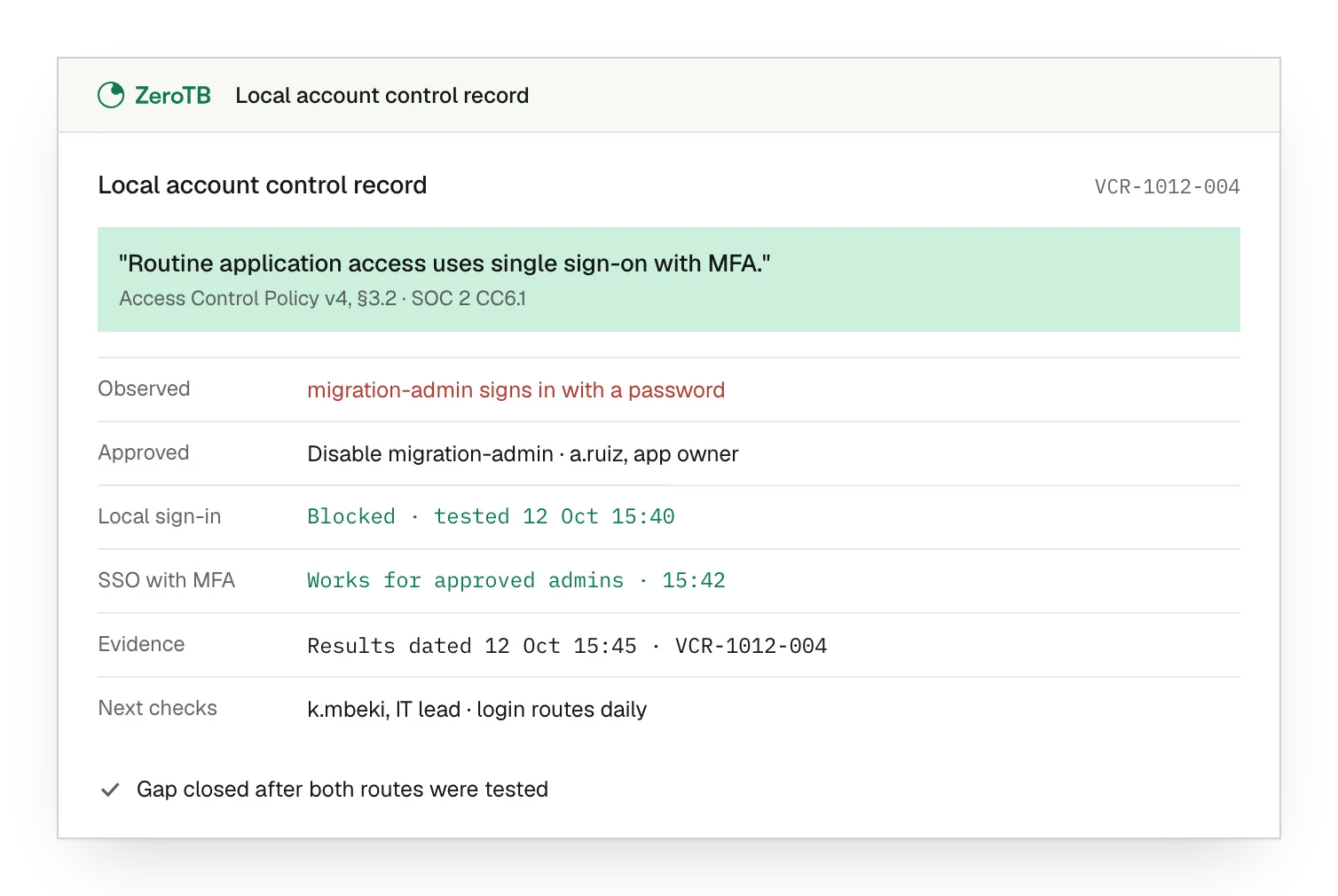
Unprotected login route. The local administrator account still accepts credentials outside the approved SSO and MFA route.
Approved account removal. The application owner approves disabling the migration account after confirming it has no remaining purpose.
Both routes tested. Local sign-in is blocked, while approved administrator access through SSO with MFA still works.
Evidence and ownership. Dated results sit beside the approval, with an owner assigned to further login checks.
Access control review checklist
Choose an approved access rule and identify the systems, accounts and login routes where it must hold.
Inspect the relevant settings and access paths, then record any difference from the rule with a current observation.
Identify who can change the affected system and propose a correction that preserves necessary access, including approved exceptions.
After the approved change, test blocked and permitted access. Keep the gap open until results meet the agreed rule.
Keep the commitment, observations, action, approval and result together, with a named owner and agreed schedule for further checks.
Sources
- AICPA & CIMA, 2017 Trust Services Criteria with revised points of focus, 2022 revision.
- NIST, SP 800-63B-4: Digital identity guidelines, authentication and authenticator management, 2025.
- HHS, HIPAA audit protocol, person or entity authentication, 2018 update.
- ZeroTB, SOC 2 compliance automation with human approval, 2026.
Related pages
SOC 2 criteria
Read how CC6.1 fits within the criteria that support a wider SOC 2 program.
Compliance frameworks
Find related control guidance across the frameworks that your team needs to manage.
User access reviews
See how teams review account permissions as people, responsibilities and access needs change.
Start with the Pilot
In the eight-week Pilot, our team maps up to 25 commitments and takes two real control gaps through approved correction and verified restoration. You receive a record of each change, its approval and the verification results.