Copilot's SOC 2 report leaves controls to you
Check services, reporting period and customer responsibilities. ZeroTB's software and team maintain SOC 2 controls after audits for US software, AI, fintech and healthtech companies of 25 to 250 people.
Check the services. Request the report through the Copilot Trust Center and confirm its service coverage
Check the period. Reports usually cover 3 to 12 months and stay current for about 12
Keep the approved use. File the vendor decision with the use it permits
Copilot's cloud agent and CLI need separate reviews
GitHub's agent application card describes two experiences: the hosted cloud agent and Copilot CLI, which can change files and run local commands.
Two environments. Reviewing the cloud agent alone can leave local access unexplained.
Name accounts and repositories. Describe the account, repositories and permitted actions together in the approval.
Trace new connections. Compare each later connection with the access the original review approved.
Content exclusions can miss files reached indirectly
GitHub's content exclusion limits include indirect access and third-party tools. Test those routes alongside the permissions protecting the data.
Data permissions count. Permissions on the underlying data remain part of its protection.
Test with harmless content. Try the restriction through the tools available in the approved use.
Keep both results. Record the expected result, observed result and access route tested.
Connected tools extend Copilot's reach with their credentials
A connected tool brings its own operations and credentials. Its access can extend beyond the repository named in a Copilot task.
Reading versus changing. Reading an issue and changing production settings require different access decisions.
Owner approves access. The system owner approves the access needed for the task.
Record the boundary. Keep that decision where the connected tool's permissions are managed.
Branch protections bind GitHub's cloud agent too
GitHub subjects its cloud agent to branch protections and required checks. Compare those configured rules with the review policy your company approved.
Check approvers and bypass. Inspect approvers, bypass permissions and the branches covered by each rule.
One review, one change. A pull request review establishes what happened for that change.
The enforced rule decides. Repository rules determine whether later changes must follow the same review route.
Cloud-agent workflows wait for human approval by default
GitHub's default gate requires human approval before cloud-agent workflows run. A setting can allow them to run automatically.
Weigh automatic runs. Judge automatic execution against what the workflow can read or change.
Builds prove compiling. A passing build leaves access and deployment settings to separate checks.
Name required results. Specify which test results a change needs before it can proceed.
Repository rules change after Copilot is approved
Initial Copilot approval cannot establish whether repository rules still work months later. Coverage, required approvals and bypass rights need continuing review.
Infrastructure repositories count. Compare deployment and infrastructure repositories with the protected branches, checks and owners.
Review changed rules. Teams can change required approvals, rename checks or grant bypass rights.
Keep dated evidence. Keep session logs and audit events, approvals, test results and deployment records together.
ZeroTB checks the GitHub settings Copilot depends on
ZeroTB has no Copilot integration. Daily GitHub checks follow SOC 2 commitments. We prepare repairs and verify restored controls across connected systems.
Stale stays visible. Missing or stale observations need a new check before the control can appear healthy.
Repairs as pull requests. Corrections reach GitHub as reviewed pull requests within the access your team grants.
Exceptions get reviewed. Record each exception's scope, safeguards and condition for ending or review.
GitHub, your owners and ZeroTB fix different gaps
GitHub's SOC 2 report, Copilot settings and repository rules answer different audit questions. The table identifies who acts and which evidence each provides.
| Task | GitHub's SOC 2 report | Copilot settings | Branch protections | ZeroTB |
|---|---|---|---|---|
| What it covers | Copilot Business and Copilot Enterprise during the reporting period | Content exclusions and the workflow approval gate | Changes requiring review and passing checks | Your SOC 2 commitments in GitHub, checked daily |
| What it leaves open | Customer responsibilities assigned in the report | Indirect access and third-party tools | Bypass rights and uncovered repositories | GitHub's service remains covered by its own report |
| Who acts on a gap | GitHub under its own audit | The team that approved the workflow | The repository owner | ZeroTB prepares repairs for the owner's approval |
| What the auditor sees | GitHub's SOC 2 Type 2 report on request | Your record of the approved use | Current rules alone cannot establish earlier enforcement | A signed Verified Control Record |
Example of verifying blocked and approved merges
In this example, restoring required review blocks an unapproved merge while allowing an approved change. Observations and approval stay in the Verified Control Record.
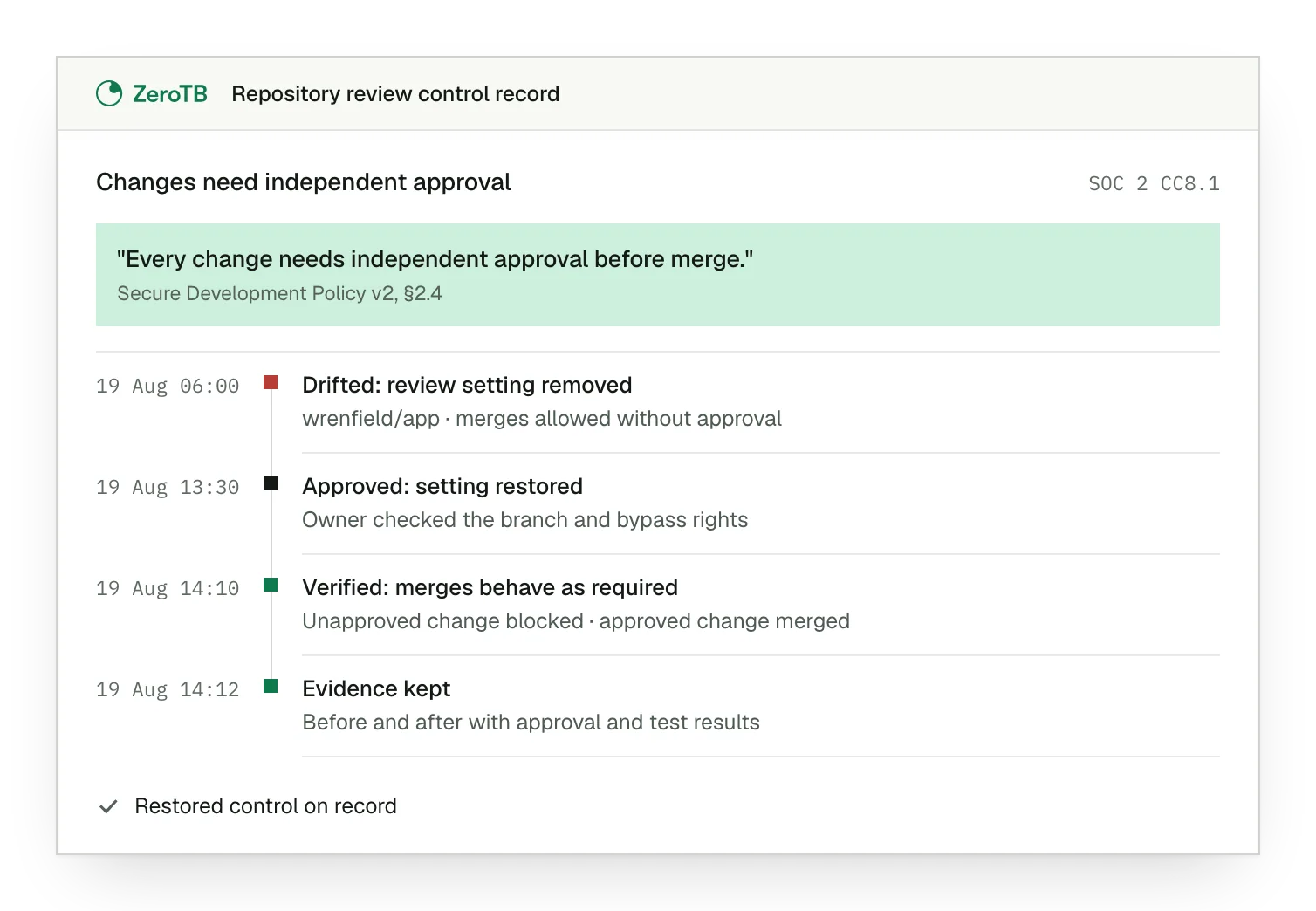
Missing review rule. Policy requires independent approval, but the repository allows a change to merge without it.
Approved rule change. The owner checks the branch and bypass rights, then authorizes restoring required review.
Verified merge behavior. The corrected rule blocks the unapproved change and allows the approved one.
Retained control evidence. Before-and-after observations stay with the approval and test results for the repair.
Your team rechecks four settings after approving Copilot
Record the Copilot account, repositories, tools and the information they can reach.
Check approvals, tests and bypass permissions on repositories that deliver production changes.
Give the system owner the correction, its effect and any retained exceptions.
Test the corrected rule against permitted and blocked actions, retaining both results.
Sources
- GitHub, Copilot Trust Center FAQ, accessed November 2026.
- GitHub, Application card: GitHub Copilot Agents, accessed November 2026.
- GitHub, Content exclusion for GitHub Copilot, accessed November 2026.
- GitHub, Risks and mitigations for GitHub Copilot cloud agent, accessed November 2026.
Start with the Pilot
The eight-week Pilot maps up to 25 commitments and takes two real control gaps through verified restoration around Copilot-assisted development.