To complete user access reviews more efficiently, resolve account ownership and prepare current permissions before asking for decisions. Reviewers need to know what the access allows and why it exists. Follow their decisions through the resulting changes, check those changes in the systems concerned, and keep the records available for the next review.
The approvals are back, but several removals still need attention. One waits for an administrator; another has been applied without a check of the result. For compliance, the remaining work is finding out what happened and getting those permissions into the agreed state.
Review delays
Quarterly access reviews take weeks when every decision depends on work that starts after the review opens. Account lists need reconciling, reviewers need context, and approved removals need someone to act. Each handoff adds another wait before the review can close.
Separate unanswered decisions from changes awaiting completion. That distinction lets compliance direct a reminder to the right person and see the remaining work. Agree the reviewers, change owners and completion conditions before the review begins, while keeping those assignments available for the next cycle.
Review scope
The review needs to cover the accounts and access routes that can reach each system in scope. Include employees, contractors, guests and service accounts, with particular attention to privileged permissions. An employee directory alone cannot describe all those identities and rights.
For each system, account for direct permissions, group membership and local accounts outside the central identity provider. An owner should explain any excluded access route. This makes the boundary visible and helps the review owner identify a missing account source before reviewers start making decisions.
Current access and context
A reviewer needs to see what an account can do and why it still needs that access. Put the dated permission record beside the account's purpose, owner and relevant role changes. Explain unfamiliar permission names so the reviewer can judge their effect.
Recent activity can inform that judgment, but inactivity alone does not settle business need. An account may support an occasional task. The reviewer needs enough context to distinguish necessary infrequent use from obsolete access and explain why a permission should remain.
Reviewer responsibility
Assign each decision to someone who understands the work and the permissions involved. A manager can explain an employee's responsibilities; a system owner can explain what a privileged role allows. Some decisions need both views before a reviewer can approve continued access.
Keep responsibility for the resulting change equally clear. The person who approves a removal may lack permission to apply it. Give the correction to a system owner who can act, with a due date and an escalation route if the change remains incomplete.
Review cadence
Use the approved policy to set the review schedule, taking account of the systems and permissions at risk. A quarterly cycle gives owners a regular opportunity to reconsider access. Privileged accounts or frequent staff changes may need attention more often.
An employee who leaves just after a review should enter the departure process then. The calendar date of the next review does not resolve that access. Assign someone to handle departures and role changes as they occur, alongside the scheduled review work.
Decisions and exceptions
A review decision should say which access remains, which changes and why. “Reduce access” leaves the system owner to interpret the request. Naming the permission to remove and the rights to retain gives that owner a clear result to implement.
An exception needs an accountable owner, a reason and a date or condition for reconsideration. Keep it separate from an unanswered request. If the reviewer cannot establish business need, route that question for a decision and leave its unresolved status visible in the review.
Applying access changes
Follow a removal decision to the system that grants the permission. There may be another step after the reviewer submits it. Microsoft Entra, for example, separates review completion from applying results; nested group membership can also leave a denied user with access. Microsoft Learn
The owner applying the change needs to know where that permission comes from. Removing a shared group membership may affect several rights at once. Specify the rejected permission and the access that must remain, so the owner can choose a change that meets both conditions.
Verification after removal
Verification needs an observation from the system where access changed. If the decision concerned a repository membership, examine that membership after removal. A disabled account in the central directory cannot establish whether separate local accounts or memberships have also been removed.
Some decisions remove one permission while retaining others. Check the retained access as well, so the owner can see whether the change matched the decision. Keep the correction open when the observation is unavailable or stale, or the connection needed to obtain it has failed.
Evidence for closure
Keep the decision and the observed result together so another reviewer can understand why the removal was closed. Record the system, account, original permission, reviewer, decision and approval. Add the action, its time and the observation that establishes the resulting access.
The review summary should distinguish decisions still waiting, corrections in progress, approved exceptions and verified changes. Those states show what remains to be done. They also let an auditor follow a completed removal without asking compliance to reconstruct its history from separate conversations.
Automation and review size
A small review with stable accounts can work from dated exports and a controlled list of decisions. The choice changes as permissions change across more systems. Consider automation when keeping that list current and moving requests between people consumes much of the review.
Look for help with collecting permissions, routing decisions and following changes. Reviewers still need to judge business need and exceptions. Before relying on a tool, examine what happens when it cannot apply a correction itself and must pass the work to another system owner.
Between scheduled reviews
The next quarterly review benefits from work completed during the quarter. Keep the owners and checks active as people leave, gain privileges or change responsibilities. When reviewers return to an account, its record can explain the decisions and corrections made since they last examined it.
This is part of ZeroTB's work across the control surfaces: checking approved access commitments and carrying corrections through with human approval. Each Verified Control Record connects the action to its checked result. Compliance can use that history to follow a correction through to completion.
Example of completing a contractor removal
Consider a completed contractor engagement with one repository membership still listed. In this example, Monday's review leads the owner to approve and remove it. Tuesday's check supplies the missing evidence: the membership is absent, along with the permission it granted. The correction can close.
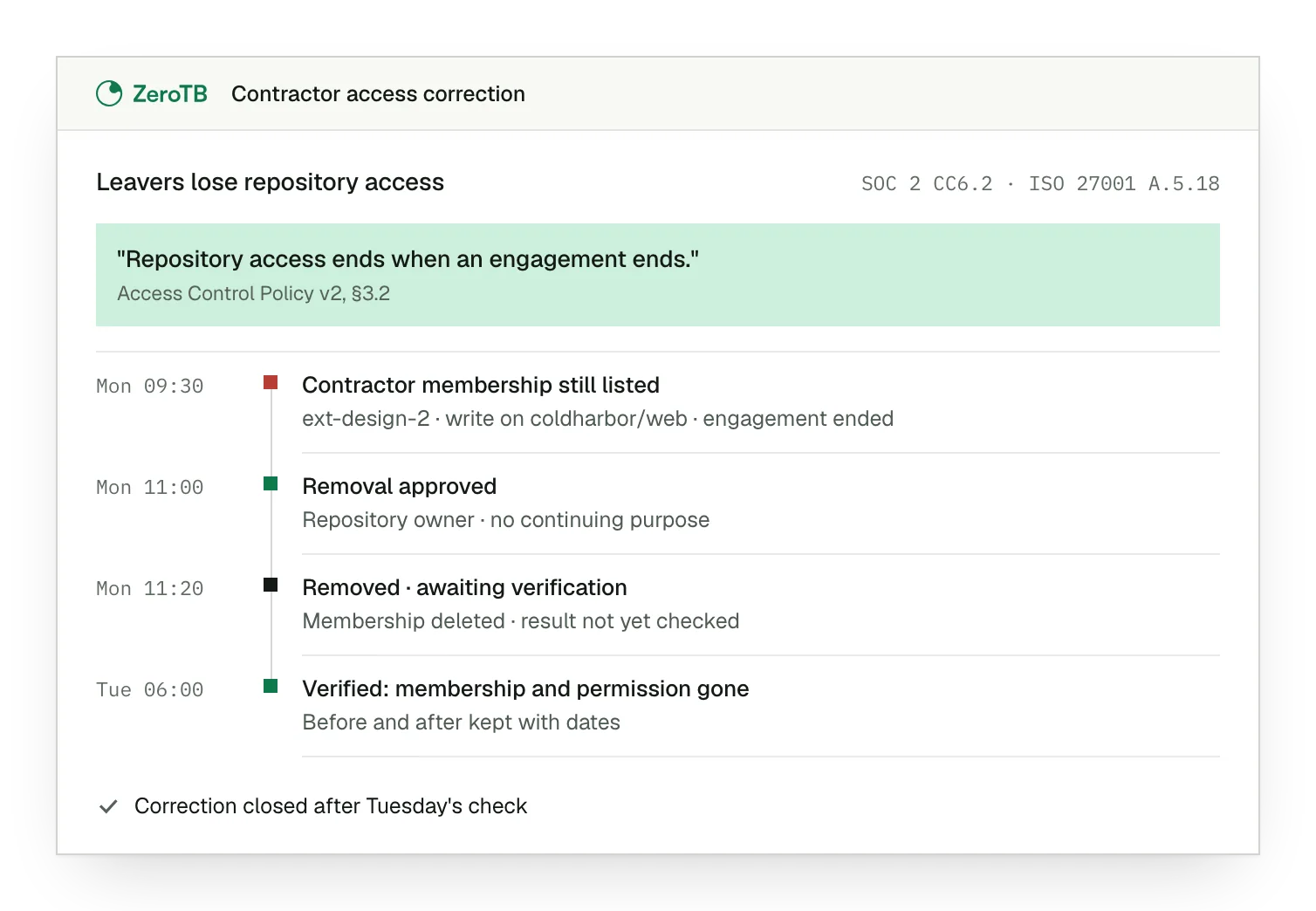
Remaining membership. One membership remains on Monday's access list after the contractor has finished the engagement.
Approved removal. The repository owner records that this permission has no continuing purpose and approves its removal.
Change awaiting verification. Monday's action removes the membership, while the record still awaits a check of the result.
Verified result. Tuesday's check finds neither the membership nor its permission, and the record keeps the dated evidence.
Access review checklist
Check that the review includes the systems, account types and access routes covered by the approved policy.
Examine one review entry for current permissions, business purpose and enough detail to decide which rights remain necessary.
Follow one removal decision to the person who can apply it, its deadline and its escalation route.
Check that each exception has a reason, an accountable owner and a date or condition for reconsideration.
Find the dated system observation that confirms the unwanted permission is gone and supports closing the correction.
Sources
- Microsoft Learn, What are access reviews?, 2026
- Microsoft Learn, Complete an access review of groups and applications, 2026
Related pages
Start with the Pilot
The eight-week Pilot covers up to 25 commitments from your report and takes two real control gaps through verified restoration. You receive working controls and signed evidence. Talk with our team about where access reviews need support.