SOC 2 CC6.2 places registration and approval before new users receive access, and requires credential removal once authorization ends. This applies to internal and external users whose access the organization administers. The practical check is to trace each account to its approval and compare the permissions granted with that decision.
Approval must precede the issue of credentials under CC6.2. During a review, the account history should identify the user, the access decision and the time credentials were created. Even when several teams handled onboarding, those records need to explain the access that the person received.
This criterion belongs to SOC 2 CC6, the group covering logical and physical access protections. Its account history continues beyond onboarding, through the end of authorization. The systems and procedures in that history depend on what the company's policy and report commitments cover.
Registered users and accounts
Registration connects a known user to the accounts issued for that user's work. The record needs enough information to distinguish that person from others with similar names. The application account and access request need to refer to that same person, even when they use different account identifiers.
Include contractors and other external users whose access the organization administers. Their requests may originate outside employee onboarding, with a project sponsor providing the business reason. Keeping that relationship visible helps a reviewer find the person who can explain whether the account still serves its purpose.
Authority to approve
An approval needs to identify the person authorized to make that access decision. A request from a colleague can explain why someone needs an account. The approval must also establish that someone with the relevant authority accepted the requested access, under the policy for the affected system.
Record the requested system and role beside the decision, approver and approval time. An administrator can then provision the account against a specific decision. A broad instruction to create an account leaves room for the administrator to select permissions the approver never considered.
Automated account creation
Automated provisioning can preserve approval when it applies a defined, approved rule. The rule needs to identify eligible users and the access they receive. Its record should let a reviewer establish why a particular account qualified when the workflow created it, including which approved rule applied to that request.
Requests outside that rule need an owner decision. A new department, contractor category or application can change what an existing workflow grants. Testing those changes helps establish whether the workflow still applies the intended approval and whether exceptions reach the person responsible for deciding them.
Gaps in the approval path
Direct account creation can bypass the checks in an onboarding workflow. Central provisioning through Okta may cover one route, while an administrator creates accounts inside the application. The approval history needs to cover both routes and establish who authorized each account before access was issued.
Comparing the application account list with approved requests can expose those gaps. An unmatched account needs investigation because the decision could be elsewhere. If the application list itself is missing or stale, obtain a current observation before concluding whether the account meets the approved rule.
Authorization after onboarding
Access needs a current purpose after the account has been created. An employee's departure or the end of a contractor's assignment can end that purpose. CC6.2 includes removing user credentials when the organization no longer authorizes the access it administers. An old approval can therefore require a new decision.
User access reviews help identify accounts whose authorization needs another decision. Keep the account's current status connected to that decision and any removal. CC6.3 develops the related question of changing permissions as roles and responsibilities change, including least privilege and separation of duties.
Missing approval records
A missing approval record calls for investigation before the account is treated as authorized. The reviewer needs to establish whether an earlier decision exists and who made it. A matching name in an employee list alone cannot explain every application permission assigned to that person.
If the owner approves continued access now, record the new decision with its actual date. That decision establishes the basis for retaining access from this point. It does not establish that approval preceded the original account creation; the earlier gap remains part of the history.
Correcting active access
The owner decides what access should remain before the account is changed. Reducing permissions, removing credentials and retaining an exception have different effects on the person's work. Describe the current access and the proposed result so the owner can assess that effect and approve the correction.
If access has no valid basis, the established response process governs its restriction or removal. Where the owner retains an exception, keep the reason with the account's record. The next reviewer needs that decision to understand why the access remains and whether its purpose still applies.
Testing the repaired workflow
Correcting one account leaves a second question: whether the provisioning workflow will issue the right access next time. Compare the changed account with the owner's decision, then test the repaired workflow. An approved test request should receive the specified role without permissions beyond that decision.
A request without approval needs a test too. Check that it stops or reaches the agreed decision point before the account receives access. Leave the gap open if a test fails or its result is unavailable. Later workflow and application changes need further checks.
Evidence across the review period
A current export cannot explain on its own whether approval preceded access. The reviewer also needs the dated request, decision and provisioning event. Together, those records establish the sequence for an account created earlier in the period, even if its permissions have since changed again.
The record of a correction should retain the failure that prompted it. ZeroTB's Verified Control Record keeps the commitment, before-and-after state, action, approval and check together. From that history, a reviewer can see what changed and whether testing established the result needed to close the gap.
Evidence for CC6.2
These records connect the approval rule to the access issued, retained or removed.
| Requirement | What an auditor asks for | Where it comes from |
|---|---|---|
| Registered identity | The identified user and the accounts connected to that user's work | Registration records, employee or contractor records, and application account lists |
| Approval before access | The approved request, authorized approver and decision time relative to credential issue | Access requests and approval history matched to provisioning events |
| Access as approved | The permissions issued and their match to the authorized system and role | Application permission exports compared with the approved request |
| Ended authorization | The decision ending access and evidence that the affected credentials were removed | Departure or contract records, removal actions and subsequent account checks |
| Verified correction | The original gap, approved change and results for the account and repaired process | Change records, before-and-after observations and provisioning tests |
Related framework requirements
| Framework | Control | What it covers |
|---|---|---|
| SOC 2 | CC6.2 | Registration and approval before issuing access, with credential removal when authorization ends |
| ISO 27001 | A.5.16 | Managing identities through their lifecycle, from creation to removal |
| HIPAA | 164.308(a)(3) | Workforce authorization, supervision, clearance and termination of access involving electronic protected health information |
Example of correcting contractor access
Correcting excess permissions includes checking how the account received them. This example follows a contractor approved for review access whose account received administrator permissions. The owner approves reducing those permissions, and a test of the repaired provisioning rule checks that the error has been addressed.
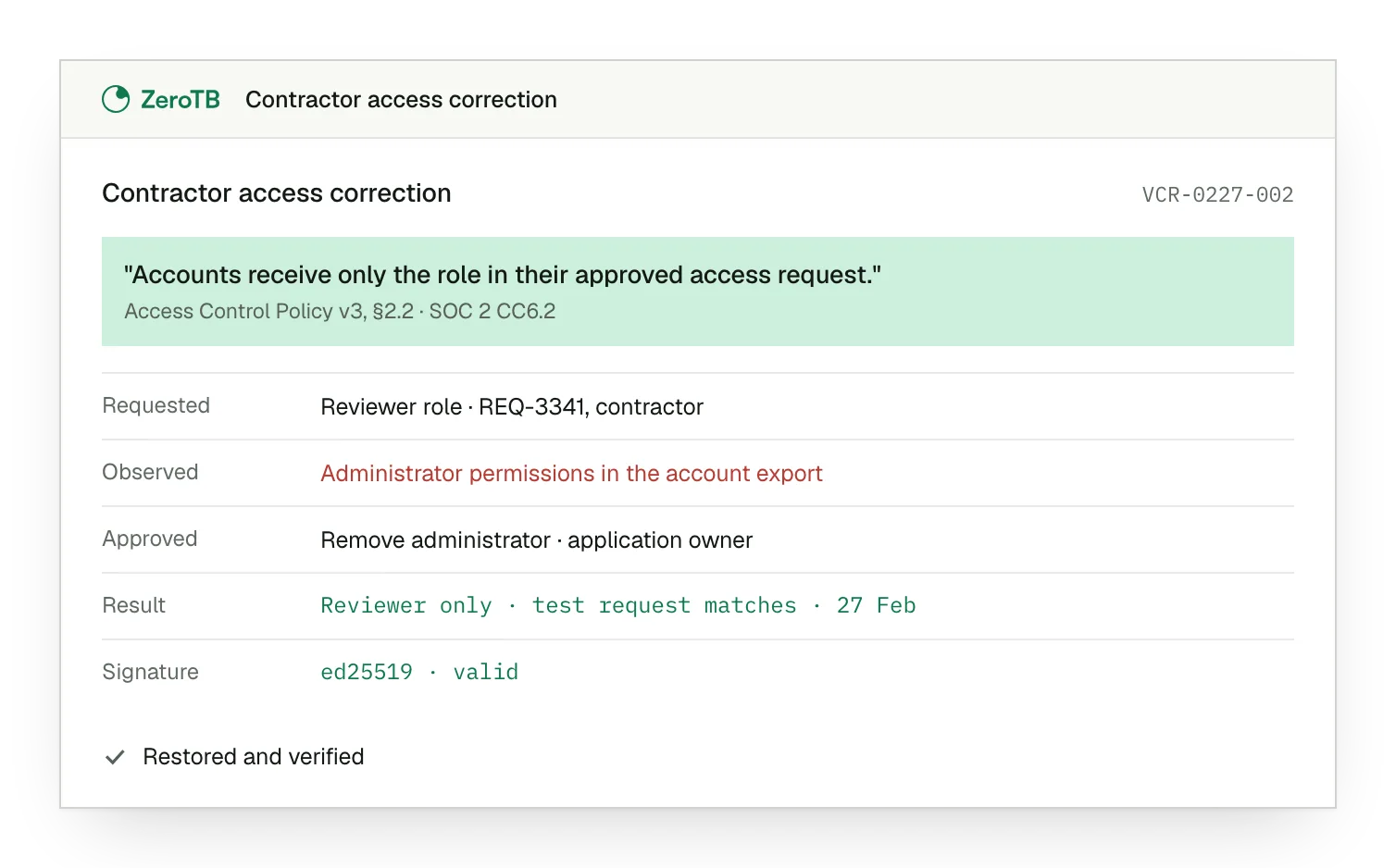
Approved reviewer role. The contractor's request specifies review access; the account export shows administrator permissions beyond that approval.
Owner's correction decision. After confirming the contractor's work needs, the application owner approves removal of the additional administrator permissions.
Account and workflow. The permissions now match the approved role, which a new request through the repaired workflow also receives.
Verified result retained. Dated test results accompany the original permissions and the owner's decision in the completed correction record.
Registration and approval checklist
Identify the systems covered by the commitment, the approval authority and the conditions that end authorization.
Find the registration and approval behind each account, including accounts that administrators created directly in applications.
Present the current and proposed access to the owner for a decision, including any exception that would remain.
Test the account against the approved change and check how the repaired workflow handles requests with missing approval.
Save dated evidence of the failure, correction and tests, with an owner responsible for checking subsequent changes.
Sources
- AICPA & CIMA, 2017 Trust Services Criteria with revised points of focus, 2022 revision.
- HHS, HIPAA audit protocol, workforce security, 2018 update.
- ZeroTB, SOC 2 compliance automation with human approval, 2026.
Related pages
SOC 2 criteria
Read the wider SOC 2 guidance to see where account approval fits within the criteria.
Compliance frameworks
Find the framework guidance relevant to the requirements your organization has agreed to meet.
User access reviews
Follow the review of existing accounts as people change roles, leave or finish their assignments.
Start with the Pilot
Talk with our team about keeping access controls in operation. The Pilot covers eight weeks, maps up to 25 commitments and takes two real control gaps through approved correction and verified restoration. You receive evidence of what changed and the checks performed.