Cursor's audit report covers only Cursor's own service
Cursor edits workspace files and runs terminal commands. Its SOC 2 report examines Cursor's service. ZeroTB's software and team keep post-audit controls working for US software, AI, fintech and healthtech companies.
Assess the service. Cursor's report supports vendor review. Your repositories and releases need their own evidence
Scope the approval. Name the repositories, information and access Cursor may use for the approved work
Review later requests. Check new tools and repositories against that scope before work proceeds
Cursor SOC 2 reports cover a past period
Cursor SOC 2 Type II evidence covers a period, usually 3 to 12 months. Its security page links to the trust portal for reports.
Check report dates. Customers usually treat a SOC 2 report as current for about 12 months.
Read the scope. The report identifies which parts of Cursor's service the examination covers.
Read beyond attestation. The public attestation statement explains neither the report's scope nor its observation period.
Privacy Mode keeps customer code out of training
With Privacy Mode enabled, Cursor excludes customer data from training under its data-use policy. Requests still pass through Cursor's backend.
Account for processing. Requests pass through Cursor's backend even when you use a personal API key.
Check retention exceptions. The policy describes temporary caching, abuse investigations and models without zero-retention arrangements.
Decide before sharing. Resolve requirements to keep project data in one environment before supplying it to Cursor.
Cursor's agent saves edits before anyone reviews them
Cursor saves workspace edits immediately but treats configuration files separately. Its agent security documentation says terminal commands require approval by default.
Check run modes. Selected run modes can allow commands without a prompt for each action.
Account for limits. Cursor describes run modes as best-effort safeguards when explaining command approval.
Inspect automatic reload. Automatic reload can execute saved edits before a developer reviews them.
MCP connections hand Cursor's agent outside credentials
Model Context Protocol (MCP) gives Cursor access to external tools. A connection needs approval separately from the calls made through it.
Review tool approvals. Specific tools can be pre-approved for the agent to use.
Inspect credential permissions. The connected service determines which records and actions its credential can reach.
Assign access owners. A tool that changes records needs someone to decide whether later access remains appropriate.
Missing branch rules let Cursor changes merge unreviewed
A Cursor change may receive review even when the branch rule is missing. That leaves the next merge outside your required SOC 2 review.
Check beyond scans. A passing code scan leaves open whether the change can merge unreviewed.
Inspect new repositories. Agent pull requests can reach new repositories before their protections are set.
Review bypass rights. Revised branch rules and bypass rights can change which merges require review.
Deployment records match tested code to shipped code
A deployment record connects reviewed code to the system it reached. Test results and release permissions explain how that change passed through.
Match tested changes. The test result must identify the examined change and match the deployed one.
Check release stops. The agreed process determines whether a failed required check stops release.
Own each exception. Record the bypass owner, affected systems, permitted use and review date.
ZeroTB rechecks repository and release rules every day
ZeroTB checks SOC 2 commitments in GitHub daily and carries gaps through verified restoration. It examines systems Cursor changes without a coding-agent connection.
Approve scoped repairs. ZeroTB drafts pull requests after read-only checks. Scoped, approved write access remains revocable.
Keep uncertainty visible. Stale or disconnected observations leave the present condition unknown and require investigation.
Keep failures open. A failed verification leaves the gap open until a check confirms the control works.
Cursor's safeguards and ZeroTB answer different audit questions
Cursor's SOC 2 report answers a vendor-review question. The other safeguards govern development, with ZeroTB investigating and repairing failures in your controls.
| Task | Cursor's SOC 2 report | Cursor's agent settings | Branch rules | ZeroTB |
|---|---|---|---|---|
| What it covers | SOC 2 Type II evidence for Cursor's service | Command approval under selected run modes | Which merges need a reviewer | SOC 2 commitments checked daily |
| What it leaves open | Your repositories, reviews and releases | Edits saved before review | Bypass rights and new repositories | Cursor's service remains covered by its report |
| Who acts on gaps | Cursor under its own audit | The developer choosing run modes | The repository owner | ZeroTB prepares repairs, your team approves |
| What auditors see | Cursor's report on request | Your record of approved use | The current branch rule | A signed Verified Control Record |
Example of restoring a missing merge review rule
Here, a repository requires review again after repair. The Verified Control Record connects the requirement, original condition, approved change and verification result.
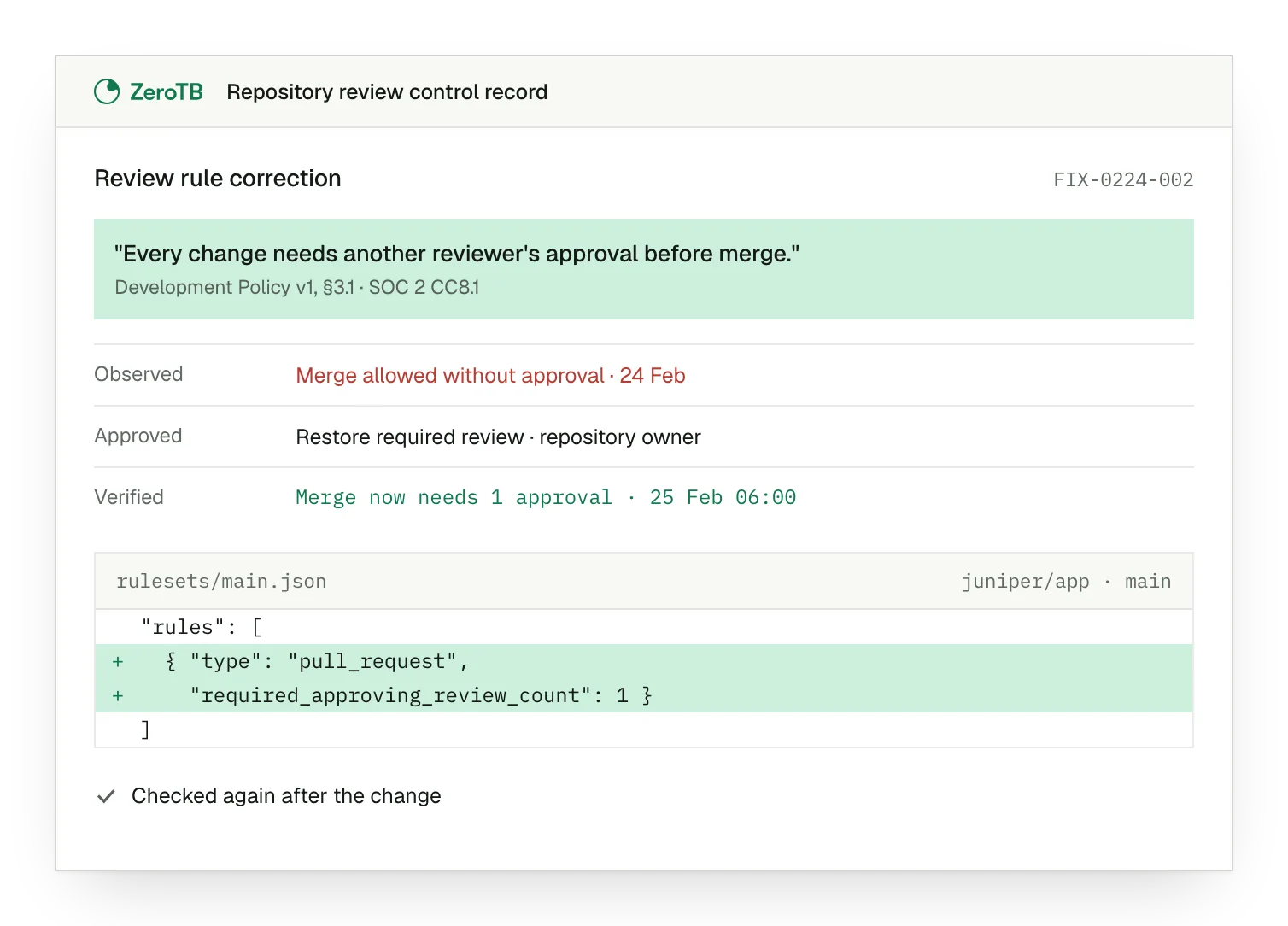
Missing review rule. Policy requires another reviewer, but the repository permits merging without one.
Approved rule change. The owner approves restoring the required review rule on the repository.
Verified merge restriction. A later check confirms that another change needs the specified approval before merging.
Five checks keep a Cursor approval current
Identify the repositories, information and workflow within Cursor's approved scope.
Check available files, commands and connected services under the chosen permissions.
Follow one change through review, tests and deployment.
Check who approved each bypass, why it remains and when approval needs review.
Compare the verification result with the approved correction and the requirement it restores.
Sources
- Cursor, Security, updated August 25, 2026.
- Cursor, Data Use & Privacy Overview, updated September 3, 2026.
- Cursor, Agent Security, accessed November 4, 2026.
- Cursor, Model Context Protocol, accessed November 4, 2026.
Start with the Pilot
Discuss Cursor controls. Over eight weeks, the Pilot maps up to 25 commitments and takes two real gaps through verified restoration.