What does 45 CFR 164.310(b) require for workstation use?
45 CFR 164.310(b) requires workstation-use policies and procedures to specify permitted tasks, how staff perform them and the physical surroundings. This applies to workstations that can access electronic protected health information (ePHI). Review those three elements together, including after a change in work, and retain evidence of the resulting arrangement.
The workstation-use review includes what happens around the device. For a laptop beside a visitor walkway, that includes who can see the display. This part of HIPAA's physical safeguards connects the approved work with the procedure staff follow and the space where they follow it.
Permitted work and surroundings
The procedure must account for the task, the manner of working and the physical setting. Section 164.310(b) permits procedures for a specific workstation or a class of workstations that can access ePHI. It does not list separate implementation specifications beneath the standard.
Existing acceptable-use instructions may cover some of these points. Read them alongside the work being done: an instruction about permitted applications may say little about leaving a session unattended. The review should identify where staff lack usable instructions for the task or the setting.
Workstation classes
A workstation class gives devices with similar uses and conditions a common procedure. It should be possible to explain why a device belongs in the class. An assigned desk and a shared support station may use identical hardware but need different instructions because people use them differently.
The inventory should therefore record more than device type. Include the permitted work and location, and identify who keeps those details current. NIST's implementation guide considers capabilities, connections and allowable activities when classifying devices. Those details help a reviewer decide which procedure applies when another workstation enters service.
Instructions for daily work
Working instructions need to cover the points where an approved task could expose information. Staff may leave a session open while stepping away or transfer a shared station to another authorized worker. The procedure should explain how to handle those moments in the application they use.
For the shared station, describe how the departing worker ends the session and how the next worker begins. Check that these instructions agree with the approved access rules. If the routine changes, make the new instructions available to staff before relying on the updated procedure as evidence of practice.
Physical surroundings
The workspace can expose information while device protections continue to operate as intended. A screen may face a visitor area; an unattended workstation may be accessible from a passage. These are conditions to inspect at the location, alongside the settings recorded for the device.
A visibility review can start from the positions people normally occupy near the workstation. If the display is exposed, assess a different orientation or work area and confirm that the task remains possible. HHS physical-safeguard guidance discusses workstation placement and measures to limit unauthorized viewing.
Remote work
The workstation-use procedure also needs to cover access to ePHI from home and satellite offices. Approval of a company-managed laptop leaves the question of its surroundings to resolve. A suitable arrangement must account for other people near the device and periods when the worker steps away.
Instructions can specify where this work may take place and what to do if the space becomes unsuitable. A portable device may move through several settings without changing its technical configuration. Review a new setting against the procedure before assuming that approval for the device covers work there.
Related safeguards
Workstation use specifies the approved activities and their working conditions. Workstation security, 164.310(c), requires physical safeguards to restrict access to authorized users. The two standards concern the same equipment, but their evidence answers different questions. Review the instructions and the protections together while retaining that distinction.
In a controlled room, the procedure describes the permitted work and how staff perform it. Physical safeguards restrict who can reach the workstation. Technical access controls govern access to its electronic systems. A record from one of these checks should identify the requirement and condition it supports.
Changes after approval
New work can require a procedure review even when nothing changes on the device. Suppose a workstation used for general administration begins handling ePHI. Its old instructions may omit conditions that now matter, including where the information can be viewed and how staff leave the session.
Compare the new activity with the existing workstation class and procedure. Decide whether they cover it or need revision. Section 164.316 requires periodic review of documentation and updates following relevant changes. Assign responsibility for recognizing these changes, including workflow and location changes that a configuration report would not reveal.
Evidence from the workplace
A workstation review needs observations of the conditions that the procedure describes. Device reports can establish configured protections. For physical surroundings, the reviewer needs information from someone able to inspect the location. Record when each observation was made and which part of the procedure it supports.
Keep the device, location and procedure version with the observation. ZeroTB connects endpoint and process checks to approved commitments and follow-up work; the responsible team confirms the physical conditions. If that confirmation is missing or outdated, leave the relevant condition unresolved until the reviewer has evidence to assess it.
Approved corrections
A correction is ready to close when the revised arrangement protects ePHI and still permits the approved work. The proposal should identify the affected workstation, the observed exposure and the intended arrangement. Its owner can then approve the change with a clear view of its operational effect.
After the change, repeat the observation in the actual setting. A screen-placement correction needs a visibility check; a session procedure needs a check of the working routine. Keep the gap open if the result is incomplete. A passing device check cannot establish whether the physical change solved the observed exposure.
Procedure history
Retain the procedure that applied when the work was checked, along with the version that replaced it. Section 164.316 requires covered documentation to remain available for six years from creation or its last effective date, whichever is later. Apply this retention period to the documentation the Security Rule requires.
Make current instructions available to the people responsible for applying them. Keep the original gap, approval, changed arrangement and dated verification together in the Verified Control Record. This lets a reviewer understand why the correction was accepted and which procedure should govern the workstation at the next review.
Evidence for workstation use
Use these records to connect each workstation with its instructions and the observations made during review.
| Requirement | What an auditor asks for | Where it comes from |
|---|---|---|
| Covered workstations | Which workstations are covered, where they are used and why they share a procedure | Workstation inventory, classification records and the process for updating them |
| Permitted work | What staff may do at the workstation and the instructions for doing it | The workstation-use policy and working instructions for each class |
| Suitable surroundings | How the surrounding space protects the workstation from unauthorized viewing or access | Workplace assessments, placement decisions and dated observations of the arrangement |
| Implemented instructions | How the organization establishes that staff can obtain and use the current instructions | Implementation reviews, staff communications and records of procedure changes |
| Verified correction | What changed after an exposure was found and how the result was checked | Change records and verification evidence linked to the affected workstation and procedure |
Related framework requirements
| Framework | Control | What it covers |
|---|---|---|
| HIPAA | 45 CFR 164.310(b) | Permitted workstation functions, procedures for using them and the physical surroundings of workstations that can access ePHI |
| SOC 2 | CC5.3 | Policies and procedures for carrying out control activities, including who is responsible for the work |
| ISO 27001 | A.7.8 | Where equipment is placed and how it is protected, providing a related basis for reviewing workstation placement |
Example of correcting screen exposure
This example follows a support workstation moved next to a visitor walkway. Its device settings still meet the approved rules, but a reviewer can see the display from the walkway. The correction addresses the location and instructions, followed by a check of visibility during use.
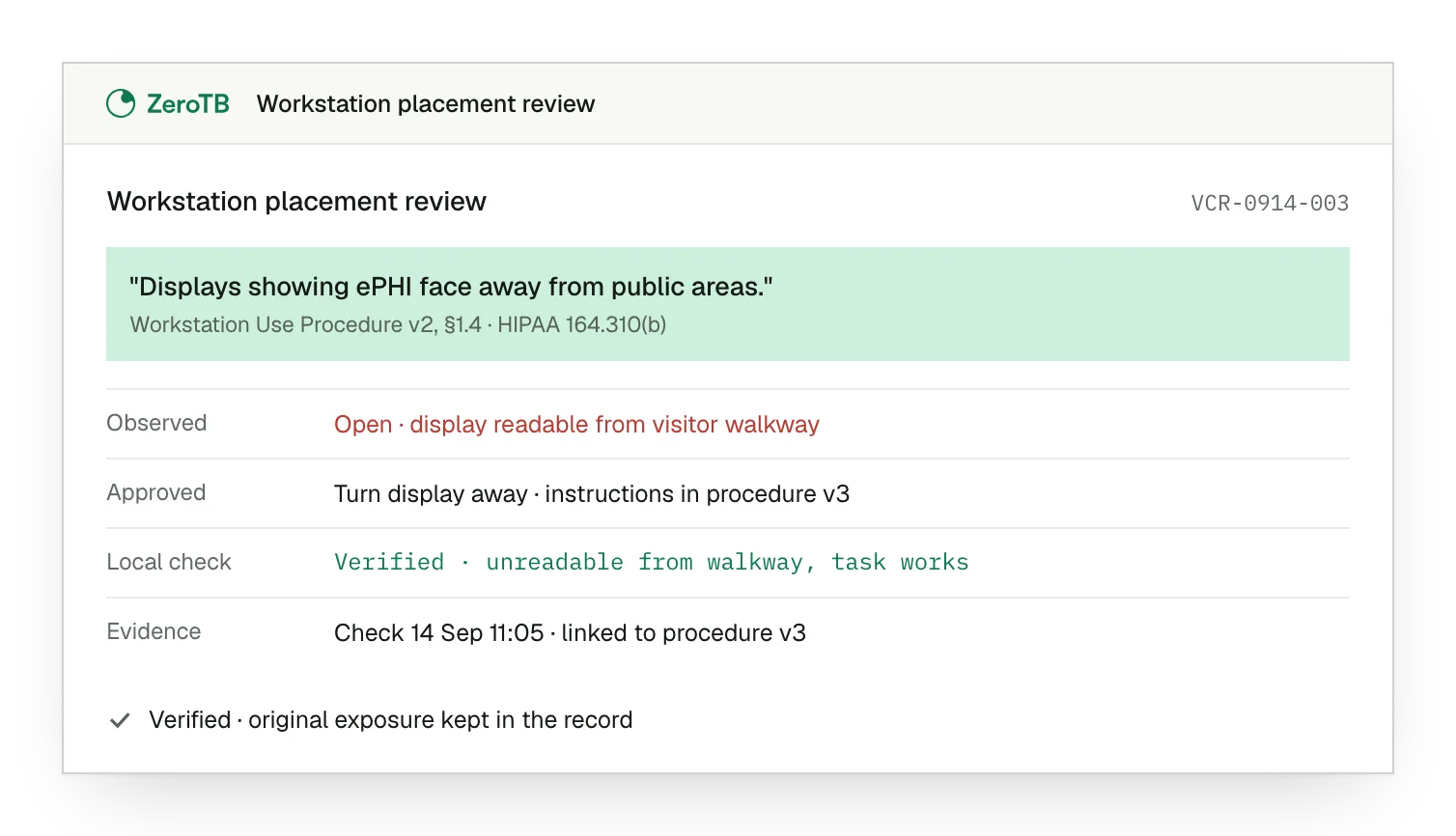
Observed exposure. The local review finds a readable display from a position where visitors normally pass.
Approved placement. The owner approves a new display position with updated instructions for the workstation.
Local verification. A second check confirms restricted viewing from the walkway while the support task remains possible.
Recorded result. The revised procedure has links to the dated check, the approval and the original exposure.
Workstation review checklist
Compare the workstation's actual tasks and location with its assigned class and the procedure that applies there.
Confirm who can see or reach the workstation during ordinary work, including periods when its user steps away.
Decide which arrangement protects the information while preserving the approved task, and record the owner's approval.
Check the changed conditions in practice and retain dated evidence with the current procedure before accepting closure.
Sources
- eCFR, 45 CFR 164.310: Physical safeguards, current text checked November 4, 2026.
- HHS, Security standards: Physical safeguards, 2007 revision.
- NIST, SP 800-66r2: Implementing the HIPAA Security Rule, section 5.2.2, 2024.
- HHS, HIPAA audit protocol, workstation-use section, 2018 update.
- eCFR, 45 CFR 164.316: Policies, procedures and documentation, current text checked November 4, 2026.
Start with the Pilot
Talk with our team about keeping workstation controls effective as work changes. The eight-week Pilot maps up to 25 commitments and takes two real control gaps through approved correction and verified restoration, with evidence of the results.