What does HIPAA 45 CFR 164.310(c) require for workstation security?
HIPAA 45 CFR 164.310(c) requires physical safeguards for workstations that access electronic protected health information (ePHI), with access restricted to authorized users. Workstation security depends on the place where the equipment is used. When that place changes, check the protection again and keep the result with the record of the change.
A device report can show encryption enabled and every software check passed. It cannot show who walks through the room. That leaves a separate question for HIPAA physical safeguards: who can reach this workstation, in the place where it is used today?
Physical access to workstations
The physical safeguards under workstation security must restrict access to authorized users. This applies to every workstation that accesses ePHI. Section 164.310(c) has no separate implementation specifications; the organization selects the measures that will meet the standard in its environment.
Workstation use, the neighboring standard, describes the permitted work and its surroundings. The security standard concerns physical protection. A reviewer needs to understand how the two fit together: where the work takes place, who needs access and how the equipment is protected there. Read the physical safeguards standards.
Workstation scope and location
The review starts with the places where staff access ePHI. A device inventory helps establish this scope when it includes location and use. Grouping workstations can make the review manageable, provided the group describes equipment used under the same relevant physical conditions.
Portable equipment belongs in that inventory too, including devices used outside the office. Records stored in a remote application still reach the person using the workstation. Identify someone responsible for each location, so questions about its physical condition reach a person who can inspect it.
Safeguards suited to the setting
Choose the physical measure for the access it needs to restrict. A room used only by authorized staff presents different conditions from a shared station beside a visitor route. Equipment placement and restrictions around the station should address the exposure found in that setting.
The general Security Rule requirements let organizations select reasonable and appropriate measures for their circumstances and risks. The assessment should explain the choice. Without that explanation, a later reviewer may see the same equipment and assume its protection still fits a changed room.
Shared and remote workspaces
Portable and shared workstations need safeguards that match each place they are used. In a shared office, consider access by visitors and other occupants. At home, consider who can reach the equipment during work and when the authorized user leaves it unattended.
A useful review follows the device through its normal working day, including storage between uses. If a location cannot support the required protection, the owner can choose a different working arrangement. NIST's workstation guidance includes placement, physical access and workstations outside controlled areas.
Physical and technical protection
Encryption and sign-in controls protect ePHI in ways that complement physical restrictions. An encrypted workstation can still be reachable by unauthorized people, and an open session can expose information. Assess the physical arrangement alongside the technical safeguards that protect the device and its applications.
Endpoint checks can establish device settings such as encryption or enrollment. The physical review needs observations about the surroundings, including who can approach the equipment. Keeping those evidence sources distinct prevents a successful software check from being treated as proof that a room remains secure.
Changes after the review
A move can invalidate a workstation assessment even when the device itself has not changed. Office repairs, shared desks and altered visitor access can change who reaches it. Treat changes to the setting as reasons to revisit the physical safeguards already selected.
Periodic review also helps identify changes that never reached the security team. The review schedule should reflect the environment and its risks. A dated observation lets the reviewer distinguish an arrangement checked after a move from one checked while the workstation occupied its previous location.
Responsibility for the correction
Assign the physical correction to someone who can change the workspace. The device administrator may be able to change encryption settings but have no authority to restrict entry to a room. The issue needs to reach the person responsible for that physical arrangement.
ZeroTB can track the follow-up against an approved commitment and assign it to an owner. The site owner approves and carries out the physical correction. The record should describe the access being restricted and the work that staff must still be able to perform afterward.
Verification at the workstation
Verification should establish that the corrected arrangement restricts unauthorized access during normal work. The person checking it needs to inspect the current location and the measure that changed. A completed work order shows that someone made the change. An observation at the workstation shows whether the safeguard works.
Check that authorized staff can still perform the intended work under the new arrangement. If the restriction fails or the location has not been checked, keep the gap open. Record the result against the approved correction so the closure decision follows the observed physical condition.
Evidence across the review period
A reviewer needs to know which workstation was checked, where it stood and when the check happened. Put those details beside the observed gap. The approval and verification can then refer to the same equipment and location, making the sequence of events easier to follow.
When another move prompts a new assessment, keep the earlier record. It explains the protection in place before the change. HIPAA documentation requirements call for periodic review and updates when environmental or operational changes affect security, so the current documentation needs to reflect the new setting.
Workstation security evidence
Evidence should connect the chosen safeguard to its actual use at the workstation.
| Requirement | What an auditor asks for | Where it comes from |
|---|---|---|
| Workstations in scope | Which workstations access ePHI and where people use them | Device inventory linked to locations and workstation-use records |
| Defined physical safeguards | How the organization restricts physical access to authorized users | Approved security procedures and the assessment supporting the selected measures |
| Safeguards in operation | Evidence that the measures described in the procedures are in use | Dated observations of equipment placement and physical access at the relevant location |
| Approved correction | The gap identified and the decision authorizing a change | The issue record and approval from the owner responsible for the arrangement |
| Verified result | What changed, what was checked and whether the safeguard now works | On-site verification linked to the approval and retained control record |
Framework coverage
| Framework | Control | What it covers |
|---|---|---|
| HIPAA | 45 CFR 164.310(c) | Physical safeguards restricting workstation access to authorized users |
| SOC 2 | CC6.4 | Physical access restrictions for facilities and protected information assets |
| ISO 27001 | A.7.7 | Clear-desk and clear-screen practices for exposed information and unattended work areas |
Example of restoring restricted access
In this example, a workstation moves into a shared room during office repairs. Its previous assessment describes a restricted office. The control record follows an approved return to a protected room, with a physical check before the issue closes.
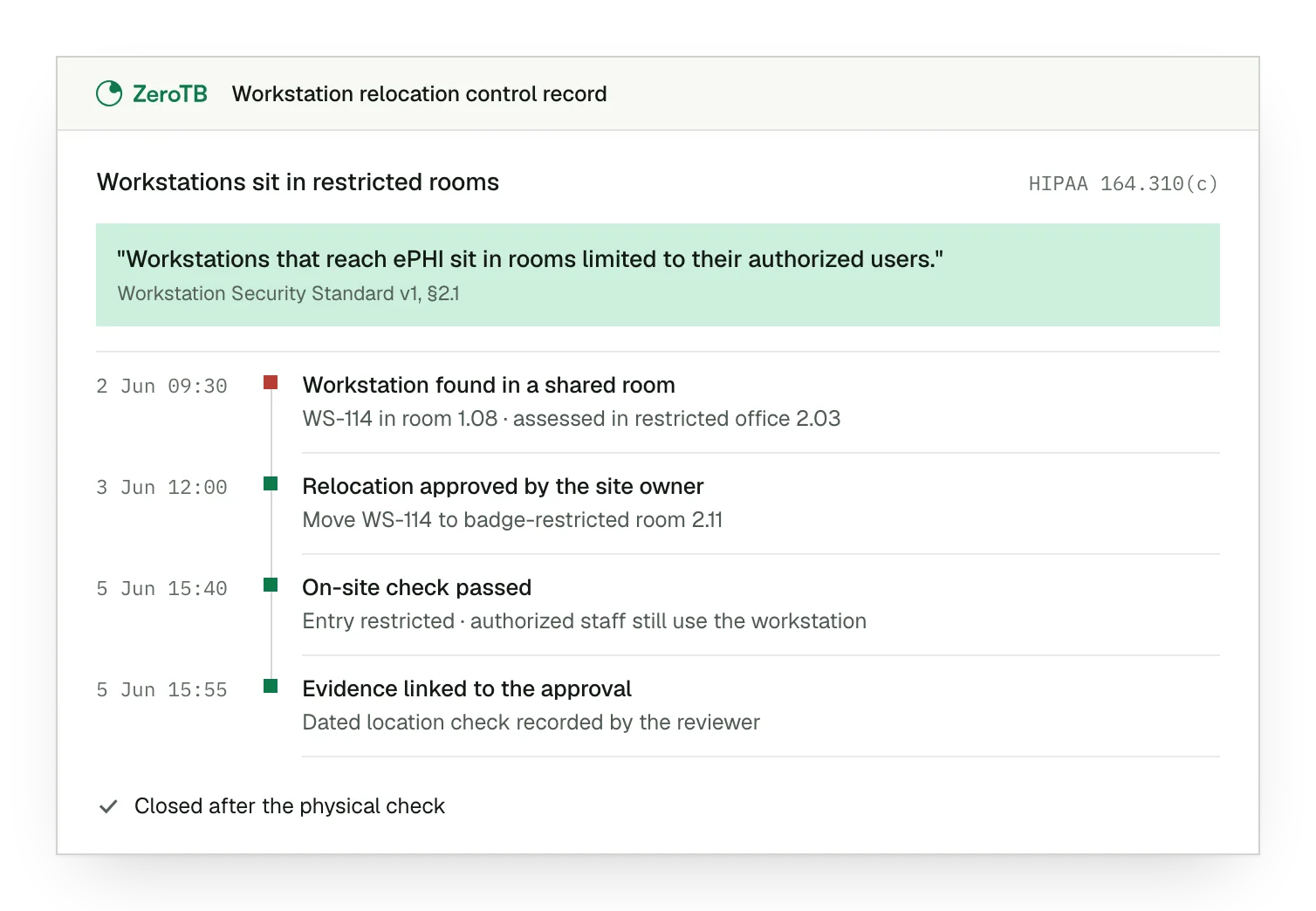
Changed location. The workstation now sits in a shared room accessible to people outside its authorized user group.
Approved relocation. The site owner approves moving the equipment to a room with suitable access restrictions.
Physical check. The reviewer confirms the room restricts access and authorized staff can still use the workstation.
Retained evidence. The Verified Control Record links the dated location check to the approved move and its result.
Workstation security checklist
Select a workstation or defined group and establish where authorized staff access ePHI during normal work.
Compare the approved safeguard with current surroundings, including visitor access and periods when the equipment is unattended.
Identify the person who can change the arrangement and approve a correction that preserves necessary work.
Inspect the corrected location and verify both the physical restriction and continued access for authorized staff.
Retain the observation, approval and verification together, with responsibility for reviewing later changes to the setting.
Sources
- eCFR, 45 CFR 164.310: Physical safeguards, 2026.
- eCFR, 45 CFR 164.306: Security standards, general rules, 2026.
- eCFR, 45 CFR 164.316: Policies, procedures and documentation, 2026.
- HHS, HIPAA Security Series: Physical safeguards, 2007 revision.
- HHS, HIPAA audit protocol, July 2018 update, workstation security section.
- NIST, SP 800-66 Rev. 2: Implementing the HIPAA Security Rule, February 2024, section 5.2.3.
Related pages
Physical safeguards
Read about facility access, workstation use and the handling of devices within the physical safeguards group.
HIPAA
See the broader HIPAA program, including the administrative and technical safeguards that accompany physical protection.
Compliance frameworks
Browse the framework libraries for guidance on related controls that your organization may also operate.
Start with the Pilot
Talk with our team about keeping controls effective as work changes. The eight-week Pilot maps up to 25 commitments and takes two real control gaps through approved correction and verified restoration, with evidence of the results.