Home / Organizational controls
What does ISO 27001 A.5.15 require for access control?
ISO 27001 A.5.15 requires access rules based on business needs and information security requirements. The rules cover physical and logical access to information and associated assets. Establish what access each role needs, apply the rules across the relevant locations, and test whether the permitted and restricted activities match those decisions.
A report leaves a restricted application and lands in a shared folder. The application still has the right permissions, but the folder admits a wider group. A.5.15 gives the ISO 27001 program a basis for deciding whether both locations enforce the intended access.
Access rules and business needs
A.5.15 connects access decisions to the work people need to do and the protection information requires. A job title alone rarely explains that decision. The rule needs to establish which activities the role permits and which information those activities require.
The information owner can then explain why a person needs to read, change or share a resource. Each action may need a different restriction. This makes the access decision useful to the administrator who configures the system and the reviewer who later examines it.
Information and asset scope
An access rule must follow the information into every location covered by the organization's policy. A restriction in the main application can leave copies exposed elsewhere. Shared folders, exported reports and other storage locations need to reflect the same approved access conditions.
The scope also includes physical access to relevant information and assets. A locked records room and a restricted application use different mechanisms, but each needs an approved access rule. Their owners should be able to explain how the arrangements protect the information people can reach.
Enforceable access conditions
A useful access rule gives an administrator enough detail to allow the intended activity and restrict everything outside it. Name the resource, permitted action, eligible role and any conditions. A broad instruction such as access by role leaves those decisions unresolved.
Those conditions give the reviewer a testable rule. If a rule allows a team to read a report, the check should distinguish reading from editing. The owner decides what the rule means; the system settings and access tests show whether that meaning holds.
Access rules and access rights
A.5.15 establishes the rules used to judge access rights. A.5.18 addresses granting, reviewing, changing and removing those rights. During an access review, the rule helps the reviewer decide whether an existing permission still serves an approved purpose or needs to change.
Group assignments from Okta can help explain access, but the application may also grant permissions directly. A reviewer needs to examine both sources where they affect the same resource. Otherwise, removing someone from a group can leave their separate application permissions untouched.
Changes across systems
A system change can broaden access without anyone editing the access policy. Inherited folder permissions are one route: moving a report can give it the permissions of its destination. A group change can also admit people to resources beyond the one that prompted the request.
To investigate the mismatch, follow the information to each relevant location. Compare the permissions there with the approved rule and trace how access was granted. The cause may be a mistaken setting or an ambiguous rule that different administrators have interpreted in different ways.
Exceptions and ownership
Keeping an access exception is a decision about a specific business need. Identify the owner, the access being allowed and the safeguards around it. The decision also needs review conditions, because access that serves a temporary purpose may become unnecessary once that work ends.
The information owner understands why access is needed; the system owner understands what a proposed restriction would change. Together, those decisions establish which permissions should remain. An old permission with no clear purpose needs investigation before the team can treat it as an accepted exception.
Approved corrections
An owner should be able to see what access a proposed correction will change. Show the approved commitment beside the observed permissions, then explain the restriction being proposed. This gives the owner a basis for deciding whether necessary work can continue after approval.
ZeroTB reads the commitment, checks the system and drafts a fix for human approval. After authorized action, it verifies the result. The Verified Control Record keeps the commitment, before-and-after state, action, approval and verification together. The owner can use that evidence to assess closure.
Tests of intended access
A corrected setting needs a test of who can still reach the information. Test the route that allowed unwanted access and the route that supports approved work. A restriction that also blocks the authorized team has left part of the intended access rule unmet.
Use test conditions that make the result comparable with the original failure. Record the identity or role tested, the resource, the attempted action and the time. If a required observation is missing or stale, keep that uncertainty visible until a current test establishes the result.
Continuing access checks
Access rules need another check when systems or business responsibilities change. A new application, a changed role or a new location for information can alter the earlier conclusion. Those changes should reach the owner responsible for checking whether the approved rule still holds.
A continuing check also needs current observations and a route for investigating failures. Record when the relevant systems were last observed and who handles a mismatch. This helps the team distinguish access that was verified recently from access whose status has become unknown since the previous review.
Evidence for access decisions
A reviewer should be able to follow the access rule through the owner’s decision to the permissions and test results.
| Requirement | What an auditor asks for | Where it comes from |
|---|---|---|
| Defined access rules | Which resources and activities the rule covers, and the business need behind the permitted access | Access policy approved by the owner, with decisions explaining its scope |
| Coverage across locations | Where the information can be reached, including shared copies and physical assets within scope | Inventories compared with storage locations and the access arrangements in use |
| Appropriate permissions | Who has access, what that access permits and who approved it | Identity and application exports, physical access records and the corresponding approvals |
| Controlled exceptions | Why an access exception remains, who owns the decision and when it will be reviewed | Exception approvals showing scope and safeguards, with subsequent review decisions |
| Verified correction | What changed, who approved it and whether tests confirmed the intended access afterward | The change approval, original observations and dated verification results |
Related framework requirements
| Framework | Control | What it covers |
|---|---|---|
| ISO 27001 | A.5.15 | Access rules for information and associated assets, with business needs and security requirements determining the permitted access |
| SOC 2 | CC6.1 | Logical protections that govern access to the systems and information covered by the SOC 2 review |
| HIPAA | 164.312(a)(1) | Technical restrictions on access to electronic protected health information, based on rights granted to people or software |
Example of restricting a shared export
The payroll rule needs to hold after a report is exported. In this example, the report inherits department-wide access from its destination folder. Removing that permission closes the unintended route, while a separate test confirms that the payroll team can still read the report.
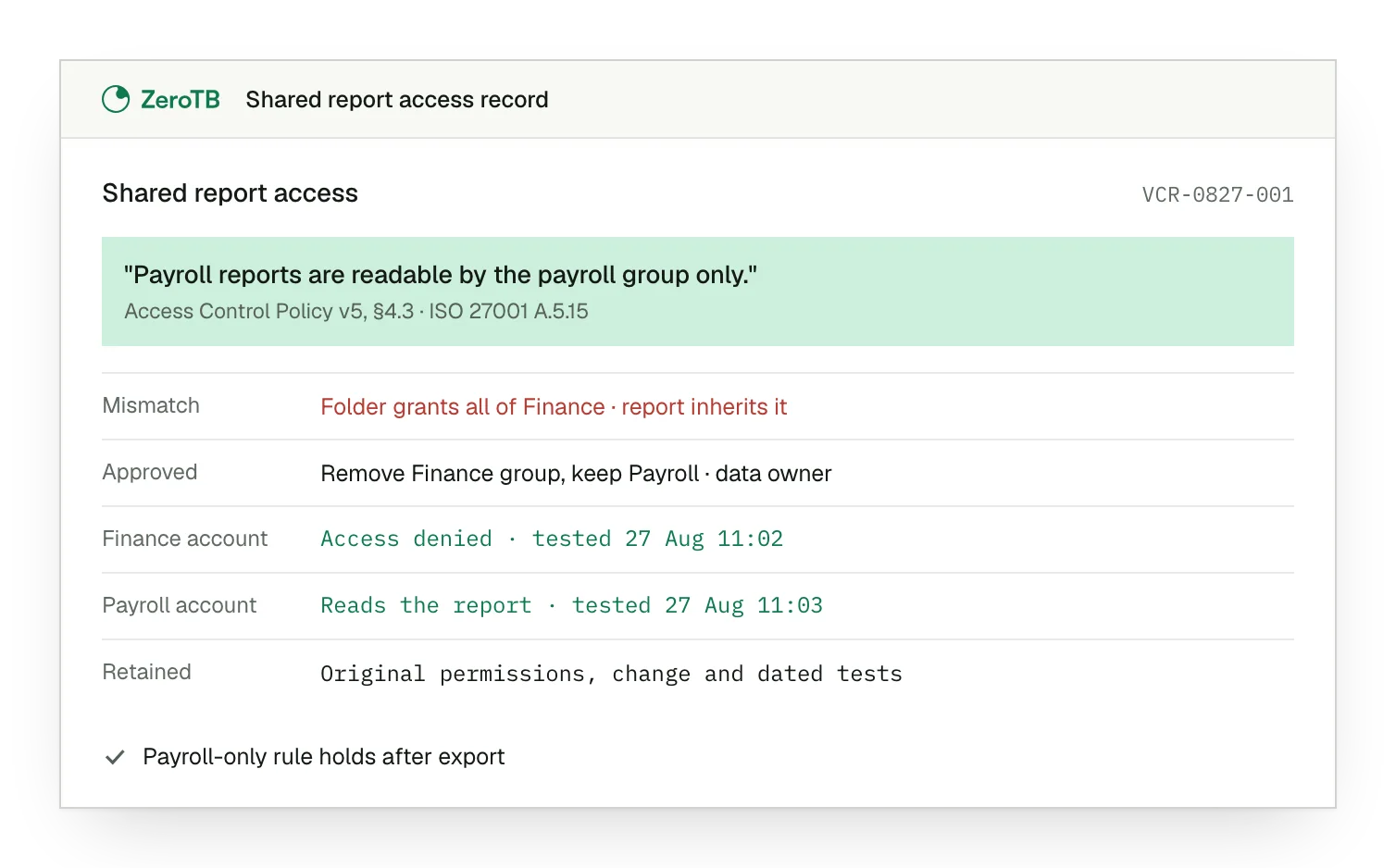
Access mismatch. Department-wide permissions on the destination folder expose a report that the access rule restricts to payroll.
Owner decision. The owner approves removing the department group after confirming that the payroll group must keep access.
Paired access tests. The test blocks a department account and confirms that payroll can still read the shared report.
Retained verification. Original permissions and dated test results remain attached to the rule and the approved change.
Access rule checklist
Compare the assigned permissions with the approved rule, including the activities allowed and the business need that justifies them.
Inspect shared copies and physical locations alongside the main application, so the review covers each relevant route to the information.
Confirm which access the owner approves removing and which must remain, with the reason and scope of each accepted exception.
Check that the dated results demonstrate both outcomes: unwanted access is blocked, and approved activities remain possible for authorized accounts.
Sources
- ISO, ISO/IEC 27001:2022, 2022, information security management system requirements.
- ISO, ISO/IEC 27002:2022, 2022, guidance for information security controls.
- U.S. Government Publishing Office, 45 CFR 164.312: Technical safeguards, 2025 edition.
- ZeroTB, SOC 2 compliance automation with human approval, 2026.
Related pages
Organizational controls
Read the neighboring controls for the organizational decisions that support an ISO 27001 program.
Compliance frameworks
Find the broader framework guidance for understanding where individual control requirements fit and overlap.
User access reviews
See how a review identifies permissions to keep, change or remove as people’s responsibilities change.
Start with the Pilot
Talk with our team about keeping access rules working as systems change. The eight-week Pilot maps up to 25 commitments and takes two real control gaps through approved correction and verified restoration, with a record of the work.