SOC 2 CC6.8 addresses how a company prevents or detects unauthorized or malicious software. Start with the protections promised in the company’s policies and report, then check whether they still work across the systems covered. When protection fails, an approved repair needs a fresh check before closure.
Device enrollment and working protection are separate things to check under SOC 2 CC6. A laptop can remain on the inventory long after its protection agent stops reporting. The security team needs to know why the agent stopped and what protection the laptop has now.
Software authorization
Software authorization establishes which programs may enter or run in a system. A company needs a way to decide what software it permits and how those decisions take effect. Malware detection addresses a related question: whether software presents a threat.
The control should state which software is permitted and how the system detects threats. Installation restrictions, approved software sources and malware protections can contribute to that control, as NIST’s malware guidance explains. The combination depends on the system and the company's commitments; the criterion alone does not select a product.
Protection scope
The protection scope needs to follow the systems covered by the company's commitments. Employee laptops may be one part of that scope, alongside other devices or workloads that introduce or execute software. Each needs an identified protection method and an owner. Record who reviews changes to that protection scope.
Compare that scope with the systems actually in use. A new device may exist in an inventory before it receives the required protection. A retired device may still appear in a protection console. Resolve those differences before using either list to judge coverage.
Active protection
Installation records tell a reviewer that an agent was deployed, but leave its present condition unanswered. Current device observations should show whether it runs, applies the intended policy and receives required updates. Keep the time of each observation with the device identity.
An update version is useful when investigating a failed update. It says less about whether the settings still match the approved control. Review those settings alongside the operating status, and consider whether the observations are recent enough to support a decision about protection.
Missing observations
When a device stops reporting, its protection state needs investigation. Begin with the last reliable observation and establish why no new report arrived. An offline device, failed agent and broken reporting connection can each leave the console without a current observation.
Until that cause is understood, an earlier successful check cannot establish protection now. Missing reports also do not establish that malware is present. The owner must decide what access or work can continue while the team checks the device and resolves the uncertainty.
Protection exceptions
A protection tool can report normally while an exception removes part of its coverage. An excluded directory or disabled check may have a legitimate purpose. The review needs to establish what the exception permits and whether the owner still accepts that exposure.
Compare the applied settings with the approved exception, including its scope and review conditions. An exception for one application should remain traceable to that application. If its purpose has ended or its scope has expanded, the owner needs a decision about restoring the intended protection.
Detection ownership
A detection needs a route to someone who can assess it and act. Check where alerts go, which team receives them and what happens when that team cannot resolve the issue. A console entry alone leaves those responsibilities unclear.
Evidence of this route includes alert settings and records of how the team handled detections. Where a controlled test is appropriate, agree on a safe method and the expected result first. The check should establish that the responsible team receives the information it needs.
Approved repairs
A repair proposal needs to explain its effect on the device and the work done there. Restarting the agent might restore reporting; changing its policy might affect applications. Explain those effects to the owner before asking for approval.
Include the expected protection state and a way to check it in the proposal. Where observations suggest compromise, the security team must also decide whether incident procedures apply. That decision can affect when and how the proposed repair should proceed.
Verification after repair
Fresh evidence must show that the repair restored the required protection before the gap closes. For an agent that stopped reporting, that means checking new reports and the policy now applied. Include update or detection checks where the approved control calls for them.
A missing or failed result leaves the gap open. A passing result needs its date, the earlier state, the approved action and the commitment it satisfies. The Verified Control Record holds that history so a reviewer can understand the closure decision.
The unobserved period
Restored protection establishes the present state; the earlier gap still needs an assessment. A fresh observation cannot explain every activity that occurred while reporting was unavailable. Record the interval from the last reliable observation and consider what other evidence can explain it.
The security team can use available logs and detections to decide whether further investigation is needed. Keep that assessment distinct from the repair result, including any limits in the evidence. A reviewer should be able to see what the team established and what remains unresolved.
Recurring protection gaps
Repeated failures need an explanation before another agent installation can count as a lasting correction. Compare the failures and the changes around them. A repeated configuration change, connection problem or retained exception may point to a cause that the earlier repair left unresolved.
Once corrected, the device still belongs in the agreed checking schedule. Assign responsibility for later failures and an escalation route when the owner cannot resolve them. Those arrangements give the next reviewer a way to follow what happened to protection after the repair.
Evidence for software protection
Use these records to connect the protection commitment with its operation and any corrective work.
| Requirement | What an auditor asks for | Where it comes from |
|---|---|---|
| Defined coverage | Systems in scope, required protections and responsibility for each protection method | Approved policies, system inventory and device or workload records |
| Authorized software | Rules for permitted software and decisions supporting retained exceptions | Software policies, installation settings and approved exception records |
| Operating protection | Dated observations of active protection, applied settings and required updates | Protection console, device status and configuration records |
| Detection handling | Alert routes and evidence that the responsible team assessed detections | Alert configuration, event records and investigation tickets |
| Verified repair | The observed gap, approved correction and fresh result supporting closure | Change approval and verification records linked to the affected asset |
Related framework requirements
| Framework | Control | What it covers |
|---|---|---|
| SOC 2 | CC6.8 | Preventing or detecting unauthorized or malicious software in the system under review |
| ISO 27001 | A.8.7 | Malware protection within the scope of the information security management system |
| HIPAA | 164.308(a)(5)(ii)(B) | Guarding against, detecting and reporting malicious software, with procedures included in workforce awareness and training |
Example of restoring endpoint protection
This example follows a laptop whose protection agent has stopped reporting, although enrollment still appears current. Its owner approves an agent repair. The record shows successful reporting and policy checks afterward, with a separate assessment of the period when those reports were missing.
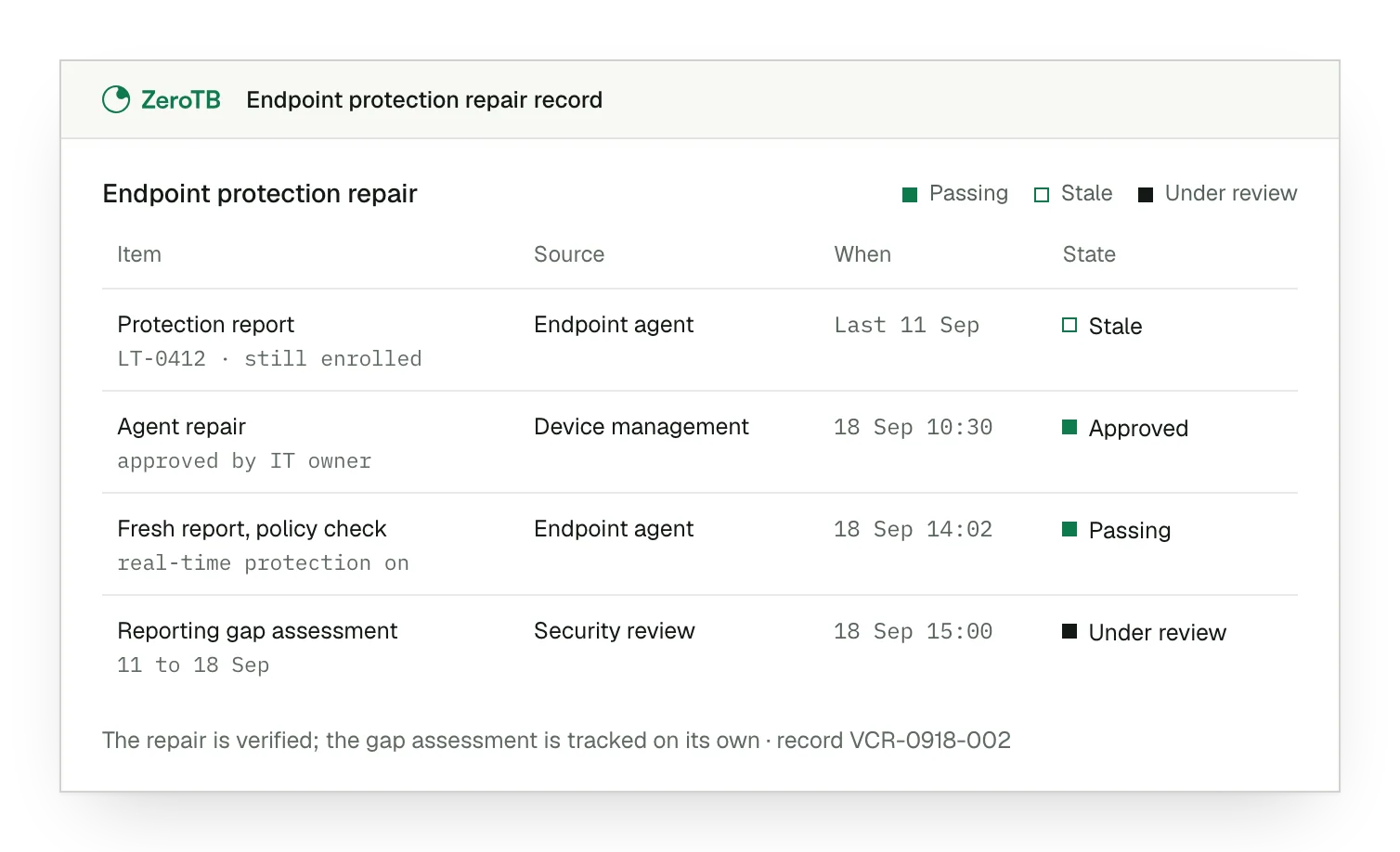
Missing observation. The inventory lists the laptop as enrolled, while its latest protection report has become stale.
Approved repair. The owner approves restoring the agent, with the required protection state recorded beside that decision.
Fresh verification. The agent sends new reports, and the check confirms that the required policy applies.
Separate assessment. The reviewer can see that assessment of the earlier reporting gap remains under review.
Software protection review checklist
Compare the approved software protection commitment with the devices and workloads in use, including systems missing from protection records.
Check active protection, applied settings, update status and observation time. Investigate stale reports and any exceptions that affect coverage.
Review the proposed change, its operational effect and the expected result. Approve the action and any necessary incident response.
Obtain fresh evidence that the intended protection works. Retain the repair decision and assess the period without reliable observations.
Identify who handles later failures and when escalation occurs, so the repaired control continues to receive attention between audits.
Sources
- AICPA & CIMA, 2017 Trust Services Criteria with revised points of focus, 2022 revision.
- NIST, Guide to malware incident prevention and handling for desktops and laptops, SP 800-83 Rev. 1, 2013.
- HHS, HIPAA audit protocol, protection from malicious software, 2018 update.
- ZeroTB, SOC 2 compliance automation with human approval, 2026.
Related pages
SOC 2 criteria
Find the wider SOC 2 criteria and see where this software protection requirement belongs.
Compliance frameworks
Find the controls that apply to each framework and the scope of their requirements.
Control surfaces
Read about endpoint work and the other systems where ZeroTB checks and restores controls.
Start with the Pilot
Talk with our team about keeping software protections effective between audits. The eight-week Pilot maps up to 25 commitments and takes two real control gaps through approved repairs and verified restoration, with records of the changes and results.