SOC 2 CC6.4 concerns restricting physical access to facilities and hardware to people with an authorized need. Define the locations, equipment and entry permissions within scope, including those managed by providers. When that need changes, remove the affected access and retain evidence that the physical restriction works.
A contractor can lose access to company applications while a building badge remains active. CC6 physical access controls need a connection between the decision to end access and the person who controls the door. That connection also needs a result the control owner can check.
Facilities and hardware in scope
CC6.4 starts with the places and hardware used by the system under review. They may be in your offices, an equipment room or a provider's facility. Each location needs an explanation of how access is restricted and who controls entry.
Use the system description and physical access policy to establish that boundary. Then compare the locations they name with the areas currently in use. Equipment moved into a different room may now sit behind a different lock, with different people able to reach it.
Provider and company responsibilities
A provider can operate the data center while your company remains responsible for access to its own premises and equipment. The provider's assurance should describe the facilities and services it covers. Company records explain who handles the remaining physical access responsibilities.
Shared premises can divide responsibility again. A building operator may issue lobby badges while the company controls an equipment room. Record who can approve, remove and confirm access at each boundary. A request sent to one operator can leave another entry permission active.
Approved entry permissions
Each physical access permission needs an approved purpose tied to a person and an area. An employee may need entry to an office without needing entry to its equipment room. The access decision should explain the area and the work that requires it.
Compare the approved access list with the permissions currently assigned in the entry system. Include contractors and other regular users of the facility. A person can remain employed while changing roles or locations, so continued employment alone does not explain every permission they hold.
Visitors and temporary access
A visitor's permission should cover the approved visit and end with it. The facility procedure determines where the visitor may go, who is responsible for the visit and when an escort is needed. Those details let the operator check whether entry followed the agreed procedure.
The visit record also helps explain a temporary credential that remains active. Its purpose may have ended even though nobody removed the permission. NIST's physical access guidance discusses visitor records and entry controls that a company can use when designing its own procedures.
Keys and shared entry codes
A badge export cannot account for a physical key or a shared door code. Review those access methods with the facilities owner as well. Someone whose badge has been disabled may still have another way into the same restricted room.
The owner needs the key's location, the area it opens and the people who received it. When a key is missing or a departing person knows a shared code, the operator decides how to restore the restriction. Record the decision and any lock or code change.
Departures and role changes
Facilities can miss a departure if the removal request stops with IT. The account closure then appears in the departure record while the badge remains on the access list. A review needs both records to see that the person's entry permission outlasted the assignment.
Role changes create a similar problem when someone still works for the company but no longer needs a particular room. Follow each affected permission to its operator, including a landlord where relevant. Keep the removal pending until that operator returns the result.
Decisions before access removal
The access owner decides which permissions to remove and which still have a valid purpose. The proposed correction should name the person, affected location and access method. It should also identify any approved access that needs to remain available after the change.
A contractor may finish one assignment while retaining an approved reason to visit another site. Resolve that distinction before an operator changes permissions. Keep any retained exception with its purpose, approver and review conditions, so the next check can distinguish an exception from an unfinished removal.
Verification at the access point
A correction needs evidence that the affected entry permission changed as intended. For an electronic badge, inspect the current permission and arrange a controlled check with the facility operator. Record which access point was checked and whether it rejected the removed permission.
Verification should also confirm that required access remains available. A key return needs a record of the physical return; an electronic export cannot establish it. If the operator cannot provide a current observation, keep the result unresolved and identify what evidence is still needed.
Checks between audits
Physical access reviews need someone to pursue removals that remain unresolved between audits. A scheduled comparison can reveal permissions that accumulated over time. Departure and role-change checks address changes as they happen, with the responsible operator returning evidence of the action.
This follow-through is part of ZeroTB's control restoration process: connect the commitment to an approved correction and a checked result. Physical access still depends on observations from the facility operator. Recording what remains unchecked helps the owner see where the work has stopped.
Physical access evidence
Access records should explain why a permission existed, what changed and how the operator checked it.
| Requirement | What an auditor asks for | Where it comes from |
|---|---|---|
| Defined physical scope | The relevant rooms, facilities and hardware, with an operator identified for each access boundary | System descriptions and physical access policies compared with the facility inventory |
| Approved entry | A reason for the permissions held by each person in the review | Access approvals linked to current badge lists, permission exports and key records |
| Temporary access | A completed visit with its entry permission resolved according to the facility procedure | Visitor records and temporary credential details, supported by the host or operator's response |
| Verified removal | Approval to remove the permission, the action taken and a dated check of the outcome | Departure tasks, operator test results and the associated Verified Control Record |
| Provider responsibilities | A clear division between the provider's physical access duties and the company's remaining work | Provider assurance and service documentation with the company's review of that division |
Framework requirements
| Framework | Control | What it covers |
|---|---|---|
| SOC 2 | CC6.4 | Who can physically access the facilities and hardware relevant to the system |
| ISO 27001 | A.7.2 | How entry measures restrict access to areas that need physical protection |
| HIPAA | 164.310(a)(1) | How facility procedures limit physical access to relevant systems while allowing people with authorization to enter |
Example of removing obsolete badge access
The badge in this example still opens an equipment room after a contractor's assignment ends. IT has closed the work account. The facilities owner confirms that the contractor has no further reason to enter, then follows the badge removal through to the operator's test.
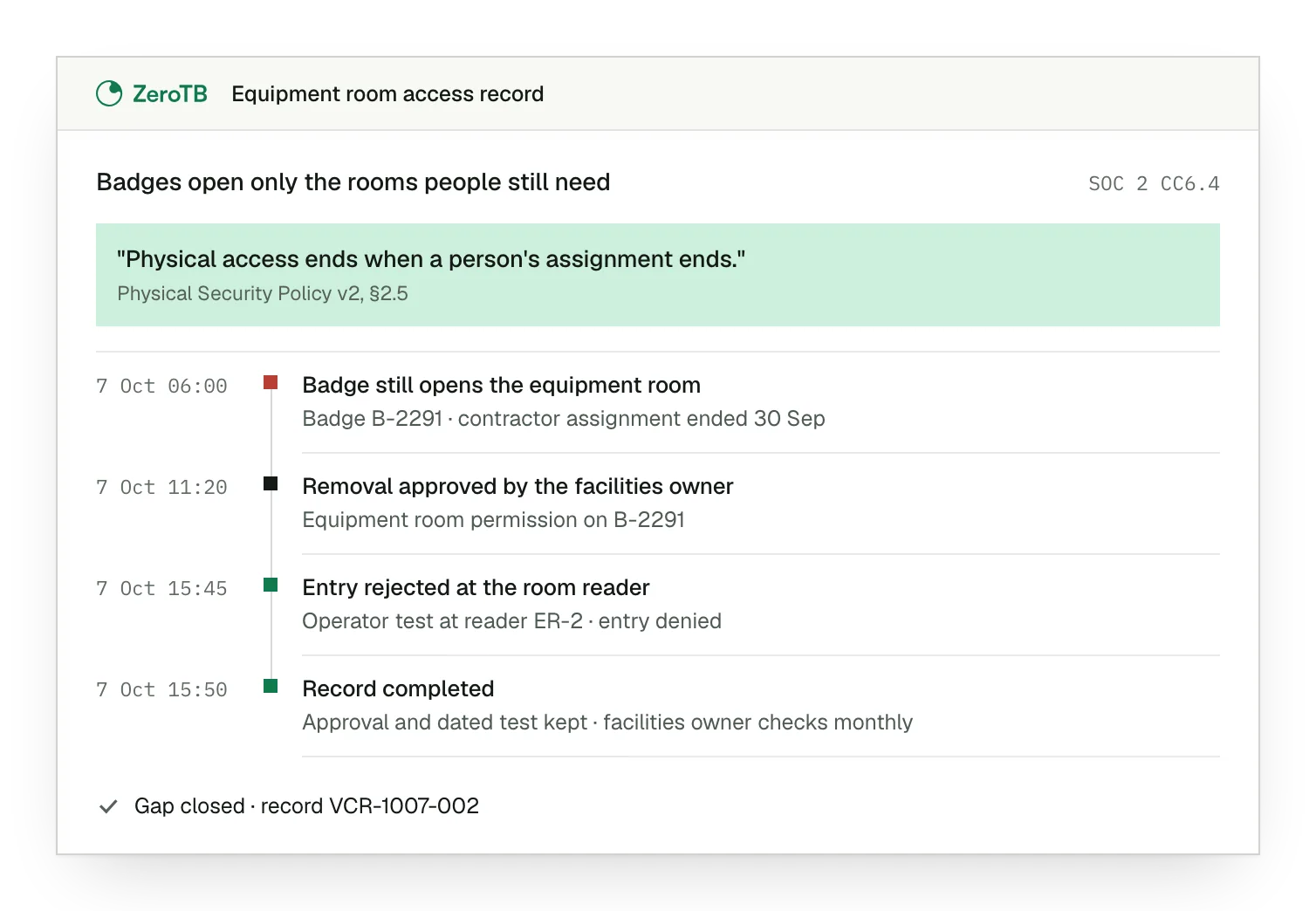
Remaining badge permission. The equipment-room permission remains active against a contractor whose assignment has already ended.
Approved access removal. The facilities owner records the decision to remove the badge permission for this room.
Entry check result. The operator tests the badge at the room's reader and records the rejected entry.
Completed control record. The record holds the approval and dated test, alongside the owner of subsequent checks.
Physical access review checklist
Identify the facilities, hardware and entry points covered by the commitment, including each provider's responsibility.
Match badge permissions, key records and temporary access to current approvals, departures and role changes.
Have the responsible owner approve removal or document a valid exception with its purpose and review conditions.
Obtain current evidence from the affected access point and confirm that required entry remains available.
Retain the commitment, original permission, approval, action and dated result with an owner for subsequent checks.
Sources
- AICPA & CIMA, 2017 Trust Services Criteria with revised points of focus, 2022 revision.
- NIST, SP 800-53 Revision 5, physical and environmental protection controls, 2020.
- HHS, Summary of the HIPAA Security Rule, physical safeguards, accessed November 4, 2026.
- ZeroTB, SOC 2 compliance automation with human approval, 2026.
Start with the Pilot
Our team can talk through the gaps your company keeps encountering between audits. In the eight-week Pilot, we map up to 25 commitments and take two real control gaps through verified restoration, keeping the approvals and checked results with each correction.