What does ISO 27001 A.7.7 mean for clear desks and locked screens?
ISO 27001 A.7.7 covers the handling of sensitive papers, removable media and unattended screens. Establish where materials are stored and how devices lock when people leave their workspaces. Test each protection separately and retain the results, since a passing device check leaves the handling of physical materials untested.
A laptop can pass its device checks while sensitive papers remain beside it on a shared desk. A.7.7 brings both observations into the physical controls review. The question is whether each form of information is protected during an absence, and what evidence demonstrates that a correction worked.
Workspace protection
Clear desks and locked screens protect different forms of information at the same workspace. Papers can be read or removed after the session is locked. Removable media also need secure storage, so the review must establish what happens to each when the user steps away.
Follow an absence through the work area: the person leaves, the screen locks and physical materials are secured. Evidence for one part cannot establish the others. Keep the observed desk conditions alongside the device result, identifying exactly which protection each observation supports and where it was checked.
Working rules
The working rule must make the expected result clear enough to test. It should tell staff where sensitive materials belong during breaks and after work finishes. Specify the locations and people it covers, so a reviewer can select the right workspaces and check the same practice.
For screens, record the idle interval and the authentication needed on return, along with the rule to lock before leaving. Reviewers can then compare actual device behavior with those expectations. Where an exception applies, keep it identifiable so the test uses the value approved for that workspace.
Papers and removable media
A clear-desk rule depends on suitable storage being within reach of the people using sensitive materials. At a shared desk, ask where papers and removable media go during a break. Check that the intended users can use that storage and that others cannot freely retrieve its contents.
Record what made the handling unsafe without copying the sensitive contents. The location, time and type of material can explain an exposed document. A readable photograph would add another copy requiring protection; use observations that let the owner understand and correct the gap without creating that exposure.
Shared and remote workspaces
A change of location can expose information to different people even when the laptop stays the same. At a shared desk, another user may arrive during a break. At home, people outside the organization may be nearby. Both arrangements need a practical way to secure materials.
Include the position of the display and the storage available when reviewing that arrangement. Endpoint checks describe the device; they do not describe who can approach it. A passing configuration check therefore leaves a separate question about the surroundings in which the information is being used.
Screen-lock behavior
A lock test needs to establish that the unattended session requires authentication before someone can use it again. First check manual locking, then the automatic lock after the approved idle interval. Attempt to resume work in each case; a dark display alone does not demonstrate a locked session.
Keep the observed behavior with the device's reported setting. A management policy can specify a value that has yet to reach the endpoint. NIST's device-lock guidance is a technical reference for locking and reauthentication, with timing defined by the organization for systems in that guidance's scope.
Changes after the audit
An earlier lock test may no longer describe the way a reassigned workstation is used. A longer interval accepted for its previous task can leave a shared session accessible too long. Enrollment in device management would not, by itself, reveal whether that interval still suits the new location.
During reassignment, compare the earlier test with the current work arrangement and its approved rule. Include any policy change made since that test. The comparison establishes whether the existing observation is relevant or another check is needed before accepting the protection at the new workspace.
Exceptions and ownership
An accepted exception should identify the information at risk and the person responsible for its protection. If work requires a different idle interval, record the device and location concerned. The decision also needs the safeguards that apply and the conditions for reviewing whether the exception should continue.
The actions can belong to different teams: IT changes a lock setting, while facilities addresses unavailable storage. Keep an owner against each action in the finding. When the technical work finishes, the person responsible for the physical issue should still have a visible action to complete.
Approved corrections
A recurring clear-desk finding needs a correction that addresses why materials keep being left exposed. Putting papers away resolves the immediate gap. If storage is difficult to use, changing that arrangement may prevent a repeat; if instructions are unclear, the owner can clarify the handling rule.
For a lock-policy correction, describe the expected behavior and identify every device affected by the proposed change. The owner can assess the effect on work before approval. Preserve the decision and any exception with the change, so verification tests the result that the owner agreed.
Verification before closure
Repeat the check that exposed the gap after the correction is complete. For a screen, test the idle interval and authentication on return. For papers or media, inspect the storage and handling at the affected workspace, including whether the corrected arrangement can be used as intended.
A finding with both failures needs both results. If the screen passes and storage remains unresolved, retain the open physical action. If the device is unavailable, arrange a fresh test. An old observation cannot establish whether the latest correction has taken effect on that device.
Evidence over time
A closure record should explain the decision to someone who was absent when the work happened. Start with the rule and the observed failure, identifying its device or location and date. Connect the approved action to the later result, including any part of the finding left unresolved.
The Verified Control Record brings those observations and decisions together. Distinguish inspections of physical materials from tests of the device, and assign further checks to an owner. Reviewing the history can reveal whether the same storage problem, policy change or device reassignment keeps reversing the earlier correction.
Evidence for clear desks and locked screens
The evidence should let an auditor follow the workspace rule through the checks, exceptions and completed corrections.
| Requirement | What an auditor asks for | Where it comes from |
|---|---|---|
| Defined workspace rules | The work areas, materials, device rules and people covered | The approved policy, with the workspaces and devices it applies to |
| Protected physical materials | Observations of how papers and media are secured when staff leave | Inspection dates and findings, with the actions taken to correct handling |
| Working screen locks | The expected lock behavior and what happened during a return test | Settings reported by the device and tests of the resulting behavior |
| Approved exceptions | Why a different arrangement was accepted and who owns the decision | Exception records identifying the workspace, safeguards and conditions for review |
| Verified restoration | The failed protection, the approved action and the result after correction | The control record, linking approvals to the relevant inspections and device tests |
Related framework requirements
| Framework | Control | What it covers |
|---|---|---|
| ISO 27001 | A.7.7 | Protection of sensitive materials and information on screens when workspaces are unattended |
| SOC 2 | CC6.4 | Physical access to facilities and hardware; workspace observations may support the relevant access protections |
| HIPAA | 164.310(c) | Physical safeguards for workstations accessing electronic protected health information; evidence must address that scope |
Example of restoring a screen lock
In this example, a shared workstation remains accessible after the approved idle interval. The owner approves a policy correction. A fresh test confirms that the session locks on time and requires authentication to resume; the record retains that result against the original failure.
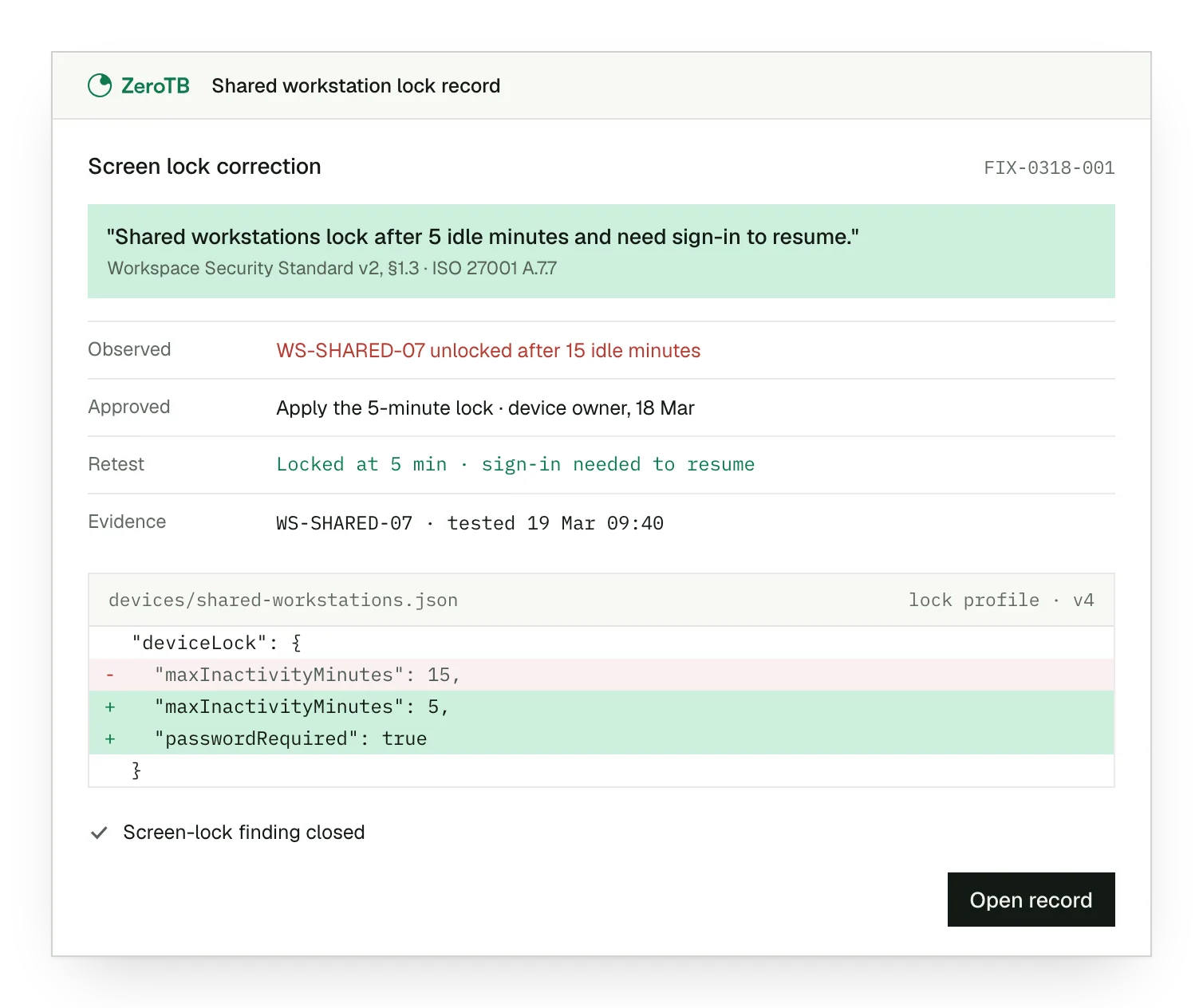
Observed lock failure. The workstation remains accessible after the idle interval specified in its approved workspace rule.
Approved policy change. The device owner approves applying the required lock setting to the affected shared workstation.
Successful return test. The session locks at the agreed interval and requires authentication before work can resume.
Retained test evidence. The dated result identifies the tested device and sits beside the approved change.
Workspace review checklist
Read the handling and screen-lock rules with their scope to select the workspaces and devices for review.
Inspect the places used to keep sensitive materials when staff leave, including access to the storage provided.
Check the lock interval on the device itself, then attempt to resume the session to test authentication.
Review the reason and safeguards for each exception with its owner before deciding what the correction should achieve.
Repeat the relevant check after the change and retain its result alongside any part that remains unresolved.
Sources
- ISO/IEC, ISO/IEC 27002:2022 overview, 2022. Implementation guidance for information security controls.
- NIST, SP 800-171 Rev. 3, 2024. Sections 03.01.10 and 03.08.01 address device locks and media storage.
- HHS, Security standards: Physical safeguards, 2007 revision. Explains the workstation-security standard and its physical safeguards.
- ZeroTB, Continuous control monitoring, 2026. Describes checks, responsible owners and the evidence produced after correction.
Related pages
ISO 27001
Explore the information security framework that includes this control and the other requirements it works alongside.
Compliance frameworks
Find the framework guides and compare the scope of related requirements across compliance programs.
Control surfaces
Read about endpoint protection and the other places where approved commitments need to hold.
Start with the Pilot
The eight-week Pilot maps up to 25 commitments and takes two real control gaps through approved correction and verified restoration. Our team can discuss recurring workspace or device gaps and whether the Pilot fits the work you need.