What does ISO 27001 A.7.13 require for maintaining equipment?
ISO 27001 A.7.13 addresses maintaining equipment, including the security of information during repairs. The work needs a schedule, authorized personnel and precautions suited to the equipment. Before accepting a repair, check both the function that was repaired and the security protections the work could have changed.
Consider a device that passes its repair test while the technician's temporary account still works. The service team has completed its job. The security owner has a different question to settle: should that account still exist? Maintenance procedures need to allow for both decisions.
Maintenance scope
Equipment maintenance must preserve the protections around the information that equipment handles. The technician may need to open the equipment, connect a diagnostic tool or remove a component. Each action can expose different information. The maintenance procedure needs to account for the actual work proposed.
Give the person accepting the repair the asset owner's details and the protections to check. These belong with the maintenance procedure so they remain available when the equipment returns. The physical controls provide the wider context for handling and protecting that equipment.
Service schedules
A maintenance schedule connects each asset to the servicing it needs and the person responsible for arranging it. Match the work to the manufacturer's instructions and the requirements adopted by the organization. Enter completed service against the asset; the schedule then shows what remains to be done.
When servicing is overdue, the owner needs to decide whether equipment can continue in use. There may be a reason for the delay, or the task may simply have been missed. Record the decision and its reason alongside the work that remains outstanding.
Authorized personnel
Maintenance access belongs to people approved for the work and the equipment involved. Check the authorization for the person attending, including the locations and systems they can access. A contract with the provider alone leaves those questions unanswered. Record who actually performed the work.
If a technician lacks the required access authorization, arrange supervision by someone who has it and understands the technical work. That person needs to be available while the work happens. Include the end of temporary access in the arrangements agreed before servicing starts.
Off-site repairs
Equipment sent away for repair needs an approved plan for the information it carries. The owner should know where it is going, who takes custody and how company information remains protected. Address those questions before the equipment leaves the organization's control.
The repair record should identify the asset sent out and any components returned or replaced. On receipt, compare the returned equipment with that record and inspect the safeguards the repair could affect. A delivery confirmation shows that equipment arrived; return-to-service checks establish whether it is ready to use.
Remote servicing
Remote maintenance creates an access route that needs a defined end. Approve the connection and the work it permits, then retain a record of the session. The technician's departure from the conversation does not establish that the connection has ended.
NIST's MA-4 guidance provides practical checks for remote servicing: authenticate the technician, monitor the work and terminate the session afterward. Also inspect any account created for the job. Ending a session can leave that account available for another connection.
Gaps after maintenance
Maintenance can leave a control weaker even when the original fault has been repaired. An equipment test can succeed with diagnostic access still enabled. The same is true of a temporary permission or a changed security setting: normal operation gives little indication that either remains.
Use the approved protection as the basis for comparison with the equipment's current state. A deliberate change should have an owner's decision behind it. Record unexplained differences against the asset, with enough detail for the responsible team to investigate what the repair changed.
Approved corrections
A correction starts with the owner deciding which protection must be restored. Read the repair history before choosing the action. A setting may have changed to permit a test, or access may still be needed for unfinished work. The correction must account for that purpose.
Give the owner a proposed action and the test that will show whether it worked. Include any effect on normal operation in that decision. When further repairs require continued access, retain the reason for it and agree when that access will end.
Return-to-service checks
Equipment is ready to return when checks confirm that the repair and the affected protections both work. The release decision needs those results, even if the service team has already closed its ticket. Without them, the person accepting the equipment has no check of its security after the work.
Choose checks that correspond to the work performed. After removing a maintenance account, test that the account fails and normal authorized access still works. If a required check fails or its result is unavailable, keep the gap open and identify the unresolved protection.
Maintenance records
A useful maintenance record lets another reviewer reconstruct what happened to a specific asset. Keep the work performed, responsible personnel, approval and dated checks together. These details also help investigate a later fault that may relate to a replaced component or changed setting.
Evidence should explain why the owner accepted the resulting state. A test result without an asset identifier can be difficult to connect to the repair. An approval without the proposed action leaves the reader guessing what was authorized. Link each record to the work it supports.
Recurring maintenance gaps
Repeated maintenance gaps point to a missing step in the way work is assigned or closed. An account left active after several different repairs suggests that the release procedure needs attention. Decide who checks temporary access after servicing and where that person records the result for the release decision.
ZeroTB checks the state after a correction through its control restoration process and keeps the verification evidence. The IT or facilities owner performs physical inspections. A reviewer may need both kinds of result to decide whether the equipment meets the adopted protection.
Maintenance evidence
A maintenance review needs records of the planned work, what actually happened and the checks made before release.
| Requirement | What an auditor asks for | Where it comes from |
|---|---|---|
| Planned servicing | Required service, responsible owner and completed or overdue work | Asset inventory, maintenance schedule and service history |
| Authorized personnel | Who performed the work and which access was approved | Work authorization, technician records and access approvals |
| Protected off-site repairs | Approval to release equipment and arrangements for information and custody | Dispatch authorization, custody records and return inspection |
| Recorded maintenance | What changed, when it changed and which asset or component was affected | Repair report and records of replaced components or settings |
| Verified return to use | Results for the repaired function and affected security protections | Dated inspection or test results linked to the owner's release decision |
Related framework requirements
| Framework | Control | What it covers |
|---|---|---|
| ISO 27001 | A.7.13 | Equipment maintenance that preserves secure operation and the information the equipment handles |
| SOC 2 | CC5.2 | General technology controls, for which servicing records may provide evidence within the scope the organization adopted |
| HIPAA | 164.310(a) | Physical access to facilities and systems, including records of repairs to facility components that affect security |
Example of closing repair access
A repair can leave temporary access active after the equipment is working again. Suppose the technician finishes the job and leaves a maintenance account enabled. The owner approves disabling that account. The release record contains two test results: the maintenance login fails, and staff access succeeds.
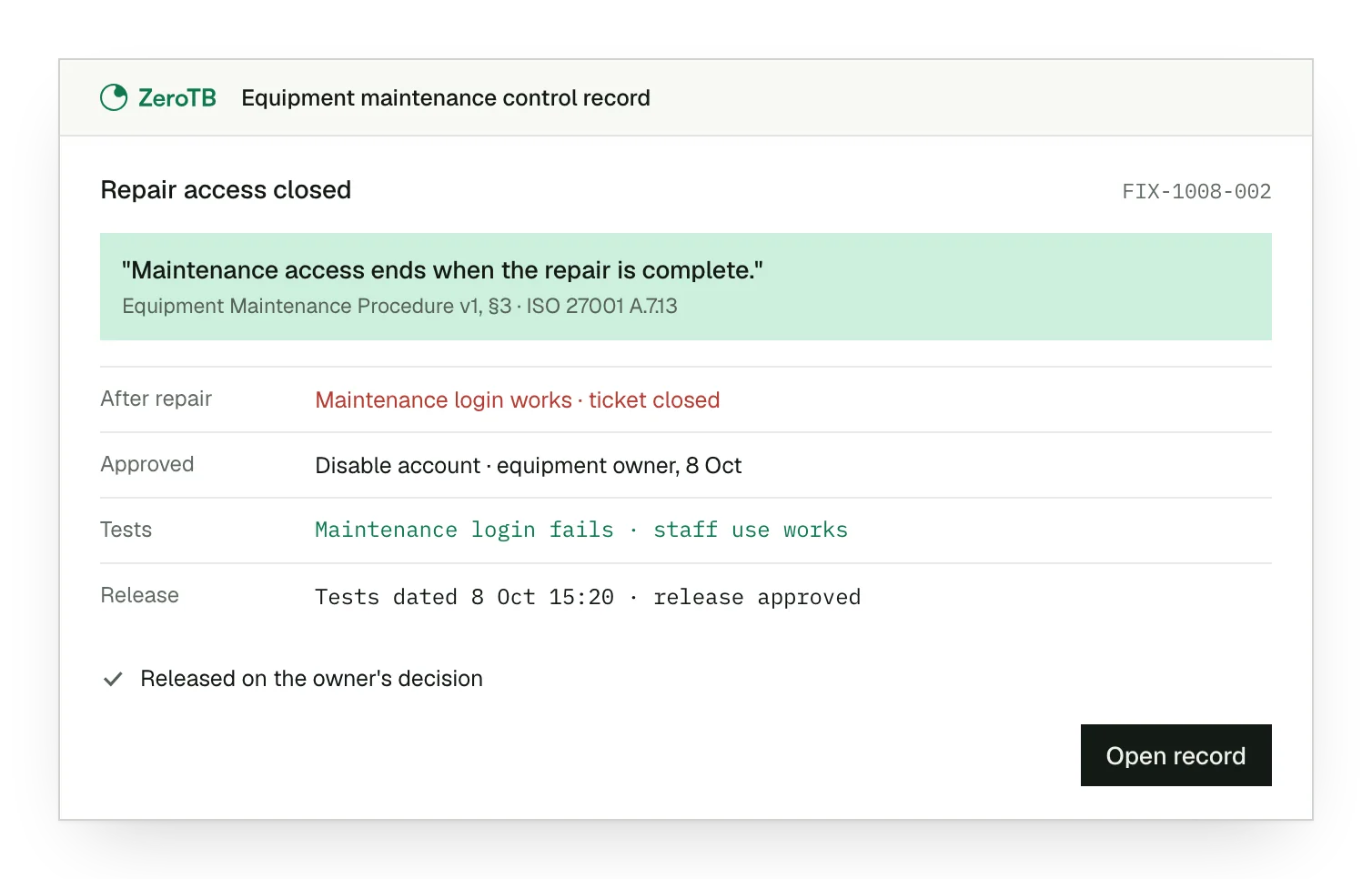
Remaining repair access. A successful login with the maintenance account reveals access remaining after the repair ticket was closed.
Approved account removal. The equipment owner confirms the work has finished and authorizes the team to disable the account.
Verified normal operation. The disabled account fails its login test, and authorized staff successfully use the repaired equipment.
Recorded release decision. The repair details and dated tests give the owner evidence for the decision to release equipment.
Equipment maintenance checklist
Identify the equipment owner and the service required, including the protections that could change during the work.
Use the repair details to inspect current settings, access and physical condition after servicing, including repairs completed off site.
Review each temporary arrangement with the owner, then approve its removal or document the reason it must continue.
Test normal operation and the protections affected by the repair; retain the results and identify any unresolved gap.
Link the dated checks to the repair and approval, then assign responsibility for checking the next return to use.
Sources
- ISO/IEC, ISO/IEC 27002:2022 standard overview, 2022.
- NIST, SP 800-53 Rev. 5, MA-2, MA-4 and MA-5, 2020 with December updates.
- eCFR, 45 CFR 164.310: Physical safeguards, accessed November 4, 2026.
- AICPA & CIMA, Trust Services Criteria, revised points of focus, 2022.
- ZeroTB, Continuous control monitoring, 2026.
Related pages
Physical controls
Read about the other safeguards around premises, equipment and the information kept at those locations.
ISO 27001
Read the framework guide for the wider context of this equipment-maintenance commitment and its operation.
Compliance frameworks
Use the library to find controls in the other frameworks included in the compliance program.
Start with the Pilot
Talk with our team about recurring gaps in the controls you operate. The Pilot runs for eight weeks: we map up to 25 commitments, take two real gaps through approved correction and verified restoration, and retain evidence of the work.