What does ISO 27001 A.7.10 require for storage media?
ISO 27001 A.7.10 covers storage media from purchase to disposal. The handling rules need to follow the information onto drives, tapes and paper, including when someone moves or reuses them. For each item, establish who is responsible, what protection its contents need and how its final disposition will be checked.
Finishing a project leaves a separate question about the media used for it. A drive may still contain the export, even though nobody needs it for the work. Finding that drive, deciding its next use and recording the outcome are part of keeping the control operating.
Media scope
A.7.10 covers the media that hold information throughout their useful life. Include the electronic and paper media relevant to the information your organization handles. Removable drives, backup tapes and printed records can each leave the systems where access to the original information is controlled.
Scope follows those copies into offices, storage locations and service providers. For outsourced storage, establish which handling responsibilities the provider accepts and which remain with the organization. This gives the control owner a basis for requesting evidence about media held outside the team's direct custody.
Handling rules
The information on the media determines how it should be handled. A drive containing sensitive records needs protections suited to those records, including who may use it and where it may be stored. The same decision applies when information is transferred to paper.
Translate the approved policy into instructions that people can use where they handle media. State the permitted storage location, authorized access and route for requesting a transfer. People receiving an item need to understand its handling requirements without opening the files or reading confidential contents.
Custody records
A custody record should identify the media and the person responsible for it now. Use an asset identifier or a traceable batch reference so that a later return, transfer or disposal record can be matched to the items it concerns.
Update the custody record when the media change hands. A drive waiting for collection still needs a custodian, a secure location and an open disposition record. Marking it as retired in the asset list should leave enough information to find it and explain who controls it until disposal finishes.
Temporary copies
A temporary export can outlive the work that justified it. Once information is copied to a separate drive, the source application's access settings cannot control who reads that copy. Closing the project or removing an application account can therefore leave sensitive information elsewhere.
Include temporary media in project completion and equipment-return checks. The information owner can then decide whether a copy still has an approved purpose. If it must remain, give it a custodian and retention decision; if its purpose has ended, direct it into the approved disposal process.
Media transport
Protection must continue while media move between people and locations. Identify who authorizes the movement, who carries the items and who should receive them. The handling arrangements should protect the contents during the journey and allow the sender to confirm receipt.
Reconcile the receiving record with the items released by the sender. A collection notice shows that a transfer began; the receiving record establishes where custody went next. If an item is missing or the recipient cannot confirm receipt, investigate that difference before closing the transfer.
Retention and reuse
The information owner should decide whether the contents still need to be retained before media are reused or discarded. A device may have reached the end of its useful life while its information still has an approved retention purpose. Resolve both questions before authorizing disposal.
Record the intended destination of the media and the decision about its contents. Reuse within another team, return to a supplier and final destruction can require different actions. Where HIPAA applies, device and media controls address removing electronic protected health information before media become available for reuse.
Sanitization decisions
A sanitization method must suit the medium, the information and its next destination. NIST SP 800-88 Rev. 2 provides guidance for that decision. Sanitization aims to make access to the target data infeasible for a defined level of effort.
Choose a supported method before releasing the item. A damaged drive may need a different action from a working drive intended for reuse. If the selected method cannot be completed, retain control of the item while the owner approves another suitable action.
Verification and release
Media should leave controlled custody only after the result supports the approved disposition. NIST distinguishes verification of a sanitization operation's outcome from validation, the decision to accept or reject its effectiveness. A completed operation can still require investigation before release.
Match the result to the media identifier and retain the acceptance decision. If the evidence cannot be connected to the item, the record cannot establish that item's disposition. Keep the gap open until the responsible reviewer has enough evidence to decide what happens next.
Missing media
An unlocated drive remains an open security issue even when its inventory entry is removed. Establish its last known custodian, location and contents. Those facts help the security owner assess possible exposure and decide whether the incident process needs to be used.
Record what the investigation establishes and what remains unknown. Finding the drive in approved storage resolves a different problem from confirming that it was destroyed. A missing item with no reliable disposal evidence needs its own documented decision; another asset's disposal certificate cannot resolve its status.
Continuing checks
A media register needs checking as items move and their uses change. Compare what it says with the media held in each location. Entries for an old custodian or a completed project deserve attention: the record may no longer explain who holds the information.
Use those findings to improve the handling process. If receipts repeatedly go missing, review how the sender confirms delivery. If project drives remain after completion, add a check at project closure. Give the correction an owner and check whether it works on the next relevant handoff.
Evidence for media handling
A reviewer should be able to follow an item from its handling rule to the record of where it is now.
| Requirement | What an auditor asks for | Where it comes from |
|---|---|---|
| Defined handling rules | Which media are covered and how their contents affect the protection required | The media policy, classification rules and inventory of items or identifiable batches |
| Accountable custody | The item's location, its current custodian and the people allowed to use it | Custody and access records compared with the media held at the location |
| Protected transfers | Who approved a transfer and whether the right recipient received the items | The sender's release record and the recipient's dated receipt for the same media |
| Authorized disposition | Why the owner decided to retain, reuse, sanitize or destroy the item | The decision about its contents and next destination, linked to the media identifier |
| Verified outcome | What happened to the item and why the reviewer accepted that result | Results or disposal evidence for the identified media, kept with the acceptance decision |
Related framework requirements
| Framework | Control | What it covers |
|---|---|---|
| ISO 27001 | A.7.10 | Protection of media during their lifetime, including the way they are acquired, used, moved and disposed of |
| SOC 2 | CC6.5 | Protection of the information left on physical assets when those assets are removed from service and disposed of |
| HIPAA | 164.310(d)(1) | Handling devices and media that contain ePHI, with provisions for movement, disposal and removal of ePHI before reuse |
Example of verified drive disposal
Disposal closes the gap when the evidence accounts for the drive that held the export. This example follows a drive left after a project ended. The owner authorizes disposal; the reviewer then matches the evidence to the drive before accepting the result.
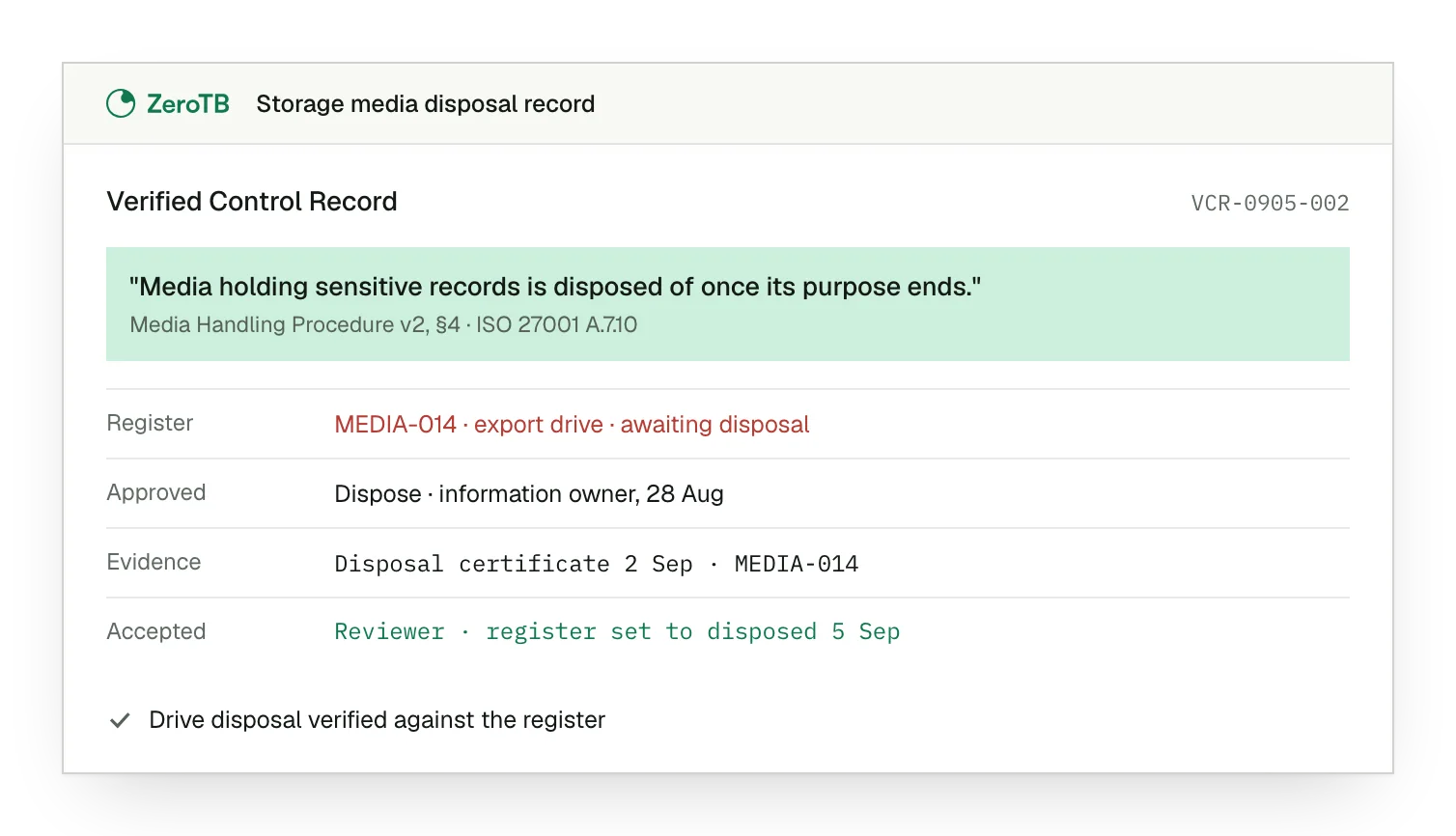
Retained export drive. The completed project left one drive containing sensitive records, still listed in the media register.
Approved disposal action. The information owner decides the copy can be removed and approves how disposal will proceed.
Matched disposal evidence. The responsible team's dated evidence refers to the same identifier as the drive in the register.
Accepted final state. The reviewer accepts the disposal evidence and changes the drive's register entry to reflect that result.
Media control review checklist
Take one approved handling rule and trace where it applies to the media the organization holds.
Check the items against the register, following incomplete transfers and overdue returns to their last known custodian.
Have the information owner decide whether the contents must remain before authorizing the media's reuse or disposal.
Inspect the result for the identified item; a failed action leaves the item awaiting a further decision.
File the accepted result with its approval, and give recurring handling problems an owner who can correct them.
Sources
- ISO/IEC, ISO/IEC 27002:2022 overview, 2022.
- NIST, SP 800-88 Rev. 2: Guidelines for media sanitization, September 2025.
- HHS, Reuse or disposal of electronic media containing protected health information, accessed November 2026.
- ZeroTB, Continuous control monitoring, 2026.
Related pages
ISO 27001 physical controls
Explore the controls that protect physical locations, equipment and media throughout their use.
ISO 27001 framework
Place storage media handling within the wider information security program and its control commitments.
Compliance frameworks
Explore related requirements across the frameworks that apply to the information and systems being protected.
How ZeroTB works
See how approved commitments connect to observed gaps, authorized corrections and evidence of the result.
Start with the Pilot
Talk with our team about the controls you need to keep operating. The eight-week Pilot maps up to 25 commitments and takes two real control gaps through approved correction and verified restoration, with a record of the results.