Home / Organizational controls
What does ISO 27001 A.5.9 require for an asset inventory?
ISO 27001 A.5.9 calls for an inventory that keeps track of information, its associated assets and their owners. Keeping that inventory current means comparing the register with systems and business records, then resolving discrepancies as assets enter use, change or retire.
A security review can follow an old inventory past an active service without ever examining it. Accurate records give that review a useful starting point. A.5.9 sits among the organizational controls, with responsibility for keeping the register aligned with the business.
Inventory scope
Business information belongs in the inventory alongside the assets used to store and process it. Devices are one part of that scope. A reviewer also needs to find the relevant applications, cloud services and records within the boundary of the information security management system.
A useful way to examine coverage is to follow a business record through the systems that handle it. The register should make those relationships visible. Include services bought outside central IT when they support information within scope; the purchasing route does not determine their security relevance.
Useful inventory fields
A reviewer should be able to use an inventory entry to find the asset, its owner and its business purpose. Start with an identifier, location and lifecycle status. Connect the entry to the information it supports so the record explains what needs protection.
Choose field meanings that work across the records being compared. Location might refer to a cloud account, a hosted service or a physical room. Status needs to show whether an asset remains in use or has retired, so reviews follow the right population.
Accountable asset owners
An asset needs an owner who can resolve questions about its use and protection. A name in an old spreadsheet gives little help when that person has moved teams. The recorded owner must still be able to decide how the asset is used and protected.
Record responsibility alongside the asset and confirm it when ownership changes. The person maintaining the technical record may need a business owner to confirm its purpose. Keep that distinction visible so a question about an asset reaches someone able to answer it.
Linked inventory records
The inventory can draw on several connected records. The SC27 journal's discussion of asset inventories.pdf) describes this arrangement. Device, infrastructure and information records can remain with the teams maintaining them. Reviewers need to be able to follow the links between those records.
Agree which source supplies each field before combining the lists. Names may differ between systems, so stable identifiers help with matching. If two entries disagree about the same asset, leave that difference visible until the responsible owner establishes which record reflects its current use.
Changes after the audit
An inventory becomes inaccurate when a business change never reaches the register. An engineering team opens a cloud account, but its record remains absent. Another team retires a system, but the inventory keeps directing reviewers toward it as though it were still active.
Registration and retirement therefore need an update to the inventory as part of the work. The same applies when an asset moves between owners or locations. Assign responsibility for those updates, then use periodic comparisons to find changes that passed through without the required record.
Sources for comparison
A useful comparison draws on records that reflect how assets are used. System inventories show observed resources; purchasing records show acquired services; asset owners explain business use. Together, these sources can reveal omissions that a review of the register alone would miss.
Compare a defined set of assets and retain the date and scope of each source. Match records by identifiers where possible, then investigate unmatched entries. Separate missing assets, duplicate records and obsolete entries because each requires a different decision before the register changes.
Gaps in observation
An unavailable source leaves a gap in the comparison. Suppose a reviewer cannot inspect a cloud account: an empty result says nothing about the assets inside it. The review needs to retain that account, its observation status and responsibility for resolving the access problem.
An old export poses a similar problem because assets may have changed since it was collected. A partial export may leave whole areas outside the comparison. Record the date and coverage beside the result so the next reviewer can see what still needs examination.
Approved inventory corrections
The reason for a discrepancy determines the correction. Before changing an entry, establish the asset's purpose, owner and current status. Two similar records may describe different environments. An entry that looks obsolete may still refer to a service someone uses for business information.
The responsible owner can then decide whether to add, merge or update the record. Keep the observation with that decision. If a registration step caused the omission, include its repair in the work and assign responsibility for recording the next asset through that route.
Verification after correction
A second comparison should confirm that the corrected register matches the assets under review. Use current observations to check the specific differences identified earlier. Confirm that the missing entry now exists, its owner is accountable and its status reflects the asset's actual use.
Keep unresolved differences visible until the evidence supports closure. ZeroTB checks approved commitments against the relevant control surfaces, drafts corrections for approval and verifies the resulting state. The Verified Control Record retains the commitment, before-and-after state, action, approval and verification for later review.
Evidence for later reviews
Evidence should let another reviewer trace the gap from the original observation to the accepted result. Retain the inventory version, comparison sources, differences found and ownership decisions. The repeat check should identify what it covered and when it confirmed the corrected record.
That history also helps teams use the inventory in other reviews. HHS describes asset inventories as useful inputs to HIPAA risk analysis. Apply the evidence within each framework's scope: an inventory correction alone does not establish that every related safeguard is operating.
Inventory evidence
The inventory, its comparison sources and the decisions made together explain how the review reached its conclusion.
| Requirement | What an auditor asks for | Where it comes from |
|---|---|---|
| Defined coverage | A review boundary identifying the information, associated assets and source populations included in the comparison | The inventory scope and dated source lists used for the comparison |
| Identifiable assets | Enough detail in each entry to locate the asset and identify its relationship to business information | Current inventory records with identifiers, locations and links to relevant systems |
| Accountable ownership | The owner responsible for each asset and the decision confirming any transfer of responsibility | Ownership decisions and transfer records linked to the affected asset entries |
| Current lifecycle status | The discrepancies discovered during comparison, with a decision about the status of each affected entry | Comparison findings and approved changes to registration, transfer or retirement records |
| Verified correction | The approved change alongside the original observation and the fresh comparison used to accept closure | Dated observations and approvals retained in the verification record |
Related framework requirements
| Framework | Control | What it covers |
|---|---|---|
| ISO 27001 | A.5.9 | Information and associated assets recorded in an inventory, with ownership kept current |
| SOC 2 | CC2.1 | Information of suitable relevance and quality for controls, supported here by accurate asset records |
| HIPAA | 164.308(a)(1) | Security management and risk analysis, where inventory records help identify locations of electronic protected health information |
Example of restoring a missing asset record
This example follows an account found in the cloud environment with no entry in the inventory. The owner confirms its business use and approves a new record. Verification compares the updated register with the account again, checking the identifier, owner and status.
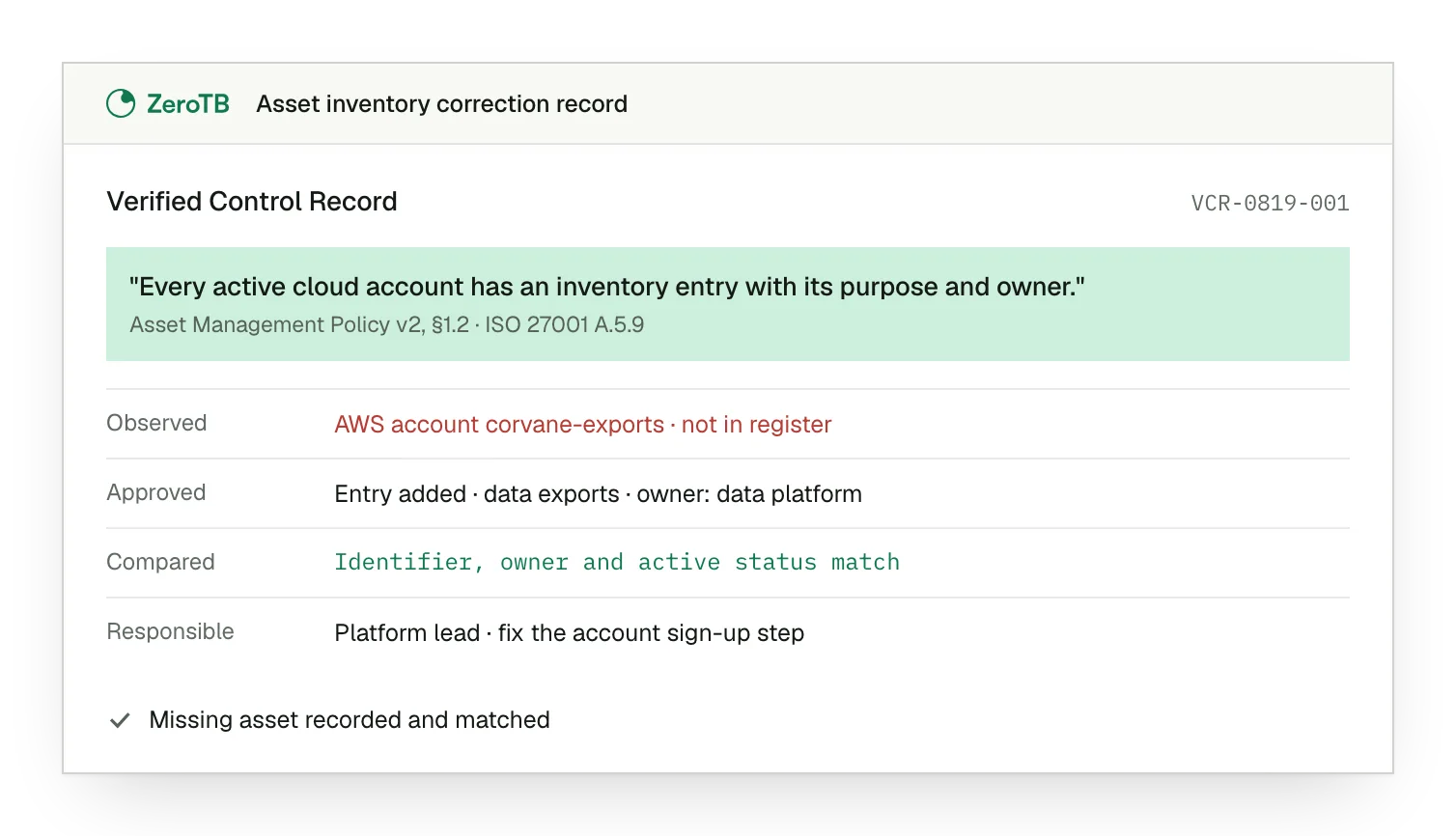
Missing account. The account appears among active resources, while the comparison finds no corresponding inventory entry.
Approved record. The proposed entry now has approval, with the account's purpose and responsible owner recorded.
Confirmed match. Current observations agree with the identifier, owner and active status in the new record.
Registration responsibility. Responsibility is assigned for maintaining the entry and correcting the registration step that failed.
Inventory review checklist
Establish which information and assets belong in the review and which sources can supply observations about them.
Use dated system and business records to find assets missing from the register, duplicates and obsolete entries.
Ask the responsible owner to confirm the asset's use and approve the proposed record or registration change.
Use fresh observations to test the corrected entries, then retain any remaining differences for investigation.
Preserve the review boundary, source observations, owner decisions and repeat checks with the corrected records.
Sources
- ISO, ISO/IEC 27002:2022 control guidance, 2022.
- ISO/IEC JTC 1/SC 27, SC27 Journal, volume 2 issue 2.pdf), December 2022, asset inventory discussion, pages 29–33.
- AICPA & CIMA, Trust Services Criteria with revised points of focus, 2022 revision.
- HHS, HIPAA and IT asset inventories, 2020.
Related pages
Organizational controls
Read about the responsibilities that sit alongside asset inventories in an ISO 27001 security program.
ISO 27001
See where asset inventories fit within the framework and the wider set of selected controls.
Compliance frameworks
Browse the framework libraries for guidance on requirements relevant to the same systems and business information.
Start with the Pilot
Talk with our team about the inventory gaps you face. Over eight weeks, the Pilot maps up to 25 commitments and takes two real control gaps through verified restoration. The records show the changes approved and the results checked.