What does ISO 27001 A.8.23 require for web filtering?
ISO 27001 A.8.23 addresses web filtering: restricting access to harmful content and other websites covered by company policy. Decide where that policy applies and how exceptions are approved. Then test filtering from the connections people use, including remote connections, and keep the results with any repair that was needed.
A laptop passes its filtering check at the office. At home, the same laptop reaches a destination that the policy says to block. That difference is the problem this guide addresses: keeping the restriction effective when the device leaves the connection where it was tested.
Filtering policy
A useful filtering policy states which web access the organization permits and which access it restricts. Categories, specific destinations and approved exceptions translate that policy into settings. The control owner can then compare the intended restriction with an observable result.
Keep the reason for each restriction clear enough for another person to review. A rule intended to reduce exposure to malicious content serves a different purpose from a restriction on otherwise legitimate sites. That purpose helps the owner judge exceptions and select suitable tests.
Device and connection scope
The scope of the review starts with the devices and connections named in the policy. Compare that scope with the paths people use for work. A service report can contain successful blocks even though traffic from some covered devices never reaches the service.
Keep the other device protections in the review as well. Web filtering restricts destinations or content, but malicious software can reach a device through other paths. A blocked website is useful evidence for filtering; the wider protection of the device requires its own checks.
Remote access coverage
A successful office-network test leaves remote access untested. Compare the filtering method used in the office with the method used away from it. If protection depends on a particular connection, confirm what happens when a device uses another permitted work connection.
Include remote access in the endpoint control review and record the path used for each test. A result collected on the office network cannot establish what happens on a home connection. The test record needs enough context to show which part of the coverage it demonstrates.
Effective filtering settings
A policy can appear in the management console while the device still permits the destination. Check the policy that applies to the device and whether its settings block access or only record activity. These settings determine what a successful test should show.
For example, Microsoft's web-filtering documentation distinguishes audited categories from blocked categories and describes enforcement requirements for supported browsers. This makes the browser and protection settings relevant to verification. Review the equivalent requirements for the filtering system in use before treating policy assignment as proof of enforcement.
Controlled exceptions
An exception should preserve a specific business activity within a defined scope. Record which destination is needed, why it is needed and which users or devices may reach it. The owner approves that access with the rest of the filtering policy still in effect.
Set a review condition when the exception is approved. The end of a project, for example, gives the owner a reason to reconsider the access. A troubleshooting bypass needs the same care: record how filtering will resume after the investigation.
Changes after the audit
A change to device coverage can undo a filtering rule that previously worked. Moving a device between groups or leaving a bypass active can change its access without changing the policy document. Investigate against the scope covered by the last successful test.
Repeat the check after a relevant change as well as on the agreed schedule. If a remote connection uses a different filtering method, the earlier result no longer answers the same question. Keep that connection detail in the finding for whoever handles the repair.
Approved repairs
A repair should restore the agreed restriction while preserving access that the business still needs. The proposed change should identify the affected path, the observed gap and the expected result. The owner can then judge how the action will affect work before approving it.
ZeroTB follows the commitment into the connected system, diagnoses the gap and drafts a correction for approval. After the approved action, it checks the resulting state and keeps the evidence. This connects the compliance decision to the technical work needed to close the gap.
Verification tests
Verification needs to show that restricted access is blocked and permitted work still succeeds. Use a safe test destination or the filtering vendor's supported test method. Agree the expected outcome before testing so a warning, logged event and blocked request are interpreted correctly.
Run the check through the affected connection and browser, then confirm that an approved business destination remains reachable. Keep both results with their dates and the policy applied. A failed test keeps the repair open, with the observed result available for further investigation.
Missing observations
A missing device observation leaves the current filtering result unknown. The date of the previous check shows how old the available evidence is. A change to the device or its policy since that date is a reason to check again.
Leave a clear task for the owner who will arrange the next test. Identify the device, the last known result and the connection to test. When the device returns, the owner can resolve that task without reconstructing why the earlier observation was insufficient.
Evidence retention
A reviewer needs to see why the team closed the repair. Keep the rule and its version beside the affected scope, the original observation and the approved action. The final dated test should show what changed and why the resulting access meets the rule.
Keep unrelated browsing history out of that record. The destination used for the test, the applied rule and the outcome explain the check. Handle the evidence according to its sensitivity, including who can read it and how long the agreed retention period lasts.
Web filtering evidence
Keep the records below together so a reviewer can follow a filtering decision through to the result.
| Requirement | What an auditor asks for | Where it comes from |
|---|---|---|
| Defined filtering policy | The approved access rules and the devices and connections they cover | The filtering policy with its version and approval |
| Device and connection coverage | Evidence that filtering reaches the devices and connections within scope | Device and policy records compared with tests on those connections |
| Controlled exceptions | The reason for an exception, its owner and its review condition | The approved request and the decision from its latest review |
| Operating restrictions | A blocked restricted test and a successful check of permitted access | Safe test results, dated and linked to the policy in effect |
| Verified repair | The original gap, the authorized action and the result after repair | The approval and test evidence in the Verified Control Record |
Related controls
| Framework | Control | What it covers |
|---|---|---|
| ISO 27001 | A.8.23 | The web-access restrictions that apply to external content under company policy |
| SOC 2 | CC6.8 | Controls that prevent unauthorized or malicious software, or detect it and prompt action |
| HIPAA | 164.308(a)(5)(ii)(B) | Procedures to guard against malicious software, detect it and report it within the security awareness program |
Example of restoring remote web filtering
In this example, filtering works on a managed laptop at the office but fails on its remote connection. The owner approves a repair to that path. The record stays open until another test confirms the block and access to the permitted business destination.
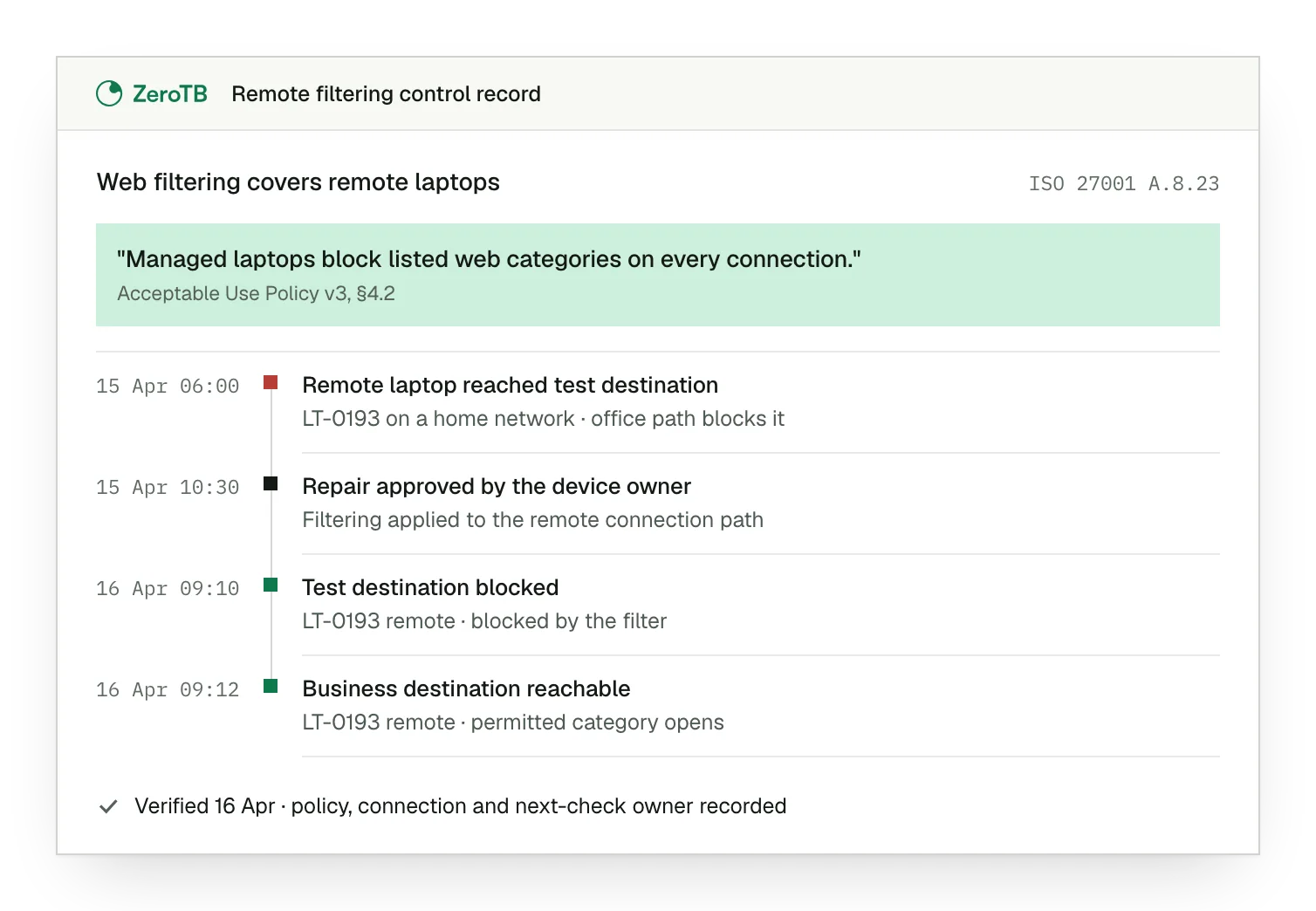
Remote coverage gap. The remote laptop reaches the test destination, although the approved filtering rule requires a block.
Approved repair scope. The device owner approves applying the intended filtering method to the affected connection.
Paired test results. The destination is now blocked, and a separate check confirms permitted business access.
Recorded verification. Both test results have dates and identify the policy, connection and owner of later checks.
Web filtering review checklist
Choose a policy restriction and agree the expected outcomes for a safe test and a permitted destination.
Match the devices in scope to their assigned policies and the connections used for work outside the office.
Review the purpose and scope of each relevant exception with its owner, then seek approval for any repair.
Test the restriction through the repaired connection and confirm permitted access, keeping the result and date of each check.
Keep the approved action and its test evidence with the rule, its owner and the schedule for another check.
Sources
- ISO/IEC, ISO/IEC 27002:2022 standard overview, 2022.
- Microsoft Learn, Web content filtering in Microsoft Defender for Endpoint, accessed November 4, 2026.
- HHS, HIPAA audit protocol, July 2018 update.
- ZeroTB, Continuous control monitoring guide, 2026.
Start with the Pilot
Talk with our team about the controls you need to keep working. The eight-week Pilot maps up to 25 commitments and takes two real control gaps through approved repair and verified restoration, with evidence from the completed work.