How does ISO 27001 A.8.2 control privileged access?
ISO 27001 A.8.2 covers privileged access rights, including the administrative permissions held by people and service identities. Keep those rights tied to an approved need, with rules for their use and removal. A correction is complete when tests show that excess access is blocked and required work still succeeds.
Privileges can survive the task that required them. A repair ticket closes, an engineer moves teams or a service changes its job, yet the account keeps its rights. A.8.2 reviews connect today's access to the administrative work that still has approval.
Privileged access scope
Privileged access gives an identity authority to administer a system. Changing security settings, managing accounts and administering a database are examples of that authority. Start the review with the available actions and the systems they affect, including access inherited through a group.
Local accounts, cloud roles and application administrators may all fall within the control boundary. Service identities belong in the review when they hold comparable rights. For each identity, establish its effective permissions: the combined access it receives from direct grants and group or role assignments.
Approved administrative work
An administrative grant should explain which work requires the permission. The account owner's job title helps establish responsibility, but the approval needs enough detail to justify the operations available. Record the task, system and decision together so a reviewer can understand that justification later.
Separate ordinary work from administrative activity where the system supports it. An engineer who needs an administrative role for maintenance can use standard permissions for routine tasks. This keeps everyday activity within its required access while preserving a clear reason for the additional role.
Temporary elevation
Temporary access has an end condition, and the permissions must reflect it. A maintenance window may end while its administrator membership remains active. The completed task and the remaining access therefore need separate checks, even when both originated in the same approved request.
The grant record should identify when the rights expire and how removal happens. If the system handles expiry, test the access remaining afterward. When work continues beyond the original window, keep the reason and approval for an extension visible alongside the earlier decision.
Service identities
A service identity's permissions should follow the work that its process performs. Deployment automation and scheduled jobs can retain rights granted during setup after their tasks change. Reviewing that access requires an owner who understands both the process and the system it administers.
That owner can identify dependencies before a correction removes permissions. Test the process with the reduced rights to establish that required work still succeeds. Check inherited access too, since a separate role can leave the same administrative operation available after its direct grant disappears.
Emergency access
A recovery account can justify continued access even when it is rarely used. Its purpose is to restore access when the usual route fails. A decision based only on inactivity can remove that route, so review the recovery need before treating the account as obsolete.
Retained recovery access needs an owner, protected credentials and review of its use. Temporary privileges granted during an incident have a different end condition: the additional rights expire when their approved purpose ends. Keep that removal decision distinct from the decision to preserve recovery access.
Changes between reviews
Access approvals can become outdated when people change roles or groups acquire new permissions. A transfer between teams may leave rights from the earlier job intact. User access reviews compare those rights with current work and identify privileges that no longer have a purpose.
A scheduled review examines access accumulated over time, while a check after a relevant change can reveal a newly added grant. Use Okta records with the relevant application permissions to examine both. Assign a gap to someone who can resolve it in the affected system.
Safe permission changes
Removing a permission requires a decision about which work must continue. The system owner approves the intended access and assesses the proposed change against that work. If a role serves several identities, include their dependencies before changing a permission shared across the group.
ZeroTB reads the approved commitment and checks connected systems for a gap. It drafts a correction for human approval, verifies the resulting access and saves the observations in a Verified Control Record. The owner can examine the completed repair alongside the decision that authorized it.
Verification after removal
Verification tests the identity's access after the correction takes effect. A direct grant may disappear while membership in another group preserves the same right. Inspect the resulting permissions and test the administrative action that the change was intended to prevent through the affected routes.
The test also needs an expected result for the work that should remain possible. Agree both results before making the change. When excess access remains, required work fails or the observation is unavailable, keep the gap open with the specific problem recorded for investigation.
Records of privileged activity
An activity log shows what an identity did with its privileged access. The approval record explains why that access was granted. Linking the two helps a reviewer investigate whether the administrative actions fit the task for which the identity received those rights.
A correction adds another set of records: the original permissions, approved action and dated tests of the result. Identify the account and system in each observation. Someone reviewing the change later can then follow what happened without reconstructing it from separate tickets and exports.
Audit evidence
The evidence should let an auditor follow the grant, the work it permits and any later decision to change it.
| Requirement | What an auditor asks for | Where it comes from |
|---|---|---|
| Defined scope | The reviewed systems and accounts, including the rights that make each account privileged | System inventory, account inventory and approved access policy |
| Approved need | The reason for the administrative grant and the decision permitting it | Access requests, role definitions and approval records |
| Temporary access | The grant period and any extension, followed by a check of remaining permissions | Maintenance records, grant history and current permission checks |
| Controlled use | A connection between the administrative action and the identity responsible | System audit logs linked to account and role records |
| Verified correction | The original rights, approved removal and resulting access tests | Change records and dated results in the Verified Control Record |
Related framework requirements
| Framework | Control | What it covers |
|---|---|---|
| ISO 27001 | A.8.2 | The allocation and use of administrative rights within the approved access scope |
| SOC 2 | CC6.3 | Access approval, modification and removal in line with assigned responsibilities |
| HIPAA | 45 CFR 164.308(a)(4) | Authorization and management of access to electronic protected health information |
Example of removing expired privileges
Removing administrator rights after a repair should preserve the engineer's ordinary access. In this example, the owner approves removing a group membership that survived the repair. The attempted security-setting change is blocked, while the standard task succeeds, establishing both expected results.
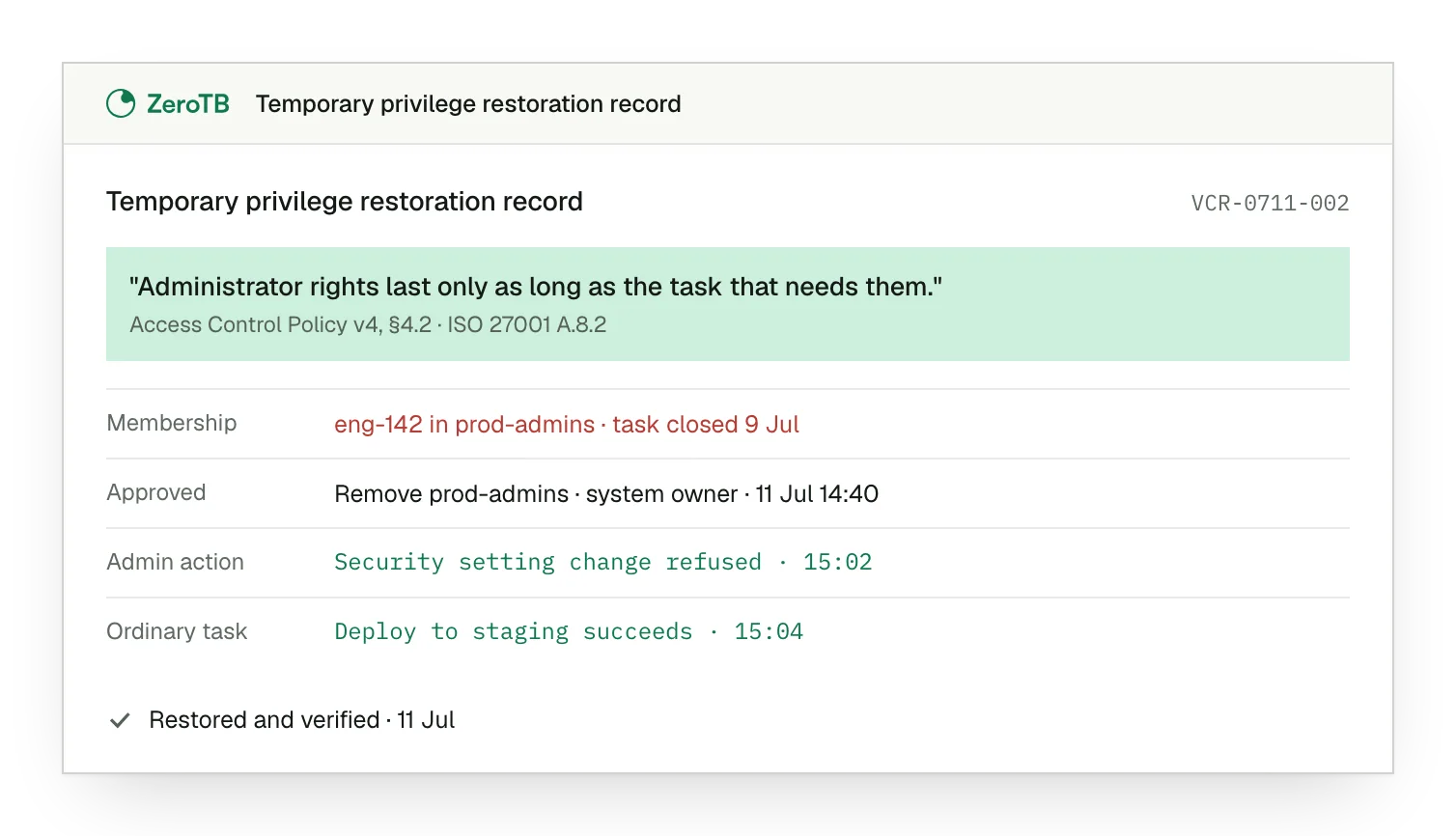
Expired maintenance grant. The engineer retains administrator membership even though the maintenance task has already been completed.
Approved membership removal. The standard role covers ongoing work, so the owner approves removing the additional membership.
Administrative action blocked. The engineer attempts to change a security setting, and the system refuses the action.
Ordinary work preserved. The regular task succeeds, leaving a dated result beside the test of restricted access.
Privileged access checklist
Identify the administrative operation and the system it affects, then establish who can approve the required access.
Combine direct grants and group permissions to establish what each identity can do, including services within scope.
Check the rights remaining after a temporary grant ends and examine the approval for any extension.
Establish which tasks depend on the permission and obtain approval for a change that preserves necessary work.
Retain dated evidence of the blocked action and the successful required task with the decision permitting removal.
Sources
- ISO/IEC, ISO/IEC 27002:2022 overview, 2022.
- NIST, SP 800-53 Rev. 5, AC-6 least privilege, 2020, updated December 2020.
- Canadian Centre for Cyber Security, Managing and controlling administrative privileges, ITSM.10.094, accessed November 2026.
- HHS, HIPAA audit protocol, information access management, updated July 2018.
- ZeroTB, Compliance automation with human approval, 2026.
Start with the Pilot
Talk with our team about keeping administrative access aligned with approved work. The eight-week Pilot maps up to 25 commitments and takes two real control gaps through approved correction and verified restoration, with evidence of the change and its result.