How does ISO 27001 A.8.19 govern software installation on production systems?
ISO 27001 A.8.19 concerns how an organization controls software installation on operational systems. Define which software is approved, who may install it and how installations reach production. Then compare the installed software with those decisions, including packages added manually or during urgent work.
A production host can pass its last release check and still contain software installed outside that release. The review needs to connect what is installed now with the decision that permits it. As releases and permissions change, an earlier approval may no longer explain what is running.
Approved installation scope
Start with the software on the operational system, including packages installed separately from the application. Those packages can affect the service even though they never appear in its release record. The installation rule needs to say which systems and software it governs.
The review should include every route that can put software on those systems. Identify the owner of deployment automation, direct administrator access and any emergency route. This gives the reviewer someone to ask when an installed package has no apparent connection to an approved release.
Installation authority
An account's installation permissions show what it can change in production. Compare those permissions with the authority assigned to its user or service. If an engineer can install any package, a policy requiring release approval still needs a way to govern that access.
Deployment automation can enforce the route, provided its inputs and permissions reflect the rule. Otherwise, the job may install an unreviewed package every time it runs. Review who can alter those inputs and what authorizes the installation, alongside the evidence that the job completed.
Approved release records
The deployed version should be traceable to its approval. A useful release record identifies the package, its source and the target production system, with the decision that permits installation. An observation from that system can then establish whether the intended version actually arrived.
Keep any conditions attached to the approval with the record. A test deployment, for instance, may use software that has never been approved for production. Without the environment and conditions, a reviewer could find a valid approval but have no basis for applying it to this host.
Unrecorded production changes
Software installed outside the release process can become an undocumented dependency. A diagnostic package is one example: an engineer installs it during troubleshooting, then another task starts using it. Closing the incident leaves the package in place without resolving whether production should keep it.
A current host inventory can expose the difference from the approved release. Follow that difference back to the installation account or job, its timing and any exception that applied. The incident record may explain why someone needed the package without authorizing its continued use on production.
Emergency installation decisions
Urgent installation belongs in the agreed emergency process. That process needs an authorization decision, a record of what changed and an owner for the resulting software state. Responders can then make the necessary change without leaving the later decision about its use unassigned.
The follow-up review covers both the package and any temporary installation privilege. When the immediate need has passed, the owner decides what remains. Software that is still useful can enter the normal assessment process; software and access no longer needed can be removed through an approved change.
Software removal or approval
Finding an unexpected package does not settle whether it should be removed. First establish what uses it, where it came from and whether production still needs it. The owner can then decide between safe removal and assessment for continued use under the approved installation process.
If the owner approves continued use, keep that decision dated and linked to the original finding. It explains the package's current status while preserving the history of the unauthorized installation. A later reviewer should be able to distinguish what happened originally from the decision made to correct it.
Safe correction
A safe removal accounts for the services that use the package. Before the owner approves it, the proposal should explain those dependencies and how to recover if the change causes a problem. Any restriction needed on the installation route belongs in the same proposal.
ZeroTB carries this work from the commitment to the result. It checks the connected system and drafts the fix for human approval, then verifies the approved change. Its Verified Control Record retains that result with the approval and observations, giving the owner evidence for the closure decision.
Verification before closure
Closure requires a current observation of the installed software and the route used to change it. For a removal, check that the package is absent and the intended service still works. Also check any installation restriction included in the approved correction.
A completed change ticket cannot supply a missing system observation. If the system is disconnected or the result is stale, keep the gap open until verification is possible. The closure record should identify what was checked, when it was checked and whether the expected conditions held.
Checks after later changes
Later deployments can restore a package or permission that an earlier correction removed. Compare the observed software and installation rights with the current approved state after relevant changes. This catches a recurring bypass even when the original change record still shows a successful correction.
Agree who owns those checks and when they run, based on the systems and installation routes involved. Keep changes to the approved state traceable as well. The change and development controls connect this ongoing work with the release process that puts software into production.
Installation evidence
Use these records to explain a production installation, the decision behind it and the outcome of any correction.
| Requirement | What an auditor asks for | Where it comes from |
|---|---|---|
| Defined installation scope | The systems and software included in the installation rule, and the routes available to change them | Installation policy and system inventory |
| Approved software release | The source and version of a production package, linked to the decision authorizing its deployment | Release approvals and deployment records |
| Restricted installation authority | The accounts able to install software and the permissions assigned to each approved installation route | Administrator permissions and deployment configuration |
| Controlled urgent work | The authorization for an emergency installation and the later decision about temporary software or access | Incident records and approved exceptions |
| Verified correction | The approved correction, observed result and evidence that the affected service and installation restrictions work | System observations and linked verification records |
Related framework requirements
| Framework | Control | What it covers |
|---|---|---|
| ISO 27001 | A.8.19 | Controlled software installation on operational systems, including the authority and route used to install it |
| SOC 2 | CC6.8 | Protections that prevent or detect unauthorized or malicious software and support action when it appears |
| HIPAA | 164.312(c)(1) | Protection of electronic protected health information against improper alteration or destruction within the regulated scope |
Example of removing temporary software
A temporary diagnostic package can remain after an incident ends. In this example, the service owner confirms that production no longer needs the package and approves its removal. The correction also removes the temporary installation permission that allowed the bypass.
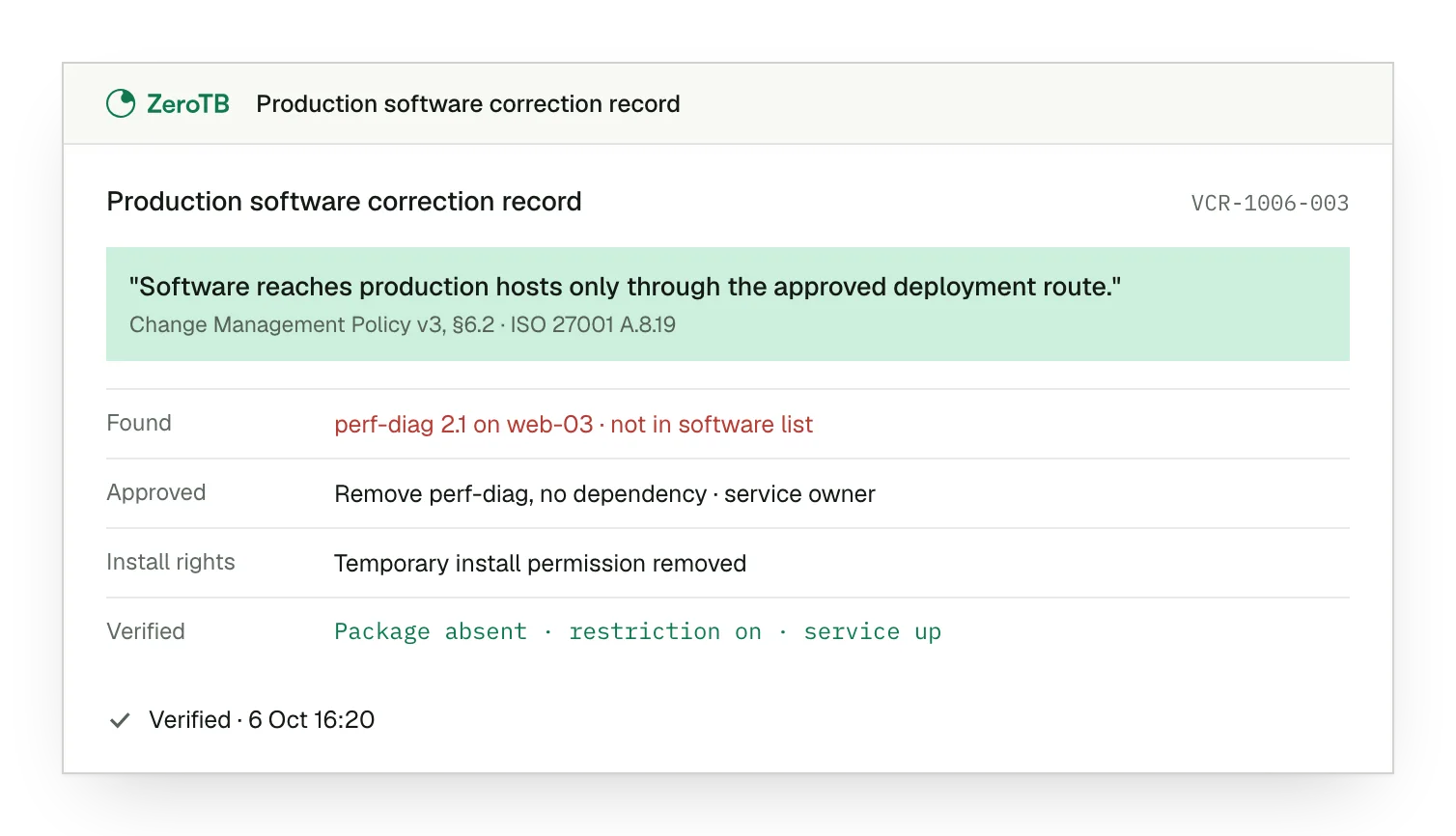
Unexpected package. The production host contains a diagnostic package absent from its approved software record.
Approved removal. The service owner confirms there is no remaining dependency and authorizes the proposed correction.
Restricted installation. The temporary permission is removed so future installations must follow the approved deployment route.
Verified result. A fresh check confirms package removal, restored installation restrictions and continued operation of the service.
Software installation review checklist
Identify the production systems, packages and installation routes covered by the approved rule, including emergency access.
Check installed package versions against release records and exceptions to find software without a current approved purpose.
Determine whether the unexpected software needs assessment and approval or safe removal, with dependencies considered before the decision.
Confirm the intended software state, installation restrictions and service operation, then retain the results with the approval.
Agree who reviews later changes and how those checks will detect a package or installation permission returning.
Sources
- ISO/IEC, ISO/IEC 27002:2022 overview, 2022.
- NIST, SP 800-53 Rev. 5, CM-11 and CM-3, 2020 with December updates.
- AICPA, Trust Services Criteria, CC6.8, 2017 criteria, redlined edition.
- eCFR, 45 CFR 164.312, technical safeguards, accessed November 4, 2026.
Related pages
ISO 27001 controls
Read about the wider framework and how its controls fit within an information security management system.
Compliance frameworks
Browse the control library by framework to find the requirements relevant to a particular system or review.
Change and development
Explore the ongoing work of checking releases against commitments and correcting gaps in the systems that deploy them.
Start with the Pilot
Our eight-week Pilot maps up to 25 commitments and takes two real control gaps through verified restoration. You receive the records of those changes, approvals and results. Talk with our team about where software installation controls fit.