How does ISO 27001 A.8.18 restrict powerful utility programs?
Under ISO 27001 A.8.18, powerful utility programs need restrictions because they can bypass the safeguards used in ordinary system operations. Define who may run each tool, for which tasks and with which permissions. Include a check after temporary maintenance to establish whether the repair access has ended.
A closed repair ticket can sit beside an active database credential. The work has ended, but the tool can still change records. Reviewing A.8.18 means following the permission beyond the task's completion and comparing the remaining access with what the owner approved.
Utility scope
A.8.18 covers utility programs that can bypass normal system or application safeguards. A database repair tool, for example, may change records directly without passing through the application's access rules. Its effective permissions determine the protection it needs within the system.
The review covers the tool, the systems it can reach and the information it can affect. An inventory becomes useful when it explains those relationships. A list of installed software alone leaves the reviewer unable to judge which utilities can override established protections.
Approved use
The owner can assess a utility's permissions when the approval describes the work they support. That description needs the task and the affected system, along with a reason for the requested authority. Permission to use a tool leaves these questions open unless its purpose is recorded.
Some tools serve a recurring maintenance job; others are needed for a single repair. The owner may retain access for the recurring job and require removal after the repair. Keeping that distinction in the approval helps a later reviewer assess whether current use still has a valid purpose.
Execution rights
A utility can act with more authority than the user who starts it. The user might have limited application access while the tool runs through a service identity that can change database records. The access review needs to follow both identities through that operation.
Check how the user invokes the tool, then inspect the rights of the identity that executes it. NIST's least-privilege guidance discusses this difference in authority. A restriction on the user's direct access may leave the utility route open, so the two sets of permissions need to be considered together.
Temporary access
The end of a maintenance window should trigger the agreed end of temporary access. That may mean an automatic expiry or an approved revocation, depending on the system. Either way, the control needs a way to establish that the credential or permission has stopped working.
A date on an access request explains when the grant should end. It does not show the state of the system afterward. Record how access will end and check the resulting permissions after maintenance, including any execution route through which the tool could retain the same authority.
Use records
A useful execution record connects the utility's action to the person or process authorized to perform it. Record enough context to establish the affected system, purpose and time of use. This lets a reviewer compare an operation with the approval that permitted it.
Where a shared service identity runs the tool, retain the connection to the operator or job that invoked it. Keep credentials and sensitive command output out of broadly accessible review records. The reviewer needs evidence of authorized use without receiving the secrets that enabled it.
Emergency maintenance
Removing utility access can also remove a route needed for emergency recovery. Before approving removal, the system owner should establish whether recovery procedures depend on the tool or its credential. Where a dependency exists, the decision needs to account for that work.
The owner may retain an exception for emergency use. Record its purpose, ownership and review or expiry condition so the remaining authority has an explicit reason. After an emergency, inspect the access that remains and compare it with the exception; investigate permissions that extend beyond the approved arrangement.
Safe corrections
A safe correction starts with a decision about the permissions that should remain. The owner needs to understand which jobs and repair procedures use the utility before approving that decision. A credential can outlast its original repair and acquire another use in the meantime.
If the tool still has a valid purpose, restricting who can run it or reducing its permissions may resolve the gap. If its work is finished, the credential may be removable. Describe the expected access in the proposed correction so the approver can judge its effect on necessary maintenance.
Verification after maintenance
A successful access check should show both what was removed and what was preserved. For a temporary repair, establish that the old credential is rejected and the approved maintenance route remains usable. Decide these expected results before the correction so the reviewer has clear acceptance conditions.
The test method must suit the operation. Inspecting permissions or checking access safely avoids repeating a repair that could alter production data. If the observation is missing or the result differs from the approved condition, retain the open gap until the result can be established.
Checks between audits
Utility permissions need attention after later changes as well as after the original repair. A new group member could gain execution rights. A replacement credential could have broader permissions than the credential it replaces. Either change can reopen access that was previously restricted.
Use current system observations for those checks, with an owner responsible for investigating differences from the approved use. The check frequency follows the commitment and the way the system changes. Keep earlier exports as historical evidence, and distinguish them from the observations used to assess current access.
Responsibility for unresolved gaps
A utility access gap needs an owner who can coordinate the correction across the teams responsible for the tool and the affected system. Finding the gap leaves that coordination unfinished, especially when the execution identity belongs to a different team.
ZeroTB reads the commitment, checks the system and drafts a correction for human approval. It verifies the result after the change and preserves the Verified Control Record. The control owner decides whether proposed restrictions and any retained exceptions fit the maintenance work.
Audit evidence
A review needs records of the approved use, the authority exercised and the access left after any correction.
| Requirement | What an auditor asks for | Where it comes from |
|---|---|---|
| Defined utility scope | The utility, its intended task and the systems it can affect | The utility inventory and procedure authorizing its use |
| Restricted authority | Permission to start the utility and permission to perform its operations | The invocation rules and execution-account permissions |
| Temporary access limits | The access end condition and observed state after that point | The time-limited approval and subsequent access check |
| Accountable use | The actor, operation, affected system and time of use | Logs identifying the operator or job and its approval |
| Verified correction | The correction approved by the owner and the access verified afterward | The change and its verification in the Verified Control Record |
Related framework controls
| Framework | Control | What it covers |
|---|---|---|
| ISO 27001 | A.8.18 | Use restrictions for utilities with the power to bypass normal security safeguards |
| SOC 2 | CC6.3 | Access decisions tied to roles, with permissions adjusted or removed when required |
| HIPAA | 164.312(a)(1) | Authorized access to electronic protected health information held in the affected systems |
Example of ending temporary utility access
The removal decision in this example preserves access for ongoing maintenance. A database utility has retained a credential from a completed repair. The owner approves removing that credential after confirming that recurring jobs use a different identity, and the record keeps both access-check results.
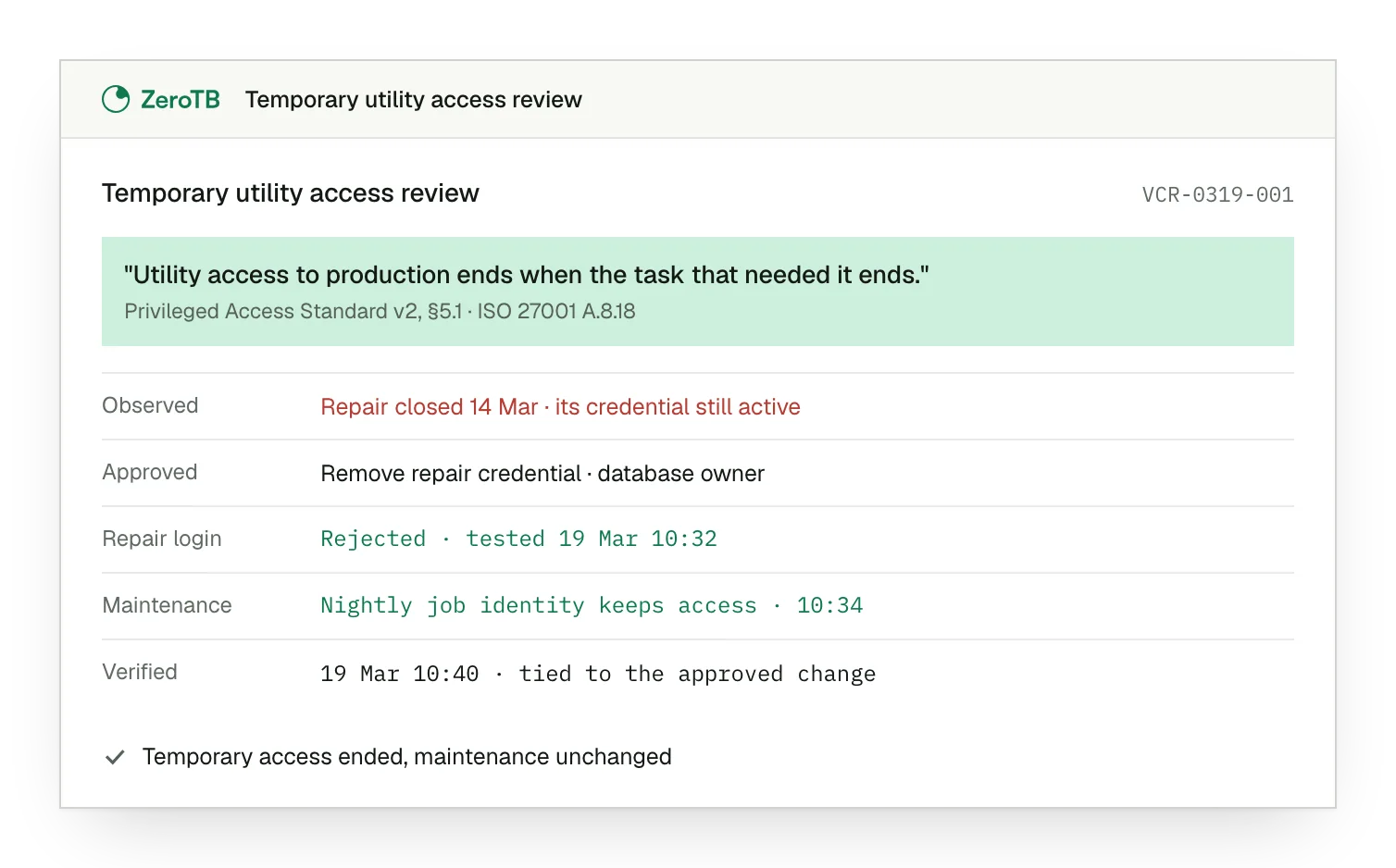
Retained repair access. The completed repair still has a usable credential with rights to change the production database.
Approved credential removal. The owner has checked the dependent jobs and approved removal of the unused repair credential.
Access checks completed. Verification rejects the repair credential and confirms that the separate maintenance identity has its required access.
Recorded verification result. The dated results identify what was tested and connect the final access to the approved change.
Utility review checklist
Start with the approved maintenance purpose and identify the utility and systems needed for that work.
Inspect the permissions used to start the tool and those used when it performs the operation.
Have the system owner decide which access to retain after reviewing recurring jobs and emergency dependencies.
Test the access left after the correction, covering the blocked repair route and permitted maintenance work.
Attach the dated checks to the approved change and retain the reason for accepting the final access.
Sources
- ISO/IEC, ISO/IEC 27002:2022 overview, 2022.
- NIST, SP 800-53 Revision 5, AC-6 and related provisions, 2020.
- HHS, Summary of the HIPAA Security Rule, accessed November 4, 2026.
- ZeroTB, Continuous control monitoring, 2026.
Related pages
ISO 27001
Read how this control fits into the wider information security program and its commitments.
Compliance frameworks
Explore the other framework requirements that may apply to the systems and information in scope.
Control restoration
See how ZeroTB carries a control gap through an approved change and checks the result.
Start with the Pilot
Talk with our team about utility access and other controls that need attention. The eight-week Pilot maps up to 25 commitments and takes two real control gaps through approved corrections, verified restoration and records of the results.