What does ISO 27001 A.8.11 require for data masking?
ISO 27001 A.8.11 concerns masking sensitive data according to the organization's access rules and business needs. Define which values each role may receive, then check the screens, queries and exports that return those values. After a change, verify that restricted values remain hidden and that permitted work still succeeds.
A support screen can hide an identifier while its download exposes the full value. The masking rule remains in the policy, but the export defeats it. Reviewing ISO 27001 technological controls means following those rules into the paths people use.
Permitted data visibility
A masking rule should state which sensitive values each role may see while doing its work. For an identifier, that could mean a partial value for one role and the original value for another. The approved task determines the necessary visibility.
Record the field, role, permitted representation and reason together. That gives the application owner a clear rule to implement and the reviewer an expected result to test. Include the policy or contractual requirement that explains why the restriction applies to this use.
Data paths and copies
The masking decision must follow the data through every route available to the affected role. Review the screen, downloadable report and other accessible views of the same record. A successful check of one route says little about a route that returns data differently.
Copies need attention because their contents can outlast the request that created them. A report generated with broader permissions may contain values its recipient should never receive. Check which account produces the copy and inspect the file that reaches the recipient.
Masking methods
Masking can happen when a system returns a value or when it creates a separate dataset. With dynamic masking, the original stays in place and access permissions determine the returned value. Test that behavior using the identity that will request the data.
A transformed copy needs inspection of its contents. It should conceal the protected values while retaining the relationships needed for the intended task. The export account affects the result too, as Microsoft's SQL Server documentation explains in its guidance on exported masked data.
Access to original values
Some roles need the original value, and that access belongs in the rule. Record what the role uses it for and which permission allows it. The application owner can then distinguish a necessary view from an accidental exposure elsewhere in the application.
The person requesting a report may have less access than the account that generates it. Check that service account and inspect what reaches the recipient. A restriction on the person's account offers little protection if the download includes values supplied through broader permissions.
Limits of masking
Masking a field does not automatically make a record anonymous. Other fields can still identify a person, and another accessible source may reconnect the transformed value to the original. The remaining information matters when deciding whether a dataset is suitable for sharing.
Assess that risk against the recipient and intended use. NIST's de-identification guidance connects the choice of transformation with disclosure risk and the data-sharing model. A masked screen and a dataset intended for wider distribution therefore need different reviews of what remains identifiable.
Drift after changes
A new report can expose sensitive values even when the original screen still follows the masking rule. If the report reads original fields through a separate path, the screen's protection may never apply. The existing test can keep passing while the new export fails.
Changed work can also reveal an outdated rule. When a team needs additional detail, the control owner must decide whether the purpose justifies it. An approved change to visibility should update the expected test result; an accidental exposure should remain a gap to correct.
Tests with representative roles
A useful masking test compares the actual output with the value that a particular role is allowed to receive. Use safe test records with known values, then exercise the relevant screens and exports. Record the role and route beside each expected and observed result.
Include a role permitted to see the original value when that access is part of the approved rule. The correction must protect restricted values while preserving the authorized task. A test that hides everything can miss a change that prevents people from completing necessary work.
Approved corrections
A repair needs to reach the function that returned the exposed value. Changing the screen will leave a separate export problem unresolved. Follow the failed test to the query, transformation or export, and check the proposed repair against the task people need to complete.
In the ZeroTB restoration process, the commitment leads to a check of the connected system and a proposed fix. People approve the change. The system verifies the outcome and retains the evidence in a Verified Control Record, closing the gap after checking the result.
Evidence of restoration
Evidence should show which rule failed and how the corrected output meets that rule. Keep the relevant observation, action and approval with the new test result. Record when the test ran and which version of the affected path it examined.
Use safe records where possible so the evidence does not create another copy of sensitive information. A reviewer needs to understand the difference between permitted and observed visibility. Expected values, test identities and dated outcomes can explain that difference without displaying a real person's identifier.
Checks after restoration
Keep the failed test after the repair, with a reference to the report or function it covers. A later change to the fields or account can expose the same value again. The saved test gives reviewers a way to check that specific failure.
Someone also needs to own the result when the check fails or cannot run. Keep an unavailable check visible until a fresh observation establishes the state. The earlier passing result remains part of the history, with its original date and scope.
Data masking evidence
For each repaired path, retain the rule, the failed test and the result that justified closing the gap.
| Requirement | What an auditor asks for | Where it comes from |
|---|---|---|
| Defined visibility | The permitted value for each field and role | Policy and approved application rules |
| Covered data paths | The screens and exports to which the rule applies | Application inventory and report definitions |
| Observed behavior | Tested roles, returned values and expected values | Dated tests with safe records |
| Authorized correction | The repair that was approved and its responsible owner | Change request and approval history |
| Verified restoration | The corrected output and confirmation that the permitted task still works | Tests after repair and the control record |
Framework mapping
| Framework | Control | What it covers |
|---|---|---|
| ISO 27001 | A.8.11 | Masking sensitive values according to the organization's approved access rules and needs |
| SOC 2 | CC6.1 | Logical access protections for systems and information within the defined scope |
| HIPAA | 164.312(a)(1) | Access to electronic protected health information by authorized people or software programs |
Example of restoring export masking
The support screen in this example shows a partial identifier. A new export gives the same role the full value, contrary to the approved rule. After the owner approves the repair, two tests check the download and the role allowed to see the original.
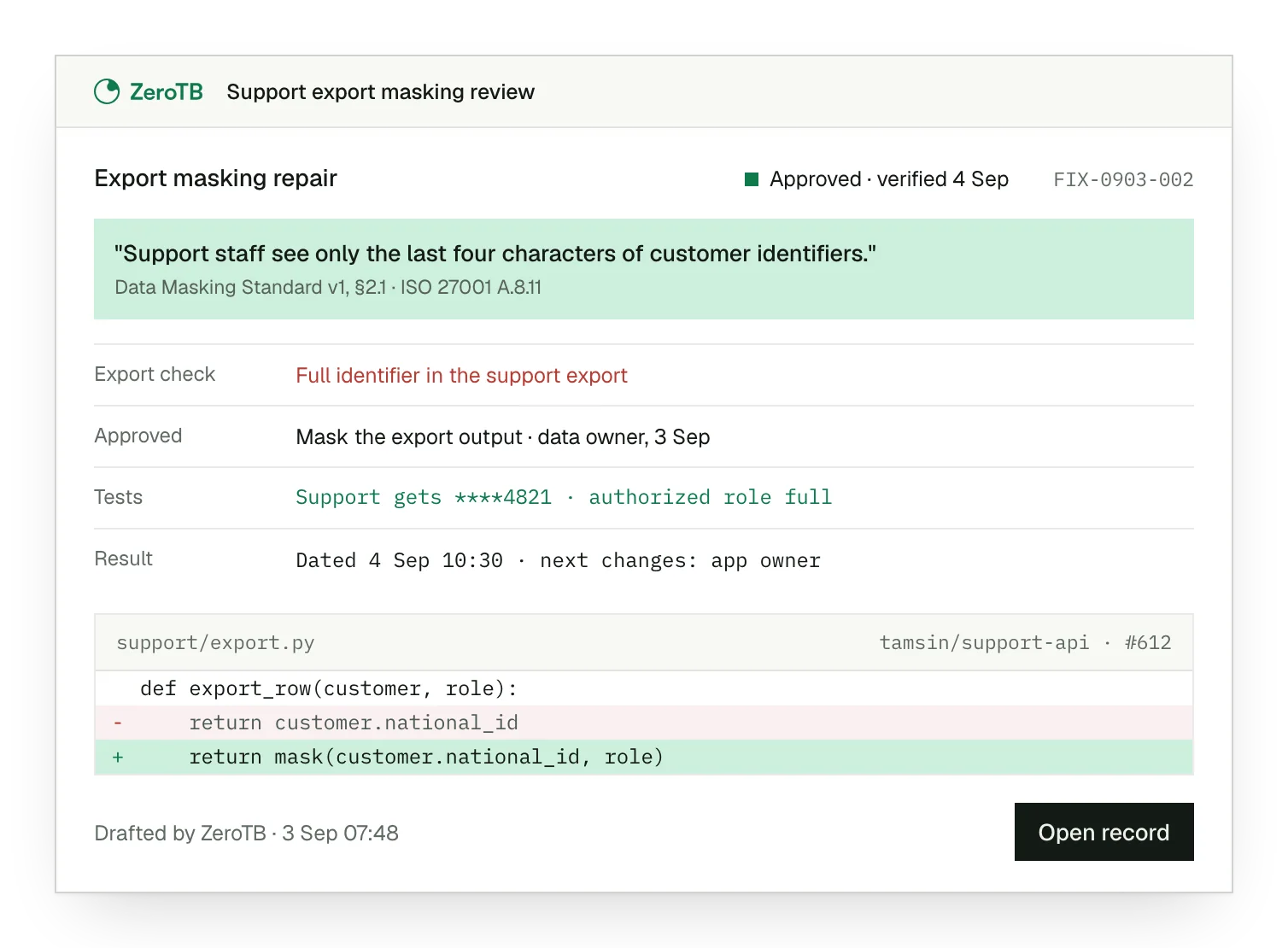
Export gap. The record shows the partial-value rule beside the full identifier returned by the download.
Approved repair. The owner approves extending the existing restriction to the output of the export function.
Paired tests. The corrected download conceals the restricted characters, while the authorized role still receives the original.
Recorded result. The dated test results remain with the approval and the owner responsible for checking subsequent changes.
Data masking review checklist
Identify a sensitive field and the approved representation that one role needs to complete its task.
Compare screens, reports and downloads for that role, including the permissions used to generate each output.
Confirm whether an exposed value has a justified purpose, then approve either the restriction or a documented exception.
Repeat the failed test and check that the authorized role can still complete the permitted task.
Retain the approval and dated evidence with the affected path, its owner and the conditions for further checks.
Sources
- ISO/IEC, ISO/IEC 27002:2022 overview, 2022.
- Microsoft Learn, Dynamic data masking, accessed November 4, 2026.
- NIST, SP 800-188: De-identifying government datasets, 2023.
- HHS, Summary of the HIPAA Security Rule, accessed November 4, 2026.
Related pages
Technological controls
Explore the other ISO 27001 controls that govern how systems protect and process information.
ISO 27001
Read how individual controls fit within the broader information security management system.
Compliance frameworks
Find guidance on related requirements across the frameworks that apply to the organization.
Start with the Pilot
The eight-week Pilot maps up to 25 commitments and takes two real control gaps through approved correction and verified restoration. Talk with our team about masking controls and where that work could help keep sensitive values protected.