What does ISO 27001 A.8.1 require for laptops, phones and other endpoints?
ISO 27001 A.8.1 concerns protecting information on or accessed through user endpoints, including laptops and phones. Define the protections each device needs, then compare those requirements with its current settings and work access. Close a protection gap only when fresh evidence shows that the approved correction worked.
A replacement laptop can reach company information while the management dashboard still shows the old laptop's healthy status. The device review needs to connect the person using that information with the device in use today. Otherwise, an accurate record of one laptop can conceal a gap on another.
Device scope
A.8.1 covers the information people handle through endpoints, including laptops, desktops, phones and tablets. That information may be stored locally or accessed through a work application. The review therefore needs to account for the device's use, even when company files remain in a remote system.
A useful scope connects each device with its assigned user, permitted work access and responsible owner. Company ownership alone cannot explain those relationships. A personal phone used for work may need an access decision, while a retired company laptop needs a record of its changed status.
Security baseline
The endpoint baseline turns a policy into settings that can be checked on each device. It can cover enrollment, storage encryption, software updates and protection against malicious software. Each setting needs an expected state that reflects the information and work the device is permitted to handle.
The baseline also gives the reviewer a basis for judging a failed check. A result should identify the requirement, the observed setting and the affected device. This lets the owner distinguish a protection failure from a device that needs a different approved configuration for its work.
Missing devices
A device missing from management can still have access to work. A review confined to the console will miss that device, even if every listed endpoint looks healthy. Comparing the console's records with work-account access brings devices outside that list into the investigation.
The comparison needs a reliable match between the records. Device identifiers can help where they are available; a person's name may refer to several laptops or phones. Before accepting a healthy result, the reviewer needs to know that it belongs to the device making the connection.
Enrollment and enforcement
Enrollment establishes a management relationship; applied settings establish whether the required protection is working. A device can appear in the console while a policy remains pending or a required protection has failed. The review needs the result for each relevant setting on that particular device.
A successful enrollment record is useful evidence of coverage, but the baseline requires more detail. Encryption status, software state and protection results answer different questions. Keeping these observations separate makes a partial deployment visible and gives the responsible owner a specific condition to investigate and correct.
Stale observations
A successful check describes the device at the time of that check. Once the device stops reporting, its last result provides progressively less help with a decision about current access. The record needs to show the observation date alongside the setting that was examined.
The agreed checking schedule determines when that silence needs investigation. A device may have disconnected, a result may be overdue, or a setting may have failed. Those conditions need separate records because restoring reporting and restoring protection are different jobs, with different evidence needed to close them.
Personal devices
Personal devices need an explicit decision about permitted work access and the protections that access requires. The decision should account for who owns the device and what information it handles. An approved arrangement also needs to explain which settings can be checked and changed.
NIST's mobile-device guidance addresses both company-provided and personally owned devices across deployment, use and disposal. That distinction helps frame the management decision. Where the organization cannot establish the required protection, the owner needs to decide what access can remain under the approved policy.
Approved corrections
A correction needs an owner who can approve its effect on the device and the person's work. Completing enrollment, applying a missing setting and restricting access have different consequences. The proposed action should identify the affected device, the failed condition and the intended result.
The owner can then decide whether the correction preserves the access the person needs. If the device cannot meet the baseline immediately, an interim arrangement needs an explicit decision and review conditions. Keep that decision with the gap so a temporary exception remains visible during later checks.
Verification results
A fresh device observation is the evidence needed to close a protection gap. The management task's completion tells the reviewer that the action ran. The observation answers the remaining question: did the affected setting reach the state required by the baseline that applied to this device?
The verification also covers access affected by the correction. The approved work route should remain usable, and any access restriction should hold when tested. If either test fails, the gap remains open. Missing results also need investigation before the reviewer has a basis for accepting the repair.
Continuing checks
The next device change can undo a successful repair. A laptop may pass to another user, lose a required setting or stop reporting after its gap closes. The checking schedule and responsible owner need to remain in place so those later changes receive attention too.
ZeroTB starts with the commitment, compares it with the connected system and drafts a correction. People approve material actions before verification checks the resulting state. The Verified Control Record preserves that sequence: the commitment, state before and after, action, approval and check are available together for subsequent review.
Endpoint audit evidence
These records connect the endpoint rule to the devices checked and the decision to close each gap.
| Requirement | What an auditor asks for | Where it comes from |
|---|---|---|
| Defined protections | The approved settings and permitted uses for the devices within scope | Endpoint policy, baseline configurations and approved exceptions |
| Device coverage | The devices using company information, with their users and responsible owners | Device inventory compared with available work-account access records |
| Applied settings | Observed enrollment, encryption, update and protection states against the approved baseline | Device management and endpoint protection results for each relevant device |
| Current observations | Check dates and the treatment of missing, stale or disconnected results | Dated observations, checking schedules and assigned investigation records |
| Verified correction | The original gap, approved change and observed result that supports closure | Change approvals and verification results retained with the device's control record |
Related framework requirements
| Framework | Control | What it covers |
|---|---|---|
| ISO 27001 | A.8.1 | Protection of information that people store, process or access using endpoint devices |
| SOC 2 | CC6.1 | Logical access safeguards for the systems and information covered by the assessment |
| HIPAA | 45 CFR 164.310(c) | Safeguards against unauthorized physical access to workstations that access electronic protected health information |
Example of restoring laptop protection
A replacement laptop needs its own evidence before a reviewer can confirm its protection. In this example, the replacement has work access but incomplete enrollment. The correction record connects the owner's approval with a fresh check of the replacement itself.
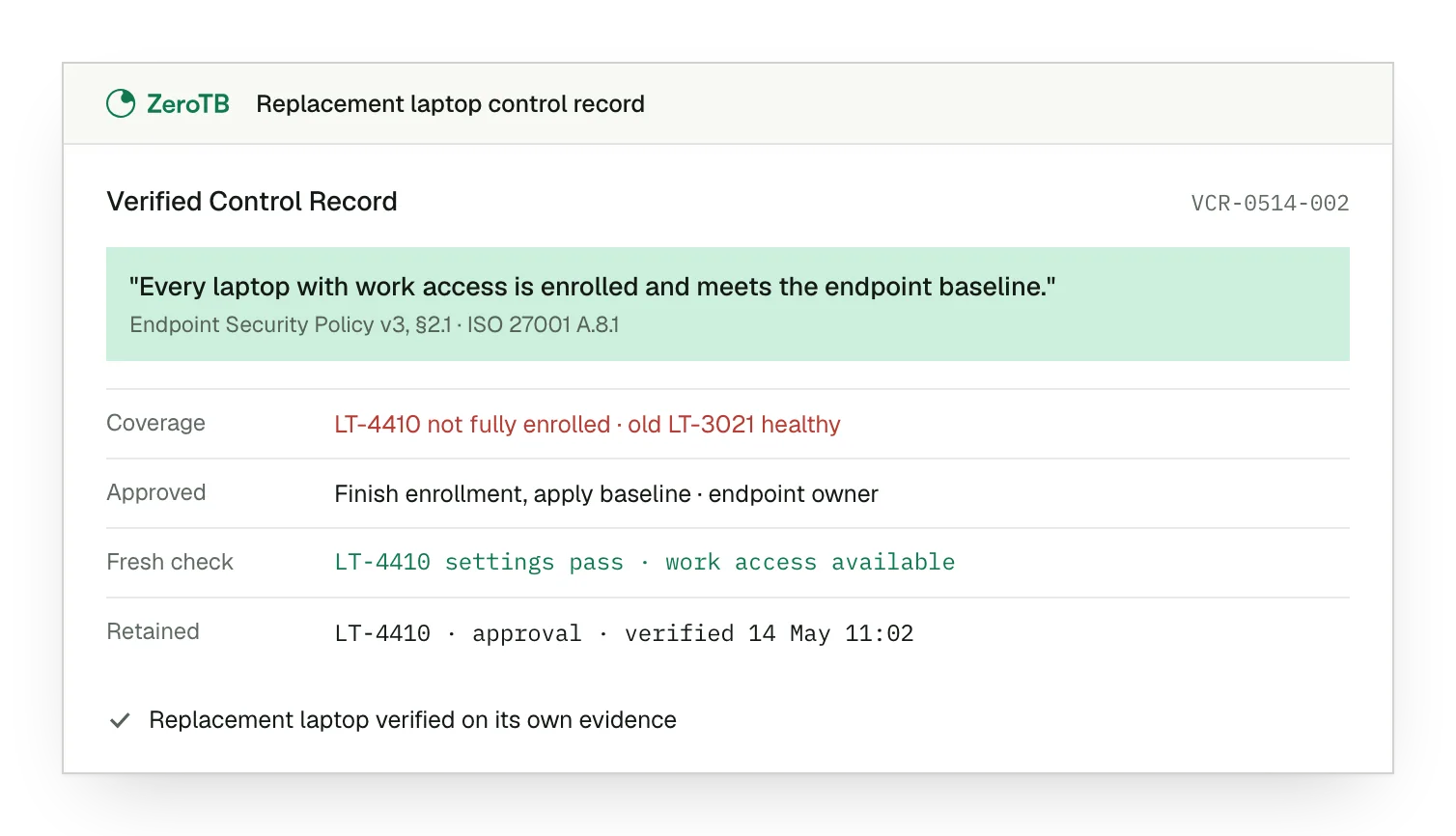
Coverage gap. The active replacement laptop lacks complete enrollment, while the old laptop still shows a healthy result.
Approved correction. The endpoint owner approves completing enrollment and applying the required protections to the replacement device.
Fresh device check. New observations confirm the required settings on the replacement and show that approved work access remains available.
Retained evidence. The record connects the device identifier, approval and dated verification results for the next review.
Endpoint review checklist
Use work-account access to check inventory coverage, investigating any active device that lacks a matching management record.
Read each required setting against its current device result, separating failed protection from missing or outdated observations.
Identify the correction and ask the responsible owner to approve its effect on the device and work access.
Check the repaired setting on the affected device and confirm that the intended access works after the change.
Keep the dated result with the approval and original gap, and confirm ownership of the checks that follow.
Sources
- ISO/IEC, ISO/IEC 27002:2022 standard overview, 2022.
- NIST, SP 800-124 Rev. 2: Guidelines for managing the security of mobile devices in the enterprise, 2023.
- HHS, Security standards: Physical safeguards, 2007 revision.
- ZeroTB, Continuous control monitoring guide, 2026.
Related pages
Endpoint controls in practice
See where device checks fit within the systems and workflows that ZeroTB supports.
Technological controls
Explore the other controls in the same Annex A theme as endpoint protection.
ISO 27001
Read how individual controls fit within the wider information security management framework.
Compliance frameworks
Find guidance on the requirements that share evidence across an organization's compliance program.
Start with the Pilot
Talk with our team about endpoint gaps and the eight-week Pilot. We map up to 25 commitments and take two real control gaps through approved correction and verified restoration, with evidence of the resulting changes.