How does ISO 27001 A.6.7 address security for remote work?
ISO 27001 A.6.7 covers security for remote work, including the protection of information outside company premises. Assess the equipment, access and working location against the tasks allowed there. A useful review identifies what has changed since approval and checks that the safeguards still protect those tasks.
Device security is only one part of a remote-work review. The person using the laptop may also handle papers, take confidential calls or work near people who should not see the information. The review needs evidence about those activities as well as the laptop.
Remote-work scope
The approved arrangement defines what someone may do away from company premises. It needs enough detail for a reviewer to understand the work: which information is involved, where it may be used and whose activities the approval covers. Contractors belong in the scope where applicable.
Permission to work remotely can leave these details unclear. A location suitable for routine administration may be unsuitable for reviewing confidential documents. Record the permitted activities and the person who can approve changes, so a reviewer can assess the arrangement against a known decision.
Device safeguards
Device checks establish whether the equipment meets the approved security baseline. Depending on the commitment, that can include management enrollment, encryption, patching and protection against unauthorized accounts. Match the observation to the device used for the work, including a replacement laptop.
A missing or outdated observation leaves a question about that device's state. A passing result confirms the specific protections checked. The endpoint coverage within Surfaces explains these technical safeguards; a review of the working environment addresses exposure beyond the device.
Accounts and connections
The account and connection determine how a remote worker reaches company information. Review them alongside the device. The account should have the approved permissions, and the route into each application should provide the authentication and connection protections the company has agreed.
NIST's telework guidance recommends choosing safeguards against the threats to the work and information involved. Record the permitted access methods in the policy. If an application offers a route around those protections, identify who owns that route and can change it.
Physical surroundings
The working space affects who can see, hear or take company information. Screen position, confidential calls, printed documents and equipment storage each create different exposures. Review these conditions against the tasks permitted in the location, including spaces shared with other people.
A safeguard needs to work during the activity it protects. A lockable drawer helps secure papers between tasks; it does not protect a conversation. The review should establish how the worker can handle the information throughout the task, using an appropriate room, storage or working practice.
Changes in working arrangements
A previous approval may no longer fit the place where someone works. Moving into a shared office changes who is nearby. A new assignment can also introduce more sensitive information, even when the worker stays at the same desk with the same laptop.
Decide which changes should prompt another review, including temporary locations and replacement equipment. Workers need to know how to report those changes. The owner then has a chance to assess the new circumstances before treating the old approval as evidence of a suitable arrangement.
Personal devices
Personal-device access needs an explicit decision about which work and information it may support. The decision should consider what the company can manage, where information is stored and how access ends. These conditions affect both the protection available and the evidence a reviewer can obtain.
The NIST guide treats personally owned equipment as part of the remote-access security assessment. If an arrangement cannot meet the approved requirements, another device or access method may be needed. Any restriction should leave a permitted way to perform the authorized work.
Loss and incident reporting
Remote workers need a clear route for reporting lost equipment or suspected exposure. That route should identify who responds and how to reach them when the normal work device is unavailable. A reporting instruction is useful only if the worker can follow it from the remote location.
The response team may need to restrict access, recover equipment or investigate exposed information under the organization's incident procedure. Make those responsibilities clear in the working arrangement. Retain the report and the actions taken so the control owner can assess whether the arrangement needs to change.
Approved corrections
The owner needs a proposed correction that explains what will change and how permitted work will continue. Relate it to the observed exposure and the approved commitment. The responsible team makes the authorized change, checks its effect and records the result before the gap closes.
ZeroTB assigns the work and keeps the commitment, action, approval and verification together in a Verified Control Record. When the correction involves a working practice, the responsible person completes that task. Their review supplies evidence alongside any technical checks needed for the same arrangement.
Verification methods
The check after a correction needs to answer the original concern. A device setting can show whether encryption meets the baseline. It cannot establish that a confidential call is private. That conclusion needs a review of the place and arrangement for making the call.
Record how the reviewer assessed the safeguard and what they found. Keep the assessment within the relevant working conditions and respect the person's privacy; unrelated personal details add no useful evidence. If the necessary observation is absent, there is still a gap to resolve.
Ongoing ownership
The record should identify who is responsible when the arrangement next changes. A closed correction settles the condition that was reviewed. Scheduled technical checks and reviews of new locations help establish whether that condition continues, with an owner assigned to respond to failures.
Responsibilities can differ within one arrangement. IT may handle a laptop that has stopped reporting, while the worker and manager assess a move to another location. Keep these responsibilities with the review triggers so the next issue reaches someone who can act on it.
Remote-work evidence
The records below let an auditor examine what was approved, what changed and how the correction was checked.
| Requirement | What an auditor asks for | Where it comes from |
|---|---|---|
| Defined working arrangement | Activities and locations covered by approval, with a responsible owner | Remote-work policy and approved arrangements for the people in scope |
| Protected devices and access | Dated checks of the device and its approved access methods | Device-management observations, account settings and remote-access configuration records |
| Suitable physical surroundings | The arrangements for protecting information during calls and other work | A dated review of the working arrangement and the safeguards agreed for that setting |
| Approved exceptions | The decision to retain an exception and the conditions attached | Exception decisions linked to the affected person, device or working arrangement |
| Verified correction | The finding, authorized change and result of the check afterward | Change records and technical or human verification kept in the control record |
Related framework requirements
| Framework | Control | What it covers |
|---|---|---|
| ISO 27001 | A.6.7 | Security arrangements for information handled away from company premises |
| SOC 2 | CC6.1 | Protection of logical access to systems and information that remote workers may use |
| HIPAA | 164.310(b) | Workstation activities, ways of working and surroundings that protect electronic protected health information |
Example of protecting shared-workspace calls
This example follows a change from a private office to a shared desk. Confidential calls can now be overheard, although the laptop passes its baseline checks. The correction provides a private room for those calls, with an owner decision and a recorded human review.
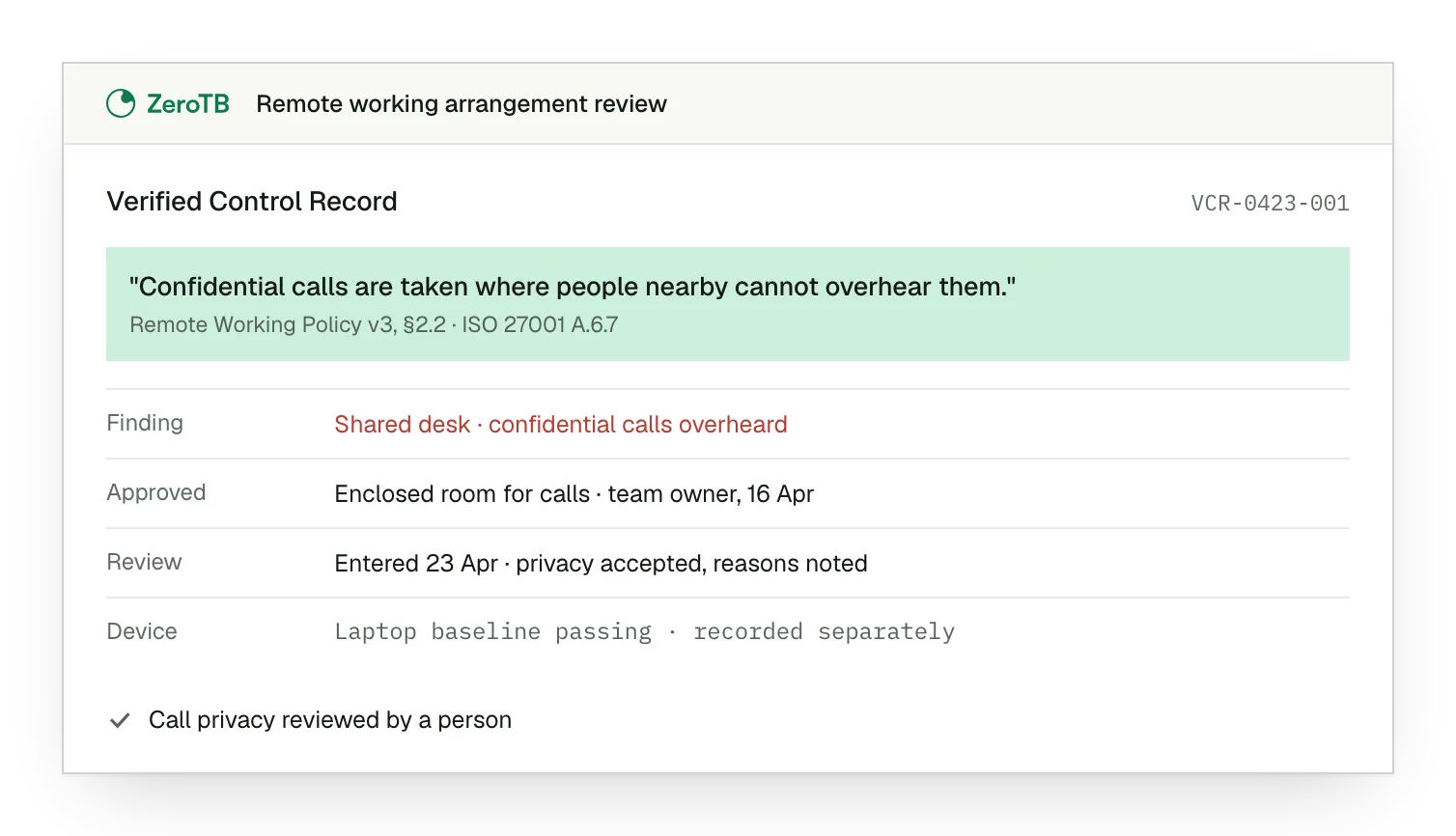
Changed working location. The finding identifies confidential calls at the open desk as the condition needing correction.
Approved room arrangement. The owner approves an enclosed room where the calls cannot be overheard by nearby people.
Human review completed. The review records the assessment of call privacy and the reasons for accepting the arrangement.
Separate device evidence. The record retains the laptop result separately from the review of privacy during calls.
Remote-work review checklist
Establish which tasks and locations the arrangement permits, and who decides whether a change needs approval.
Compare the present location, equipment and tasks with the conditions covered by the earlier review.
Choose a technical check or human review for each safeguard, with a clear statement of what it establishes.
Use the results to decide whether the gap can close, then assign responsibility for the next review.
Sources
- ISO/IEC, ISO/IEC 27002:2022 standard overview, 2022.
- NIST, SP 800-46 Rev. 2: Guide to enterprise telework, remote access, and bring your own device security, 2016.
- HHS, HIPAA audit protocol, workstation use, 2018 update.
- ZeroTB, SOC 2 compliance automation with human approval, 2026.
Related pages
People controls
Explore the other ISO 27001 people controls that govern responsibilities, awareness and working practices.
ISO 27001
Place remote-work safeguards within the wider information security program and its related control areas.
Compliance frameworks
Browse the framework library to find related requirements and guidance for other control reviews.
Start with the Pilot
Talk with our team about remote-work controls and the eight-week Pilot. We map up to 25 commitments and take two real control gaps through approved correction and verified restoration, with records of the decisions and results.